
Agent API overview.
The Agent API for machine-to-machine loyalty operations.
On this page
The Agent API lets external systems operate your loyalty platform without a user interface. POS systems award points on purchase, AI assistants check balances and suggest rewards, and automation tools trigger loyalty actions from external events, all through a single stateless REST API.
Connecting Claude, ChatGPT, Claude Code or Cursor? Use AI connections. It adds browser sign-in, an MCP endpoint and owner approvals on top of this API. Stay on this page if you build an integration, a POS bridge or an automation.
💡 Different from the standard API: The REST API uses session-based login tokens. The Agent API uses long-lived API keys with granular scopes, built for machines.
What it does
| Capability | Description |
|---|---|
| Points & Rewards | Award points on purchases, redeem rewards at checkout |
| Resource Management | Create, read, update, and delete clubs, cards, rewards, stamps, vouchers, tiers, and staff |
| Member Lookup | Query member details and balances across cards |
| Member Wallet | Members view their own balance, browse rewards, and check claim eligibility |
| POS Integration | Full earn-and-burn flow for point-of-sale systems |
| Automation | Trigger loyalty actions from Zapier, Make, n8n, or custom scripts |
| AI Agent Access | AI assistants can query and operate loyalty programs via the same API, or over MCP through AI connections |
Architecture at a glance
flowchart LR
    subgraph client ["Your System"]
        A["POS / AI / Automation"]
    end

    subgraph platform ["Reward Loyalty"]
        B["Agent API\n/api/agent/v1"]
        B --> C["Key authentication"]
        B --> D["Scope enforcement"]
        B --> E["Rate limiting"]
        B --> F["Audit logging"]
        B --> G["Business logic\n(same rules as dashboard)"]
    end

    A -- "HTTPS + JSON\nBearer key or X-Agent-Key header" --> B
Key design principles:
- Stateless. No sessions, cookies, or CSRF tokens. Every request is self-contained.
- JSON-based. All requests and responses use JSON.
- Same business rules. The API enforces the same validation, limits, and permissions as the dashboard.
- Zero-UI. No locale in the URL. Language is optional via
Accept-Languageheader. - Audit-logged. The platform records every request in the Activity logs.
It's a tool, not an AI
The Agent API does not include an AI. It is a structured interface that AI agents (or any other system) can call as a tool. It sits alongside web search and database queries as something an autonomous agent acts on.
graph TD
    A["Any external system\n(AI agent, POS, automation)"] --> B["Brain: LLM\n(cloud, local, or hybrid: optional)"]
    A --> C["Planning\nOrchestration layer"]
    A --> D["Tools"]
    D --> E["Browse web, read emails,\nquery databases..."]
    D --> F["Agent API\nThe loyalty platform"]

    style F fill:#f0f4ff,stroke:#a5b4fc,stroke-width:2px,color:#1e293b
Any system that sends HTTPS requests and reads JSON can use the API. Reward Loyalty does not need an LLM provider key.
Whether you're connecting an AI assistant, a POS system, or an automation pipeline, the architecture stays the same:
| Layer | Where It Runs | Responsibility |
|---|---|---|
| Your agent / integration | Your infrastructure | Reasoning and deciding which API calls to make |
| Your LLM (if any) | Your config (env vars, secrets manager) | Powering your AI: cloud providers, self-hosted models, or none at all |
| The Agent API | Your Reward Loyalty platform | Receiving REST requests, returning JSON, enforcing your business rules |
The platform side needs no LLM provider key. The Agent API sees the key header and the JSON request body, nothing else. Cloud LLMs, local on-premise models (DeepSeek, Qwen, Llama), hybrid setups, and no-AI automation all work the same way. A curl command is as valid an "agent" as a full autonomous AI assistant.
What's agent-ready today:
- Structured error recovery. Error responses include a machine-readable
retry_strategy. Check whether the operation is safe to repeat before retrying; some errors need operator help. - Self-identifying keys. The
/healthendpoint returns the key's role, scopes, rate limit, and owner, letting agents understand their own permissions on first contact. - An MCP endpoint. AI clients connect at
/mcpand get the same operations as tools, with browser sign-in and owner approvals. See AI connections. - Complete endpoint reference. The Endpoint Reference documents every route, parameter, and response field. You can use this as the tool definition for your agent framework today.
- OpenAPI 3.0 spec. The platform generates a dedicated Agent API specification from the controllers at
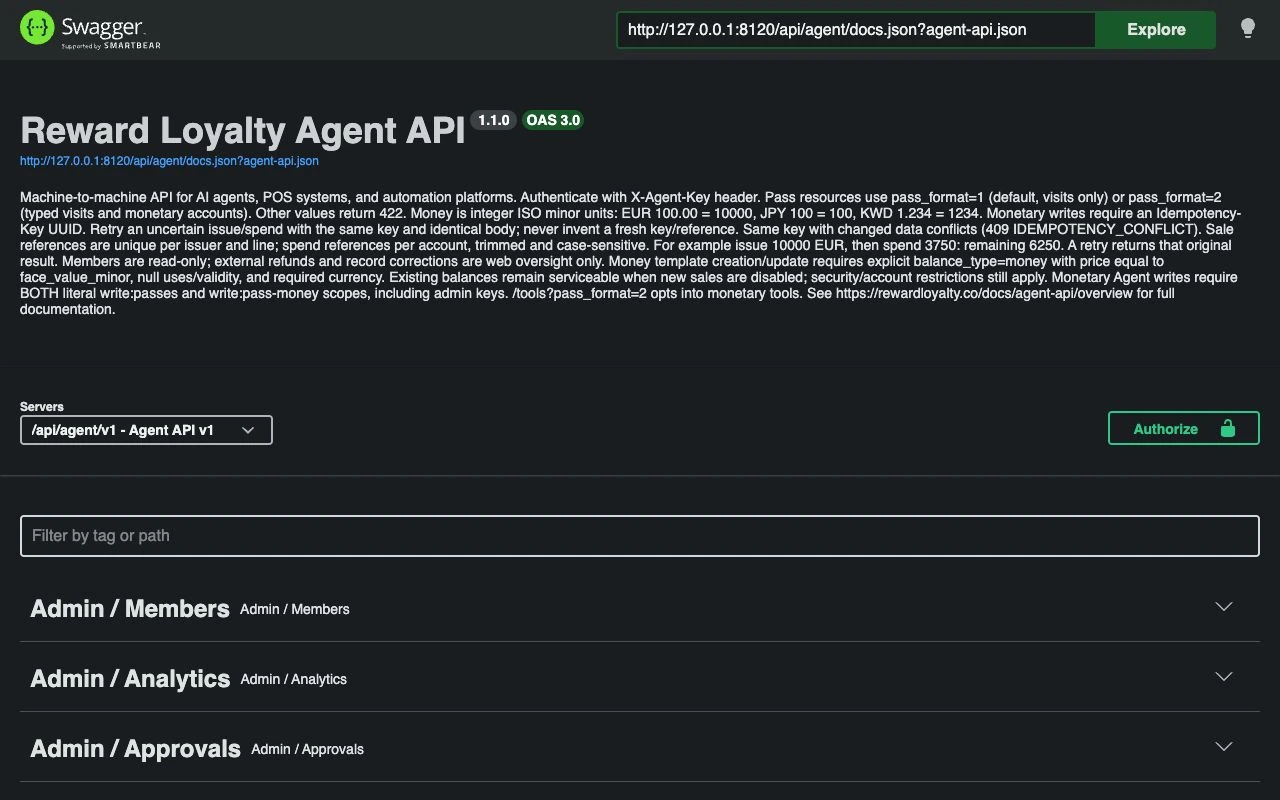
/api/agent/docs.json. Import it into Swagger UI, Postman, or any automation platform. The spec covers partner, admin, and member roles with accurate request/response schemas. Browse the live spec → - Tool discovery endpoint.
GET /api/agent/v1/toolsreturns machine-readable tool definitions scoped to the authenticated key's role and permissions, in the format your agent framework expects. Your agent calls this once at startup to learn what it can do. See Tool Discovery for details.
Quick start
1. Enable the Agent API feature
Turn on the Agent API switch under Settings → Integrations. The matching FEATURE_AGENT_API flag in .env sets the server default, the same as the store integrations.
The Agent API is an opt-in feature. While the switch is off (the default), the platform hides all agent routes, navigation, and key management. With it on, access is per plan and per partner: the partner's plan includes the Agent API, or an admin grants it on the partner's Permissions tab. A partner who already holds it keeps their keys until their plan or permission changes; once no active plan offers it and no partner holds a grant, Integration API keys stay out of every partner dashboard and off the My plan comparison.
2. Enable Agent API for a partner
As an administrator, edit the partner account and enable the Agent API permission in the Permissions tab. See Enabling & Managing Keys for details.
3. Create an Integration API key
In the partner dashboard, go to Integrations → Integration API keys and create a new key. Choose the permission level that fits.
4. Copy the key (one-time display)
The dashboard shows the full key once. It looks like:
rl_agent_a8f3k2m1x9v4b7n2p5q8r1t6w3y0z4d7f0h3j6l9...
After you close the dialog, only the prefix (rl_agent_a8f3k2m1) remains visible. There is no way to retrieve the full key.
5. Make your first request
curl -X GET https://your-domain.com/api/agent/v1/health \
  -H "Authorization: Bearer rl_agent_a8f3k2m1x9v4b7n2p5q8r1t6w3y0z4d7f0h3j6l9..."
The X-Agent-Key header works too. Send one of the two.
Response:
{
  "error": false,
  "data": {
    "status": "ok",
    "key": {
      "name": "POS Terminal 1",
      "prefix": "rl_agent_a8f3k2m1",
      "role": "partner",
      "scopes": ["read", "write:transactions"],
      "rate_limit": 60,
      "expires_at": null
    },
    "owner": {
      "id": "9e1a...",
      "name": "Coffee Corner",
      "type": "partner"
    }
  }
}
Base URL
All Agent API requests use:
https://your-domain.com/api/agent/v1
No locale prefix or session token, only the key.
What the API covers
Endpoints
The API provides endpoints for these three roles:
| Category | Endpoints |
|---|---|
| Health check | GET /health |
| Clubs | Full CRUD |
| Loyalty cards | Full CRUD |
| Rewards | Full CRUD |
| Members | Read + Balance |
| Transactions | Purchase + Redeem + Deduct |
| Apple Wallet | Read and update item settings |
| Stamp cards | Full CRUD + Stamp + Redeem |
| Vouchers | Full CRUD + Validate + Redeem |
| Tiers | Full CRUD |
| Staff | Full CRUD |
| Admin: Partners | List, view, permissions, activate/deactivate |
| Admin: Members | Platform-wide search + details |
| Admin: Analytics | Platform + per-partner metrics |
| Member: Profile | Read + Update |
| Member: Balance & Cards | Wallet overview + Card details |
| Member: Transactions | History (all + per-card) |
| Member: Rewards | Browse + Eligibility check |
| Platform, programs, counter, growth and operations | Listed in Admin tools and Business tools |
Agent-native tooling
| Feature | Description |
|---|---|
| OpenAPI 3.0 spec | Machine-readable API specification available at /api/agent/docs.json, importable by Swagger UI, Postman, and automation platforms. Browse the live spec → |
| Swagger UI | Interactive API documentation at /api/agent/docs. Browse every endpoint. Writes sent with Try it out are refused, because browsers add an Origin header and the API refuses it. See Authentication |
| Tool discovery endpoint | GET /api/agent/v1/tools?format=openai returns all available operations as tool definitions, scoped to the key's role and permissions. See Tool Discovery |
| Multi-format export | Tool definitions as JSON, in OpenAI function calling, Claude tool use, MCP tool definition and generic JSON Schema shapes, via php artisan agent:export-tools or the /tools endpoint. They are files for your own agent framework. They don't start a server |
| MCP endpoint | POST /mcp answers MCP over Streamable HTTP, with browser sign-in or a key. The AI connections overview lists the clients you can connect and how each one signs in |
Next steps
- Authentication: How keys work, security model, and error handling
- Enabling & Managing Keys: Create, revoke, and configure keys
- Scopes & Permissions: Permission levels and what each scope unlocks
- Partner Endpoints: Full endpoint reference for partner operations
- Member Endpoints: Balance, rewards, profile, and claims for members
- Admin Endpoints: Partner management, member search, and analytics
- Tool Discovery: Machine-readable tool definitions for AI agent frameworks
- Complete Endpoint Reference: Every endpoint across all roles in one page
- Error Handling: Structured error responses and retry strategies
- Idempotency and approvals: Repeat writes safely and handle changes that wait for the owner
- Audit Logging: What each log entry contains and how to monitor agent activity
Related topics
- AI connections: Connect Claude, ChatGPT, Claude Code or Cursor
- REST API Reference: The session-based API (different from Agent API)
- Partner Permissions: Enable Agent API access per partner
- Activity logs: View agent activity audit trail
- Integrations: Other integration options (Shopify)