
Launch a branded loyalty service for your clients.
Reward Loyalty is ready-made loyalty software for agencies that want to sell branded rewards programs to client businesses. You install one shared application on your hosting, add your clients, and set the fees for your service.
What will your agency provide?
Decide what each client receives, what your fee includes, and who will handle setup and support.
Your agency administers the installation. Each client business has a business-owner account, called a partner account in Reward Loyalty. Its employees use staff accounts at the counter. Its customers use member accounts to collect and redeem rewards.
The software costs US$349 once for one production installation serving unlimited client businesses, without a per-client software fee. The purchase includes 12 months of updates and product support. Renewal afterward is optional at US$99 a year; without renewal, you keep using the last version you received. Budget separately for hosting, email delivery, payment processing where applicable, and your team’s work.
How do client businesses share one installation?
Give each client its own business account. Each business manages its own programs and sees customer activity belonging to that business. Customers can keep programs from several businesses in one account, with separate balances and rewards. Choose Portal when you do not want a shared public catalogue; public business pages and direct program links remain accessible.
Does each client need a separate installation?
If you choose a separate application, database, and domain for each client, follow the single-business setup for each one. Each additional production installation needs its own license.
How will clients pay your agency?
Choose manual invoicing or automated subscriptions. In manual mode, you assign each business a plan and collect payment outside Reward Loyalty. Stripe and PayPal can handle eligible businesses’ subscriptions. Administrator-created accounts without the required provider connection do not automatically gain self-service billing when you enable a provider.
Who handles setup and support?
Your agency handles hosting, email, backups, updates, client onboarding, and first-line support. Agree what your fee includes and whom the client’s employees contact when something fails. Reward Loyalty product support helps investigate problems with built-in features and the supplied installation and update process; it does not operate your client service.
Whose brand will customers see?
White-label means you present the service under your agency’s name, logo, colors, and domain. Each client adds its own business identity and program artwork to its business page and loyalty cards.
Manage your client businesses in one place.
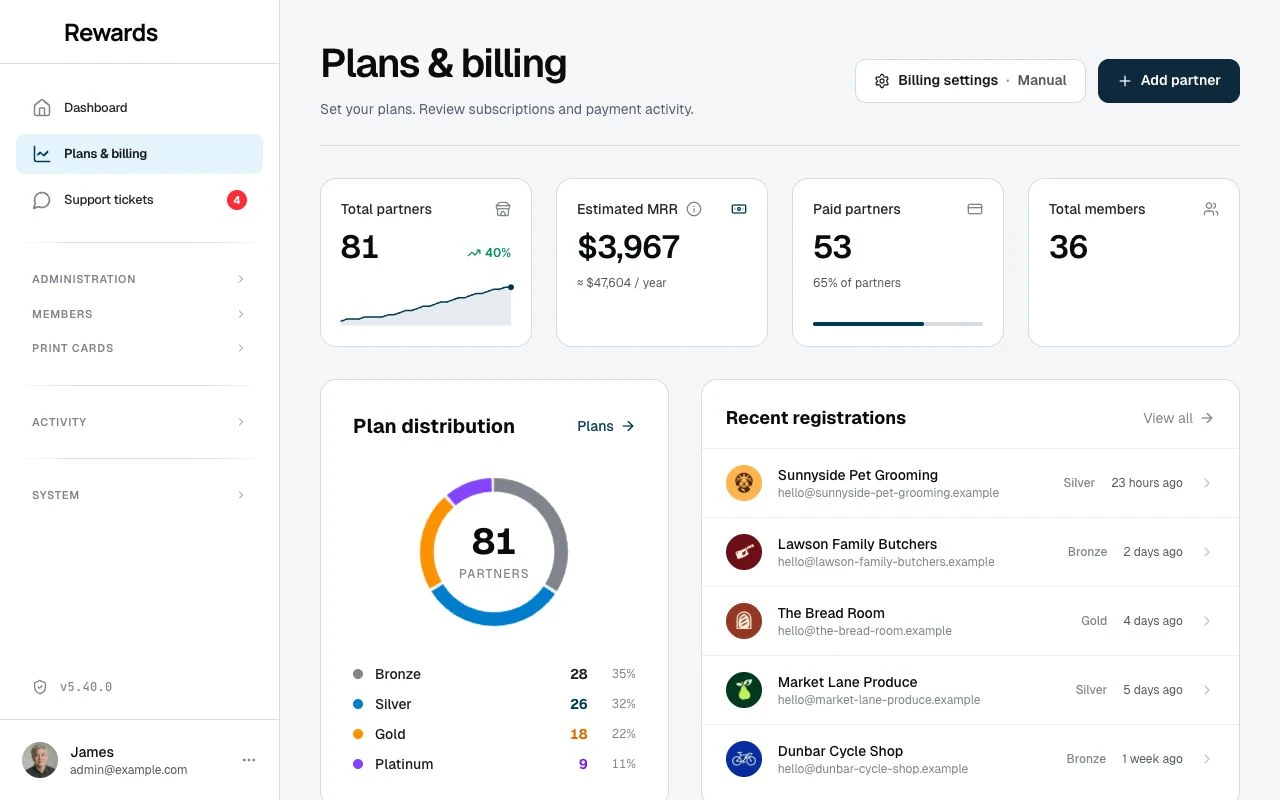
The Plans & billing dashboard shows your client businesses, assigned plans, registrations, and billing status. Each client has its own business dashboard; your agency administers the shared installation.
One platform. Launch clients one by one.
Prepare the shared platform first. Then repeat the client-launch steps for each business. Follow the linked setup instructions and complete the checks before inviting customers.
Prepare the platform
-
1
Choose hosting for Reward Loyalty
Choose hosting that meets Reward Loyalty’s current requirements and can handle your clients’ simultaneous checkouts and email workload. Use MySQL or MariaDB for the live installation. Ask the provider to confirm the exact plan before buying.
-
2
Choose addresses for your website and loyalty application
Assign someone to connect the addresses and enable secure HTTPS connections.
Your agency website explains and sells the service. Reward Loyalty runs at its own web address. The example below uses subdomains of one domain; these are different address roles, not four separate domain purchases.
Agency website
yourplatform.com
The service website, sales material, and support entry point.
Loyalty application
app.yourplatform.com
One shared Reward Loyalty installation for all partner businesses.
Email-sending domain
mail.yourplatform.com
The domain your email provider verifies for sign-in codes and service messages; it is not another website.
Private test copy
staging-app.yourplatform.com
A private copy for testing updates and recovering backups before relying on them.
Check the license terms before adding test copies. Each additional production installation needs its own license.
Read the license terms -
3
Set up sign-in emails
Connect a transactional email service so users can receive sign-in codes. Follow the provider’s steps to verify your sending domain and gather the settings needed by the installer. Check rejected messages and spam reports in the provider’s dashboard. Test a real sign-in email after installation.
-
4
Install and check the application
Follow the installation guide, then use test accounts to check the live application before inviting clients. Use a private test copy to rehearse updates and backup recovery.
- Request an administrator sign-in code by email and use it to sign in.
- Create a test business, program, staff account, and customer; record a purchase and confirm the expected credit.
- Upload an image and check that it displays.
- Restore a backup on the private test copy and verify the recovered application.
-
5
Choose the customer homepage and apply your branding
Under Settings → Homepage, choose Portal for a sign-in page without a shared public catalogue. Set your agency’s application name, logo, and colors. Choose a public homepage instead only when presenting participating businesses together is part of your service.
-
6
Configure client plans and billing
Choose the plans your service will use. The software provides four configurable tiers; one is the free starting tier for businesses that register themselves. Set the relevant names, features, limits, and paid-plan prices. For automated billing, follow the provider setup guide and complete a test subscription. Confirm both the payment and the business’s resulting access.
Test the webhook, the connection through which the payment provider reports subscription changes. Failed subscriptions restrict access rather than automatically switching the business to the free plan.
Launch each client
-
7
Add the client business
Create the client’s business account under Administration → Partners and assign its plan. Confirm its network (the business group it belongs to) and currency, then give the business owner sign-in instructions.
For the pilot, add client businesses yourself and leave public business signup disabled.
-
8
Create the client’s first loyalty program
Choose one program for the pilot. Use a worked example for the client’s trade to decide what qualifies, how customers earn, what they receive, and what the reward costs the business to fulfil.
-
9
Add and train the client’s staff
Add staff accounts for the locations where employees work. Rehearse customer lookup, earning, redemption, and the documented correction process. Tell employees whom to contact when they cannot complete a transaction.
-
10
Test the counter workflow, then launch
Customers scan the business’s QR code to open its programs. Employees scan the customer’s member code to record earning or redemption. Rehearse both actions on the actual counter device with an internet connection, confirm the expected result in the customer’s wallet, and test the printed QR before putting it into use.
-
11
Review the client’s first month
Use member lists, program reports, and transaction histories to review joining, earning, and reward use. Compare the results with the client’s normal purchase cycle and investigate where participation stops. Review staff corrections and support requests with the client. Check subscription status separately in Plans & billing.
Resolve critical Health Center failures and review warnings against the current hosting requirements. Read the release notes before testing and applying updates.