Skip to content

Billing configuration.

Choose a billing mode, see where credentials live, and link to the Stripe and PayPal setup guides.

Jul 21, 2026

Status: Billing is implemented and working. Manual billing needs no setup. Stripe and PayPal sync each subscription change to the local plan through a webhook. Partners see their plan, features, and usage on the Partner Billing Page. For the wider multi-tenant setup, read the SaaS Setup Guide.

Overview

Reward Loyalty 5 has three billing modes. You pick one with BILLING_PROVIDER.

Mode How it works Best for
Manual (default) You assign plans and invoice partners outside the app. Agencies, network operators, white-label deployments
Stripe Stripe runs the subscriptions through Laravel Cashier. A webhook syncs each change to the partner's plan. Operators who want automated card billing
PayPal PayPal runs the subscriptions through its REST Subscriptions API. A webhook syncs each change. Partners cancel and change plans on in-app screens, because PayPal has no hosted billing portal. Operators whose partners prefer PayPal

Stripe and PayPal each have a step-by-step setup guide:

  • Stripe Billing: API keys, products and prices, the webhook, and how to verify.
  • PayPal Billing: REST app credentials, billing plans, the webhook, and how to verify.

All three modes share the same plan tiers. The tiers themselves (limits, features, prices, currency, the PLAN_* environment overrides, and the admin Plans editor) are covered in Plans & pricing. The provider decides how the app reads subscription state. It does not change plan definitions, feature gates, or resource limits.


Manual mode (default)

Manual mode needs no setup. It is the default when BILLING_PROVIDER is empty or absent.

# .env: manual billing (or leave this line out)
BILLING_PROVIDER=

How it works:

  • You assign plans from the partner management screens.
  • The EntitlementService treats every partner as manual status: full plan access, no billing restrictions.
  • You invoice partners through your own accounting software (QuickBooks, Xero, bank transfer, and so on).

Health center: Billing Provider: Manual / Offline, always green.


Stripe mode

Stripe runs partner subscriptions through Laravel Cashier, with Stripe Checkout for new subscribers and the Stripe hosted portal for existing ones. A webhook syncs each change to the partner's plan.

Full guide: Stripe Billing. It covers the API keys, the products and prices, the webhook and its signing secret, how to verify in the Health center, and how to test before going live.


PayPal mode

PayPal runs partner subscriptions through its REST Subscriptions API. A partner approves on PayPal and returns to the app, then a webhook keeps the plan in step. PayPal has no hosted portal, so partners cancel and change plans on in-app screens, and a plan change is a cancel followed by a new subscription.

Full guide: PayPal Billing. It covers the REST app credentials, the billing plans and their P-… IDs, the webhook and its id, how to verify in the Health center, and how to test in sandbox.


Where credentials live

Provider credentials can be supplied two ways, and you can mix them:

  • Server environment (.env). The setup guides above use this. It suits Docker, cloud, and managed hosting where secrets come from your host.
  • Admin Provider credentials screen. Open SaaS overview → Billing settings → Provider credentials to store the Stripe and PayPal secrets from the dashboard. See Provider credentials. (Google Wallet credentials live under System settings → Integrations, since it is an integration rather than a billing provider.)

How the two combine:

  • A credential saved from the admin is encrypted at rest and overrides the environment value. Its Clear action removes the stored value so the field falls back to .env.
  • Secrets saved from the admin are tied to your APP_KEY. If APP_KEY is rotated or lost, those secrets can no longer be decrypted. The app still boots and falls back to .env, and you re-enter the affected credentials. Keep APP_KEY backed up and stored separately from your database dumps, since a backup contains the encrypted rows.
  • The price/plan IDs (Stripe price IDs, PayPal P-… plan IDs) are set per tier in the Plans editor (each tier's Pricing section shows the active provider's id fields), and a saved value overrides the matching environment variable, while a blank field falls back to it. See Editing plans from the admin. In short: the provider's credentials live on the Provider credentials screen, and each tier's display price and provider price/plan IDs live in the Plans editor.

Subscription state resolution

The active provider reports each partner's billing state to the EntitlementService, which uses one shared vocabulary across all modes:

State Meaning Access
manual You manage billing outside the app. Full plan access
billing_disabled Billing is off for the installation; no provider is configured. Full plan access
legacy The partner has a plan but no provider customer or subscription. Treated as pre-existing. Full plan access
active An active paid subscription. Full plan access
trialing An active trial (Stripe). Full plan access
past_due A payment failed (Stripe). Restricted: creating new items is blocked, existing data stays intact
cancelled The subscription ended. Restricted once the subscription reports cancelled; the plan label stays
incomplete The first payment or approval has not finished. Restricted
suspended Suspended, unpaid, or an unknown status. Restricted

manual, billing_disabled, and legacy never restrict access. The mapping is fail-safe: an unrecognized provider status resolves to suspended rather than granting access.

A failed or cancelled paid subscription does not move the partner back to the free plan. The partner keeps its plan label; the billing state restricts access and blocks new creation until it is resolved (through the EntitlementService). There is no automatic downgrade to the free tier. Resolving the payment, or an operator changing the plan by hand, restores access.

For each provider's native statuses and how they map onto these states, see Stripe subscription states and PayPal subscription states.


Health center

The Health center reports billing in the Services category:

Status Meaning Action
Manual / Offline Manual mode. No Stripe or PayPal needed. None
Stripe Stripe is set up with API keys and a webhook secret. None
⚠️ Stripe (not configured) BILLING_PROVIDER=stripe but the API keys are missing. See Stripe Billing
🔴 Stripe (webhook insecure) API keys present but STRIPE_WEBHOOK_SECRET is missing. The webhook rejects all requests. See Stripe Billing
PayPal PayPal is set up with credentials and a webhook id. The detail line shows the sandbox or live mode. None
⚠️ PayPal (not configured) BILLING_PROVIDER=paypal but the credentials are missing. See PayPal Billing
🔴 PayPal (webhook insecure) Credentials present but PAYPAL_WEBHOOK_ID is missing. The webhook rejects all requests. See PayPal Billing

Both webhooks process inside the HTTP request, with no cron job or queue worker. Plan changes take effect in real time.


Partner billing page

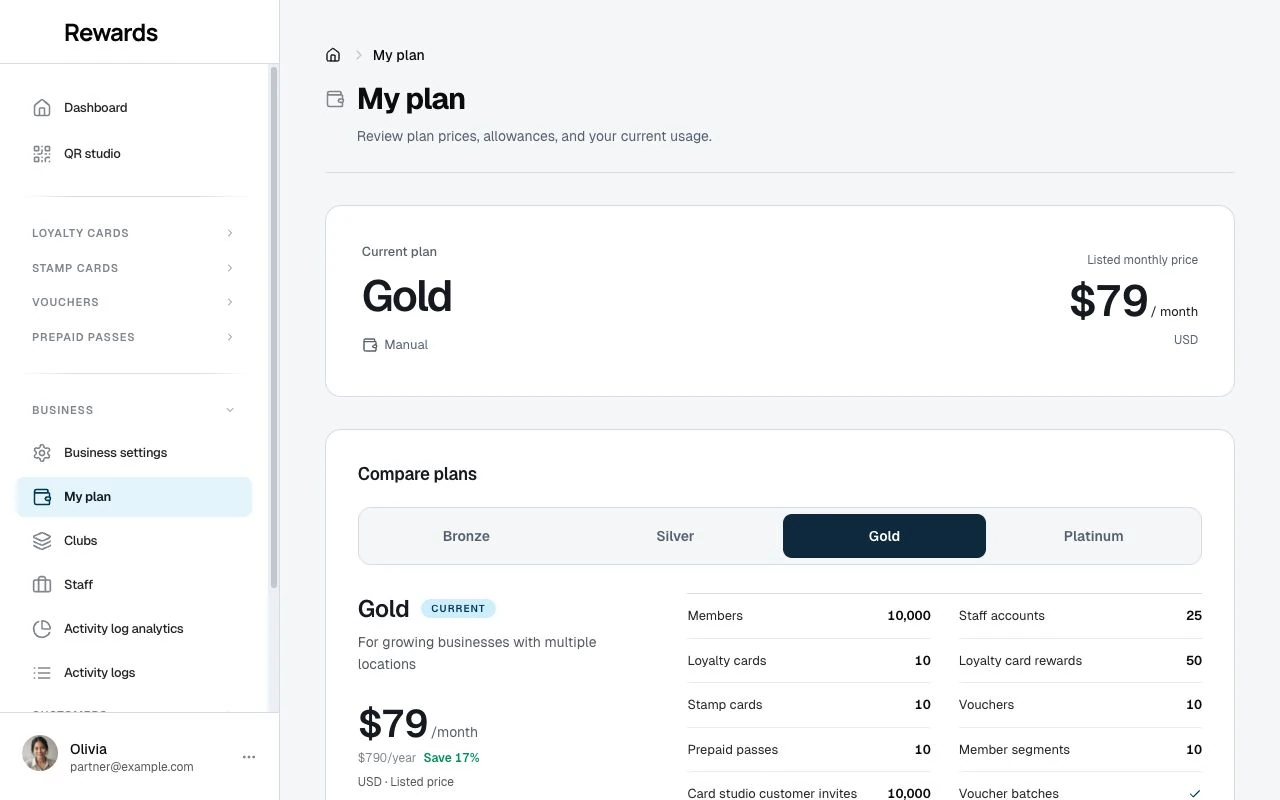
Partners open My Plan from the sidebar or the user menu. The page lays out three panels side by side:

  • Your plan. One panel with a tab per active plan. Each tab shows that tier's price, a yearly price where the tier offers annual billing, and what it includes: the same allowance and capability rows the registration page shows. Below the included rows, the tab lists what the tier lacks, muted with a lock: capabilities the tier holds shut and allowances it sets to zero, so one glance shows the gap to the next tier. The registration page keeps the included-only view, because a signup card sells what you get. Features and allowances no active plan offers appear on neither. The current plan opens first, marked with its subscription status (Stripe and PayPal modes) or a Current chip (manual mode). Where self-service billing runs, the other tabs carry upgrade and change-plan buttons and a monthly/yearly toggle for checkout. Without self-service (manual mode, or an admin-created account under a provider), the panel ends with Contact us to change your plan, which opens Help & support with the billing topic preselected.
  • Resource usage. Progress bars of usage against the limit for each resource, plus the member allowance: a count of members who interacted with the business against the plan's included members. The member figure is an upgrade signal; the app never blocks new members, because staff credit them at the counter. A zero allowance with nothing used stays off the list.
  • Plan features. A grid of the features the current plan enables and disables. What the plan enables lists first; locked features sink below, and each names the cheapest plan that offers it, so a lock reads as a map instead of a wall. A feature that no active plan offers stays off this grid entirely; it shows for a partner who holds it through a per-partner permission, and for no one else.

The My plan page with plan tabs, prices, resource usage bars, and the plan feature grid.

Above the panels, alerts appear for trial, past due, cancelled, or suspended states. Manage billing sits in the page header and opens Stripe's hosted portal for payment methods and invoices (Stripe); PayPal accounts get an in-app Cancel Subscription control below the panels.

Self-service depends on the provider and on whether the partner registered themselves. For the Stripe self-service flow, see What partners see on My Plan in the Stripe guide. For the PayPal cancel and change-plan flow, see What partners see on My Plan in the PayPal guide.

Cookies on this site.

Google Analytics runs only if you allow it. Cookie policy