Redeeming your rewards.
Claim your earned rewards when you complete a stamp card
Completing a stamp card unlocks your reward. Depending on the program type, rewards either land in your account or wait for a quick visit to claim your physical prize.
Types of rewards
Businesses offer two reward types when you complete a stamp card:
Automatic points rewards
Points land in your loyalty card balance the moment you collect your final stamp.
How it works:
- You earn your final stamp
- System detects card completion
- The system credits points
- You receive a completion notification
- Stamp card resets for the next round (extra stamps carry over)
Example: Complete a 10-stamp card and receive 1,000 bonus points.
No action required from you. The points appear in your loyalty card balance right away.
Physical rewards
Tangible items like free products, discounts, or services require you to visit the business location to claim.
How it works:
- You earn your final stamp
- The card resets for the next round and a reward is added to your Rewards ready count
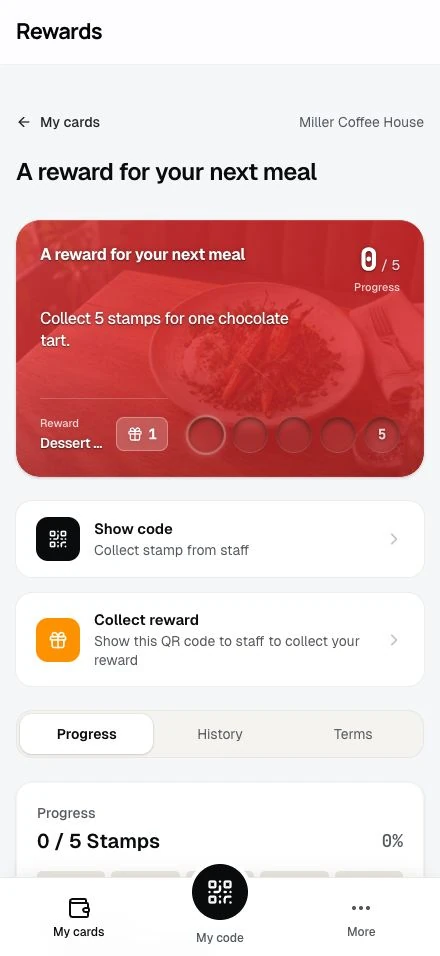
- "Collect reward" button appears on your card
- You visit the business location
- Show your reward QR code to staff
- Staff confirms and gives you your reward
Example: Complete a 10-stamp coffee card and receive a free large coffee at the store.
Claiming automatic points rewards
When points are credited
Points land the moment you collect your final stamp:
- Staff scans your QR code at checkout
- The final stamp lands on your card
- The system detects completion
- The system credits your linked loyalty card
- Success message displays
The entire process happens in seconds.
Viewing your points
To confirm points were added:
- Go to My Cards
- View your loyalty card balance
- Check the recent transactions
- See the points credit from stamp card completion
The transaction will show:
- Points added
- Source: Stamp card completion
- Date and time
- Stamp card name
Using your points
Once credited, points work like regular loyalty points:
- Redeem for rewards from the loyalty program
- Accumulate toward tier progression
- Combine with other points in your balance
The points have no expiration (unless the loyalty program itself has expiration rules).
Card reset
The reset happens at completion, in the same moment the system credits the points:
- The stamp count starts over, and any stamps above the requirement carry over to the new round
- Progress bar returns to the carried-over amount
- Ready to keep collecting
Your history records the completion, and you can begin working toward your next reward right away.
Claiming physical rewards
Checking reward availability
When your card is complete, you'll see:
"Reward Ready!" message A celebration notification confirming your reward is available.
"Collect reward" button Tap this to access your reward QR code.
Reward description Details about what you've earned and how to claim it.
Generating your reward QR code
To show your reward code:
- Open your completed stamp card
- Tap the "Collect reward" button
- A large QR code appears
- Instructions display: "Show this to staff to collect your reward"
This QR code is different from your stamp collection code: it's for reward redemption.
Visiting the business
Bring your phone to the business location:
- Approach the counter or staff member
- Mention you have a stamp card reward to claim
- Open your reward QR code
- Staff scans the code
- Staff confirms the reward details
- Staff gives you your physical reward
Staff confirmation
After scanning your code, staff will:
- See your reward details on their screen
- Verify your identity
- Confirm the physical item to give you
- Tap Claim reward to process the redemption
Once they confirm, your reward shows as claimed.
After claiming
Your stamp card updates:
- Your Rewards ready count goes down by one
- Your Redeemed count goes up by one
- Your history logs the redemption
The claim leaves your stamp progress untouched: the card already reset when you completed it, so any stamps you collected since then stay where they are.
Multiple pending rewards
Rewards accumulate. Each time you complete the card, one more reward joins your Rewards ready count:
- Complete your card → A reward becomes available and the card resets, with extra stamps carrying over
- Complete it again → A second pending reward joins the first
- Claim whenever it suits you → Each claim reduces the count by one
Unclaimed rewards accumulate while you keep collecting. Check the program end date and claim them before it expires.
Reward expiration
Claim physical rewards before the stamp program's end date. After that date, the card moves to History and staff cannot process a claim.
If the business retires a card while it is still within its validity dates, earning stops but completed rewards remain claimable while the business remains active. Check the card's Terms for its end date before visiting.
Points credited at completion follow the linked loyalty card's expiry rules.
Troubleshooting reward redemption
"Collect reward button doesn't appear"
Possible reasons:
- You haven't completed the card yet (check your Rewards ready count)
- You already claimed all earned rewards
- Technical issue
Solution: Check the Rewards ready counter on your card. If it shows a reward and the button is missing, contact the business.
"Staff can't scan my reward code"
Try these solutions:
- Increase screen brightness
- Hold phone steady
- Verify you're showing the reward code, not the stamp collection code
"Wrong reward was given"
If you receive something different from the reward description:
- Mention the discrepancy to staff
- Show them the reward description on your card
- Staff can verify the correct reward in their system
Mistakes are rare, and staff can fix them on the spot.
"My card still shows stamps after claiming"
That is expected. The card reset when you completed it, not when you claimed. Stamps you see now are progress toward your next reward, including any extra stamps that carried over from the completed round.
If your Rewards ready count didn't go down after a claim:
- Refresh your account
- Check the History tab for the redemption entry
If the redemption is missing, contact the business with the date and time of your visit.
Viewing redemption history
All reward claims are recorded in your stamp card history:
To view:
- Open your stamp card
- Go to the History tab
- See all completions and redemptions
Each entry shows:
- Date and time of redemption
- Reward that was claimed
- Card completion count
Your history keeps a record of your rewards until you remove the associated account data through privacy settings.
Combining rewards with other programs
Stamp card rewards work alongside other loyalty features:
Points rewards + Loyalty cards: Points from stamp cards add to your loyalty card balance and count toward tier progression.
Physical rewards + Points: Some programs offer both: you get points AND a physical reward to claim.
Multiple stamp cards: You can complete and redeem rewards from multiple stamp cards at once.
Tips for successful redemption
Check the end date: Claim rewards before the program expires.
Verify reward details: Read the reward description before visiting to know what to expect.
Bring your phone: You need your device to show the reward QR code.
Visit during business hours: Ensure staff are available to process your redemption.
Ask questions: Staff can clarify any reward details or redemption procedures.
Check your history: Confirm your redemptions appear.
Next steps
- Stamp cards FAQ: Common questions answered
- Tracking Your Progress: Monitor your stamp collection
- Collecting Stamps: Continue earning stamps