The referral landing experience.
What new members see when they click a referral link.
A referral link opens a landing page. It shows who invited the visitor and the configured reward, then sends them on to register.
The reward is triggered by the friend's first points-earning transaction on this installation, on any loyalty card. Someone who has already earned points cannot complete a new referral. Each side receives the points configured for that campaign.
The landing page
The landing page shows:
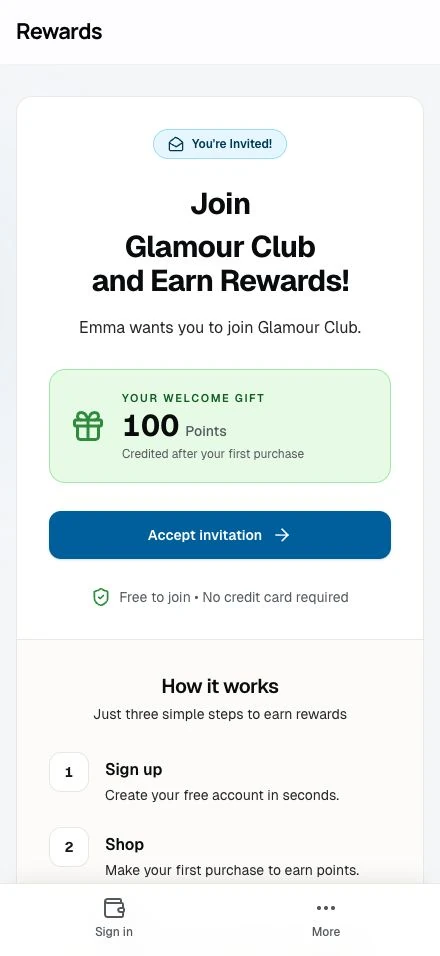
Personal touch
- Referrer's name up top: "Sarah invited you!"
- A real name reads as a recommendation, not an ad
Welcome bonus
- The page highlights the welcome bonus points
- A clear line on what the new member gets
The business behind the invitation
- The page uses your installation's styling, not a per-business theme: no club logo or colors
- The business name appears in the footer, so visitors know who the invitation is from
- The reward card's name sits in the headline ("Join Coffee Rewards and Earn Rewards!")
Clear call-to-action
- One Accept invitation button leads to registration
- One clear path to sign up
Link structure
Referral links use a short, clean format:
Short link: https://rewards.domain.com/r/AB12CD
When clicked, this redirects to a localized version:
Full link: https://rewards.domain.com/en-us/r/AB12CD
The visitor's browser settings decide the locale.
What happens when links are clicked
The link handles three cases:
For new visitors (not logged in)
- Land on the landing page
- See the referrer's name and welcome bonus
- Click Accept invitation to register
- Complete registration (email, verification code)
- Referral recorded, no code to enter
- Lands on the member dashboard with the referee's card added
- See message: "Make your first purchase to unlock your bonus"
For existing members (logged in)
If someone clicks a referral link while already logged in:
- System checks if they can be referred
- If eligible: Creates pending referral, adds the reward card to their wallet, redirects to their referral dashboard
- If self-referral: Shows message "Nice try! You cannot refer yourself."
- If already referred: Shows message "You have already been referred or have an existing account."
Note: Logged-in members skip the landing page. They go straight on with a message that fits their case.
For invalid or expired links
If something's wrong with the referral:
- Code doesn't exist: "Invalid or expired referral link." + redirect to registration
- Program disabled: "This referral program is currently disabled. Please sign up normally." + redirect to registration
In both cases, the visitor can still sign up as usual. They won't get the referral bonus.
After signup
Once the new member registers via a referral link:
Immediate effects
- Pending referral created: Links the new member to the referrer
- Card auto-added: The referee's loyalty card appears in their My Cards
- Welcome message: Explains they'll earn bonus points on first purchase
- Status visible: Referrer sees "Pending" in their referral list
What the new member sees
Their dashboard shows:
- The loyalty card they were referred to
- A note about the pending welcome bonus
- Normal use: they can browse, collect more cards, and so on
Completing the referral
The referral stays "pending" until the new member earns points:
- New member visits the business
- Shows QR code at checkout
- Staff awards points for their purchase
- System detects this is their first transaction
- Welcome bonus is added
- Referrer's bonus lands at the same moment
- Each member receives a notification if their email preferences allow it
Mobile experience
The landing page is optimized for mobile since most referrals come from messaging apps:
- Full-width layout: Easy to read on small screens
- Large tap targets: Big buttons that are easy to press
- Fast loading: Minimal assets for quick display
Conversion best practices
The page keeps the path to signup short:
Trust signals
- A real name shows a person stands behind it
- The business name in the footer says who is behind it
- A clear reward (bonus points)
Friction reduction
- No code to copy/paste: everything is automatic
- Simple registration (email and a verification code)
- Immediate value after signup
Clear next steps
- One obvious call-to-action
- No dead ends or confusion
Privacy considerations
The landing page respects privacy:
- Shows the referrer's first name and last initial. Anonymous accounts appear as Member
- No email or contact info exposed on the page
- After signup, the referrer sees the friend's first name and last initial, or Member for an anonymous account, plus the referral status. The list shows no email or contact details
Troubleshooting
"The page shows an error"
The referral code might be invalid. Ask the referrer to:
- Double-check they copied the full link
- Reshare from their referral dashboard
- Try the short code format:
/r/AB12CD
"I already have an account but clicked a link"
If you're logged in:
- The referral applies if you're eligible
- An existing points history prevents completion, even if the link creates a pending referral
- Self-referrals are blocked
"I signed up but don't see the bonus"
The bonus lands on your first purchase, not at signup. Visit the business, earn points, and it appears in your transaction history.
Related topics
- Referral program overview: How referrals work
- Sharing & earning: How referrers share links
- Setting up referrals: Partner configuration
- Collecting cards: Adding cards to your wallet