Plans & pricing.
Configure the four plan tiers: limits, features, prices, and currency.
A plan tier sets what a partner can do: its resource limits, its feature flags, and its pricing. This page covers where plan values live and every way to change them: the config/plans.php defaults, PLAN_* environment overrides, the admin Plans editor, the display currency, and annual billing. For the billing modes, the providers, and how subscription states resolve, see Billing configuration.
Where plan values live
Every value in config/plans.php is a default. To change most plan values, on a new or an existing install, set an environment override instead of editing the file. (The structural fields are the exception: is_default, sort_order, and the internal *_key translation keys are read from the file only, never the environment.) config/plans.php ships as pure defaults and updates refresh it, so new plan keys (for example the annual-billing flag) reach every install. Do not edit this file on an install, or an update will overwrite your change. Your customizations belong in the two override layers instead: the environment (PLAN_*) and the admin Plans editor (database). Both live outside config/plans.php and survive updates, and App\Providers\PlanOverrideServiceProvider applies them at runtime.
Configuring plan values from the environment
Naming. Set PLAN_<TIER>_<SETTING>, both uppercase, in .env:
PLAN_TIER1_MAX_MEMBERS=500 # a resource limit
PLAN_TIER3_HAS_AGENT_API=true # a feature flag
PLAN_TIER2_NAME="Starter" # any plan field
PLAN_TIER2_CURRENCY=EUR # the tier's display currency
<TIER> is TIER1–TIER4 for the stock tiers, or the key of any custom tier you added to config/plans.php. <SETTING> is any key from that tier: MAX_MEMBERS, MAX_CARDS, MAX_VOUCHERS, HAS_VOUCHERS, HAS_AGENT_API, HAS_WEBHOOKS, HAS_ACHIEVEMENTS, HAS_GOOGLE_WALLET, NAME, PRICE_MONTHLY, CURRENCY, and so on.
Types and accepted values.
- Numbers (
MAX_*,PRICE_*): an integer. Use-1for unlimited. A non-numeric value is ignored, which keeps the default. - Booleans (
HAS_*,ANNUAL_ENABLED):true/false,1/0,on/off, oryes/no(case-insensitive). Any other value is ignored, which keeps the default, so a typo such asHAS_AGENT_API=enabledcannot switch a feature off by mistake. - Annual billing (
ANNUAL_ENABLED):trueoffers a yearly interval for a paid tier: the yearly price and the provider's yearly price/plan id are used, and partners can check out yearly.falsemakes the tier monthly-only: no yearly price, provider id, or checkout appears, regardless ofPRICE_YEARLY. Example:PLAN_TIER2_ANNUAL_ENABLED=false. The free/default tier bills nothing, so it is always monthly-only. - Text (
NAME,CURRENCY): used as written. - A blank value (
PLAN_TIER1_MAX_MEMBERS=) counts as "not set" and changes nothing.
Localized names. Set a plan's name and description per language. PLAN_<TIER>_NAME sets the default label for every language, and PLAN_<TIER>_NAME_<LOCALE> overrides one language, for example PLAN_TIER1_NAME_NL_NL="Brons" (the locale is the language code uppercased, such as EN_US or DE_DE). DESCRIPTION works the same way. When you set neither, the built-in localized names from the language files apply. The internal *_KEY translation-key fields resolve through the language files and do not read from the environment.
Precedence. From lowest to highest, a partner sees the value resolved as:
- The default in
config/plans.php. - A
PLAN_<TIER>_<SETTING>environment override, which replaces the default for that plan. - A database plan override saved from the admin Plans editor, which replaces the value for that plan and wins over the environment (see below).
- A per-partner override in the partner's admin settings, which wins for that one partner.
Layers 2 and 3 both set the plan-wide value; a database edit is the most recent intent, so it wins over the environment. Layer 4 still lets an admin grant or restrict an individual partner on top of the resolved plan.
Cache behavior. The overrides read at runtime, so a change to .env applies on the next request. If you run php artisan config:cache for performance, the .env file no longer reads at runtime. In that setup, set the PLAN_* values as real environment variables in your container or host, instead of or in addition to .env.
Check the result after a change with Tinker:
php artisan tinker --execute "echo config('plans.tier1.max_members');"
A partner's My Plan page also shows the resolved limits and features.
Plan pricing currency
Each tier carries its own display currency in the plan definition. The shipped default is USD. This currency appears everywhere a plan price shows: the registration page, the partner My Plan page, and the Estimated MRR tile on the SaaS overview. It is separate from the currency members see on their cards and balances, which comes from the partner's network.
Set it per tier, either in the Plans editor (each paid tier's Pricing section has a currency picker with every ISO currency) or from the environment:
PLAN_TIER2_CURRENCY=EUR
PLAN_TIER3_CURRENCY=EUR
PLAN_TIER4_CURRENCY=EUR
Use an uppercase ISO code, and set the same currency on every paid tier: the MRR estimate sums plan prices without conversion, so mixed currencies make that figure meaningless.
The display currency labels what partners see. What a partner is charged, including the charge currency, comes from the Stripe price or PayPal plan you map to the tier, so keep the two in step.
Prices reverted to USD after an update? You edited
config/plans.phpon an earlier version. Updates replace that file with the shipped defaults, so those edits are gone after updating. Re-enter your prices and currency once in the Plans editor or asPLAN_*environment values; both survive every future update.
Editing plans from the admin
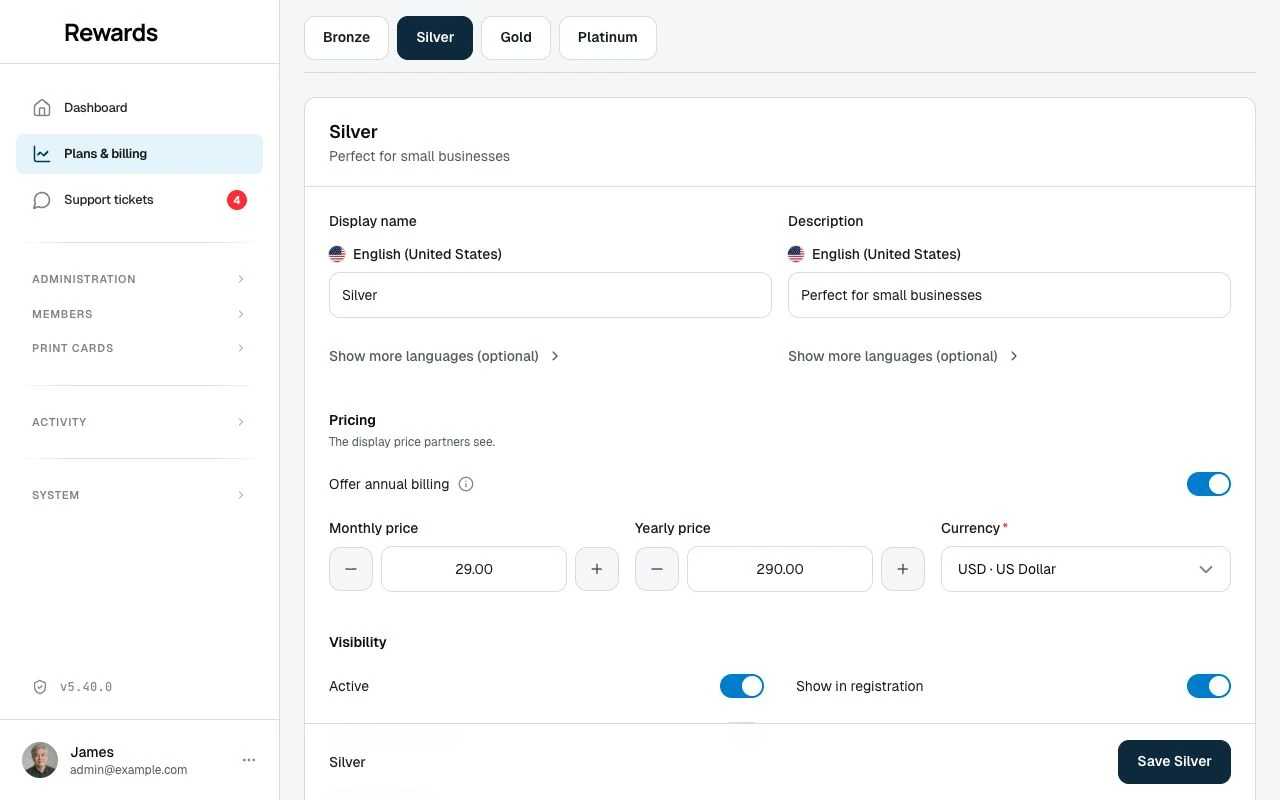
Open SaaS overview → Plans to change a tier's pricing, flags, limits, visibility, name, and description without touching .env. The Plans link is on the SaaS overview: in the empty state before any partners exist, and beside the plan-distribution chart once there is data. Each edit lives in the database and layers over the environment and the config/plans.php defaults (precedence layer 3 above). The editor saves only the fields you change, and Reset to defaults removes the database value so the plan falls back to the environment override, then the file default.

Editable fields: the plan name and description, its display pricing (monthly price, an optional yearly price gated by the Offer annual billing toggle, and currency, on paid tiers; the free default tier has none), its visibility (active, listed in registration, "popular" highlight), the resource limits the code enforces (max_*: members, staff, clubs, loyalty cards, stamp cards, vouchers, prepaid passes, member segments, member card codes, rewards, agent keys), and every feature flag (has_*). Cards on homepage and Invite businesses carry inline help notes: the first because its effect depends on your homepage layout and each program's own visibility, the second because it ships off in every tier and most operators grant it per partner instead. Tier ordering (sort_order) is not editable here (it drives the upgrade/downgrade hierarchy, so it lives in config/plans.php), and limits that no code enforces (locations, promoted cards) are not shown.
Webhooks is one of these feature flags, has_webhooks. Gold and Platinum ship with it on; Bronze and Silver ship with it off. Switch it for any tier the same way as any other flag, in the editor or with PLAN_<TIER>_HAS_WEBHOOKS in .env (an advanced, server-managed override, not the normal path). What the flag does: it sets the Webhooks default for a partner when they are created on the plan or assigned or reassigned to it, and it controls how the plan reads on the cards. If every active plan has it off, Webhooks drops off the plan cards on registration and out of the My Plan comparison, the same as any feature switched off everywhere.
Editing the flag does not rewrite the Webhooks setting of partners already on the plan. Each partner carries their own stored Webhooks permission (set from the plan when they joined it), and that stored value is what decides their access. So turning has_webhooks on or off for a tier changes the plan cards and the default for new and reassigned partners, but existing partners keep whatever they have until you change it. To change an existing partner right away, grant or revoke Webhooks for them on their Permissions tab (this takes effect right away), or assign or reassign their plan through the normal plan-assignment flow, which re-derives the setting from the plan. Either way, changing the plan or the permission never touches that partner's existing endpoints, secrets, event subscriptions, or delivery history: it only turns new deliveries on or off and shows or hides the Integrations → Webhooks menu. See Webhooks overview and setup.
Achievements works the same way, through the has_achievements flag. Silver, Gold, and Platinum ship with it on; Bronze ships with it off. Switch it per tier in the editor or with PLAN_<TIER>_HAS_ACHIEVEMENTS in .env, and use the per-partner override on the Permissions tab for one partner. Removing the feature never deletes anything: members keep every achievement they earned, rewards already on their way still arrive, and new progress stops counting until the feature returns. See Achievements overview.
Google Wallet is another of these feature flags, has_google_wallet. Gold and Platinum ship with it on; Bronze and Silver ship with it off. Switch it per tier in the editor or with PLAN_<TIER>_HAS_GOOGLE_WALLET in .env (an advanced, server-managed override, not the normal path), and use the per-partner override on the Permissions tab to grant or revoke it for one partner regardless of plan. One thing sets it apart from Webhooks and Achievements: the flag alone does not make the feature run. Google Wallet also needs the app Google service-account credentials configured in Settings → Integrations (or .env), and without them it stays inert on every plan, no matter the entitlement: the plan decides who may use it, and the credentials decide whether it can run at all. If every active plan has it off, Google Wallet drops off the plan cards on registration and out of the My Plan comparison, the same as any feature switched off everywhere.
Editing the flag does not rewrite the Google Wallet setting of partners already on the plan. Each partner carries their own stored google_wallet_permission (set from the plan when they joined it), and that stored value is what decides their access. So turning has_google_wallet on or off for a tier changes the plan cards and the default for new and reassigned partners, but existing partners keep whatever they have until you change it. To change an existing partner right away, grant or revoke Google Wallet for them on their Permissions tab (this takes effect right away), or assign or reassign their plan, which re-derives the setting from the plan. See Google Wallet Integration.
Localized name and description. The plan name and description are per-language fields, not one global string. The editor shows your app's default language first (required, every tier needs a label in it), with every other active language tucked behind a Show other languages disclosure, matching every other translatable field in the admin. Fill in only the languages you care about: a language you leave blank falls back to the app's default-language value for that field, so a Spanish-only edit never blanks out English. .env label overrides (PLAN_<TIER>_NAME, PLAN_<TIER>_NAME_<LOCALE>, and the DESCRIPTION equivalents, see Localized names above) remain available for a server-managed install and always take precedence over the admin UI, but editing the name/description from the Plans editor is the normal path.
The free tier's description is never replaced. Every tier, including the free default tier, shows the description you configure for it, on the Plans editor, on the partner billing page, and on the public registration page. Registration additionally shows one fixed, separate sentence under the free tier ("You start on the free … tier. No credit card required."). That sentence is a secondary note about how the free tier works, not a substitute for your configured description.
Display price vs. what is charged. The price you set here is the price partners see. What a partner is charged comes from the billing provider: the Stripe price or PayPal plan you map to that tier and interval. When Stripe or PayPal is the active provider, the editor shows a reminder to keep the two in sync: change the display price here and update the provider's price to match, or partners will see one amount and be billed another.
Mapping the provider price. When Stripe or PayPal is active, each tier's Pricing section also shows the price/plan id fields for that provider, the Stripe price id or the PayPal plan id, right below the display price. The monthly id is the one you always set; the yearly id field appears only when the tier has annual billing turned on. Set them to connect the plan to the exact price the provider charges. These layer over the environment the same way: a saved id overrides the matching STRIPE_PRICE_* / PayPal plan value, and leaving a field blank falls back to your environment. Only the active provider's fields appear, and switching providers keeps whatever you already saved for the other one. Under manual billing there is no provider amount, so the display price is what you quote and invoice. Prices accept decimals; the app stores them in minor units, and you pick the currency from a searchable list of ISO currencies.
Out of scope for an override: the default-plan choice (is_default) and the internal translation keys are not editable per tier. is_default, which tier new businesses start on, is decided in config/plans.php only, never from .env or the database, so the shipped rule that businesses start on the free tier stays a single, deliberate choice. (The provider price/plan IDs, by contrast, are editable. See the price-id mapping above.) An override that somehow contained an out-of-scope key is ignored, so those keys can never move into the database.
The default tier is free. The default tier (is_default) is where a business lands when it self-registers, and it carries no price: the Plans editor tags it Free and titles it Included with registration, and hides the pricing and provider price-id fields for it. There is no built-in timed trial that later charges; paid access begins only when a business upgrades to a paid plan.
Because every self-registering business lands on the default tier, it is always active and always available at registration: the editor locks those two toggles on for the default tier and refuses to store them off, even from a crafted request. The free tier is also never marked "popular". That is an upsell affordance, so the toggle is hidden for it. Paid tiers keep full control of active, visible, and popular.
Effect on partners. A plan override changes the tier definition; it does not rewrite any per-partner override:
- Existing partners keep every per-partner setting an admin already made for them. A plan value that has no per-partner override, for example the member allowance, resolves through the plan, so an edit to that value takes effect for them on the next request.
- New partners (and a partner you move to a different tier) take their starting permissions from the resolved plan at that moment, including your edits.
This keeps intentional per-partner customizations safe while letting a plan change flow through where you have not overridden it.
Monthly and annual billing
Every paid tier is billed monthly. Annual billing is optional and set per tier with the Offer annual billing toggle in each tier's Pricing section:
- Toggle off: monthly only. Partners see and pay a monthly price. No yearly price appears at registration, on the partner billing page, or at checkout, and the app refuses a yearly checkout even if someone crafts the request. With the toggle off, the yearly price field and the provider's yearly price/plan id field are hidden. There is nothing to set up for the year.
- Toggle on: annual offered. Set the yearly price, and when Stripe or PayPal is active, map the provider's yearly price id / plan id for that tier. Partners then get a monthly/yearly switch and can check out on either interval.
A few rules keep this predictable:
- Monthly is always required. Turning annual on never removes the monthly option; it adds a yearly one beside it.
- Annual on needs a yearly price. The app refuses a save with annual on but no yearly price, so the display and the interval never drift apart.
- A saving is shown only when there is one. If the yearly price is lower than twelve monthly payments, partners see how much they save. An annual price with no discount (yearly = 12 × monthly) is still a valid choice. It shows no savings badge. The toggle, not the size of any saving, decides whether annual is offered.
- The free/default tier bills nothing, so it has no monthly or annual price and no toggle.
- Annual-only is not a supported mode. A paid tier is always available monthly; annual is an optional addition on top. The two supported shapes are monthly only (annual off) or monthly + annual (annual on). There is no "yearly, no monthly" tier. Set the monthly price, then add annual beside it if you want it.
- Legacy installs (before the flag shipped). On an install whose
config/plans.phppredates the annual-billing flag, the app derives annual availability from the yearly price: a tier with a yearly price offers annual, one without is monthly only. Once you take an update (which refreshesconfig/plans.php), the explicit Offer annual billing toggle takes over and becomes editable per tier. Until then the yearly-price fallback keeps checkout and the pricing UI consistent.
Set up the provider's yearly price/plan id the same admin-first way as the monthly one: Provider credentials for the keys and webhook, then the Plans editor for the yearly price and its yearly price/plan id (with .env as the alternate). See Stripe billing and PayPal billing for the exact provider steps.
Related topics
- Billing configuration: Billing modes, credentials, and subscription states
- SaaS setup guide: The end-to-end SaaS enablement walkthrough
- Partner permissions & limits: Per-partner overrides on top of a plan
- Partner registration: How the tiers appear on the signup page