
Your member code.
Show your member QR at the counter, request points, or enter a code you received.
On this page
Your member code identifies your account at the counter. Open My code and show the QR code to staff. They choose the program and action available at their business.
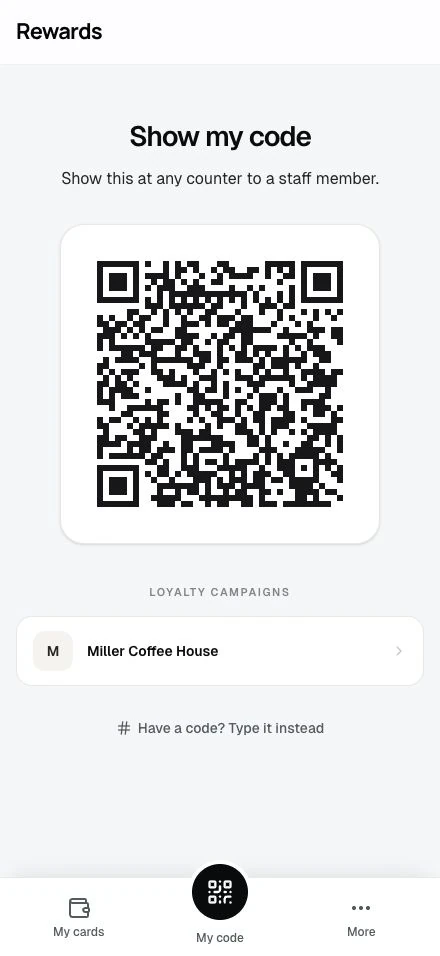
A QR code on a specific card can open that program's staff workflow. A business poster may instead open a program page for you to join. These codes serve different purposes.
| What you want to do | Use |
|---|---|
| Identify yourself to staff | My code |
| Join a program | The business's program link or QR code |
| Redeem a points reward | The claim flow on that card's reward page |
| Enter a code someone gave you | Enter code, as described below |
See Using member cards for printed member cards and linked codes.
Request points
To receive points from another member:
- On a phone, open More → Request points. On a larger screen, use Request points in your account menu or Quick Actions.
- Choose the loyalty card that will receive the points.
- Generate the request link.
- Share the link with the other member.
The link lets the other member choose to send points. Creating it does not add points to your balance. See Requesting points.
Enter code
- On a phone, select More → Enter code, or open My code and select Have a code? Type it instead. On a larger screen, select Enter code in your account menu or Quick Actions.
- Enter the code exactly as you received it.
- Submit it and follow the result shown on the page.
The result depends on the code. A points code adds the points it represents; a member-card code can link a printed card. An expired or invalid code cannot complete the action.