Redemption codes.
Award points to customers using verbal 4-digit codes
Redemption codes let staff award loyalty points to customers without scanning a QR code. Staff generates a 4-digit code, tells it to the customer, and the customer enters it later to receive their points.
When to use redemption codes
Redemption codes solve real-world situations where QR scanning isn't practical:
| Scenario | Why Codes Help |
|---|---|
| Phone orders | Customer isn't there to scan |
| Drive-through | Faster than fumbling with phones |
| Forgot their phone | Customer still gets their points |
| High-volume rushes | Verbal codes can be quicker than scanning |
| Delivery orders | Award points for online/phone orders |
Think of it as a backup method. QR scanning is faster when possible, but codes ensure no customer misses out.
How it works
The flow has two parts:
- Staff generates a code → tells customer the 4 digits
- Customer enters the code → receives points on their card
Each code stays valid for a window you choose when you generate it, from 1 hour to 1 month. The field starts on the default set in settings (3 days out of the box). A code works only once.
Staff: Generating a code
- Go to Redemption codes in the staff sidebar
- Tap Generate code at the top of the list. If you have more than one loyalty card, the screen opens with an empty Select a card picker so you choose the right one first; with a single card it opens straight on it
- Enter the number of points the code should be worth
- Under Valid for, choose how long the customer has to enter the code (1 hour to 1 month). It starts on the default from settings
- Tap Generate code
Once a card is selected, the card name at the top stays a switcher, so you can move to another card without starting over.
The page shows the 4-digit code large and clear. Read it aloud to the customer straight away. Two actions appear below the code:
- Generate another code: Returns to the form so you can issue a second code for the same card right away
- View all codes: Opens the redemption codes list where you can see all codes and their status
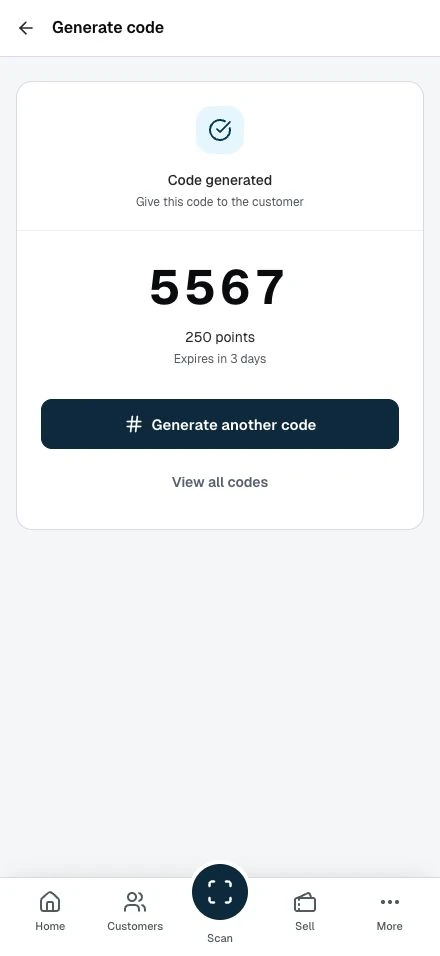
Your Redemption codes list also records the code the moment you generate it.
Managing codes
The Redemption codes list shows all your generated codes:
| Column | Description |
|---|---|
| Card | Which loyalty card receives the points |
| Code | The 4-digit code |
| Points | How many points the code awards |
| Status | Available, Used or Expired |
| Expires | Relative time until expiry; Details includes the exact date and time |
| Used By | Customer who redeemed it (blank if unused) |
| Used | "Not used yet" or the redemption date |
| Actions | Delete unused codes |
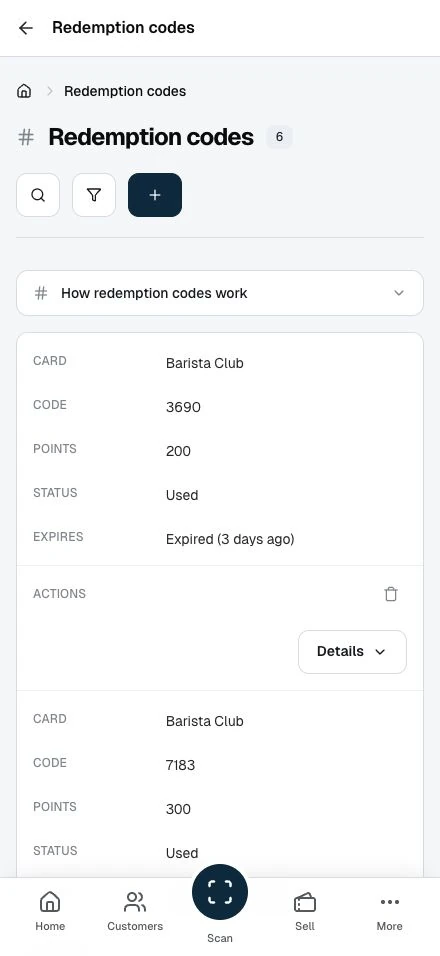
Use Filters to choose Available, Used or Expired codes. Used takes priority for a redeemed code, even after its expiry has cleared. Available means an unused code remains reserved and valid. Other unused codes show Expired.
On phones, Details shows the exact expiry and usage information. Member email addresses keep their existing masking.
Search matches the code itself, not the card name.
Customer: Entering a code
Customers redeem codes through their account:
- Click their account menu (top right)
- Select Enter Code
- Type the 4-digit code
- Click Submit Code
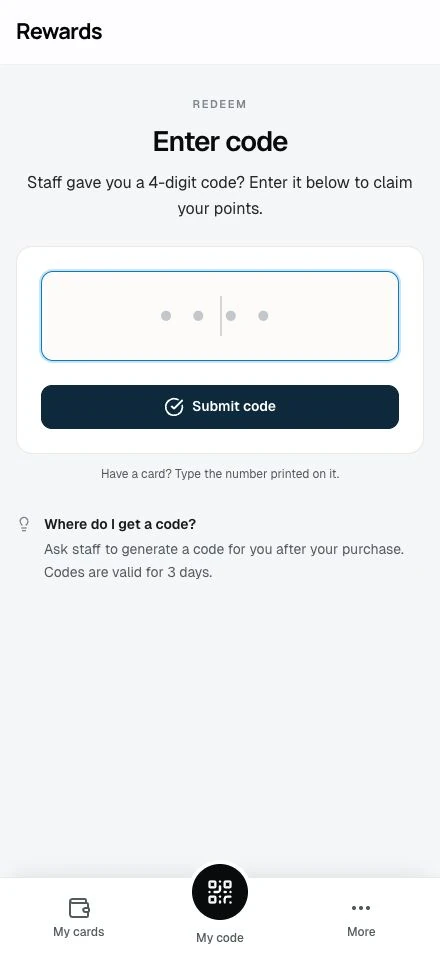
On success, they see: "Code redeemed! You received X points for [Card Name]"
The points appear on their loyalty card right away. Two bonuses apply on top of the code's face value:
- Tier multiplier. If the customer holds a tier with a points multiplier, that multiplier applies to the code's points. A 100-point code becomes 150 points for a member with a 1.5× multiplier.
- First-time bonus. When the code is the customer's first transaction on the card, the customer also earns the card's initial bonus points, and the app adds the card to their My Cards.
Common customer questions
"Where do I get a code?" From the staff. They'll tell you a 4-digit number when you make a purchase.
"The code doesn't work"
- Check you entered all 4 digits right
- The code may have expired
- Someone may have used the code
- Ask staff to generate a new code
Code expiration
Codes don't last forever. This stops anyone sharing or reusing old codes.
Staff choose how long each code stays valid at the moment they generate it, with the Valid for field:
- 1 hour, 2 hours, 4 hours, 8 hours, 12 hours
- 1 day, 2 days, 3 days
- 1 week, 2 weeks, 1 month
The field starts on the default validity the administrator sets (3 days out of the box). See Loyalty cards Settings to change that default.
Members can't redeem expired codes. Staff generate a new code if a customer's code expired.
Security considerations
One-time use: Each code works once. After redemption, the system marks it used.
Expiration: Codes auto-expire to prevent hoarding or sharing.
Audit trail: The system tracks which customer used each code and when.
Staff visibility: Staff can see all codes they've generated and their status.
Best practices
Tell customers right away. Don't make them wait. Give the code right after generating it.
Keep codes short-term. Same-day or next-day redemption works best. Customers forget or lose long-valid codes.
Use for exceptions. QR scanning is the primary method. Codes are for when scanning isn't possible.
Print on receipts. If your POS allows it, printing codes on receipts reduces verbal errors.
Related topics
- Staff Overview: Staff dashboard navigation
- Awarding Points: QR-based point awards
- Loyalty cards Settings: Configure code expiration
- Member Earning Points: All ways customers earn points