
Account settings and privacy.
Your profile, language, email preferences, the data each business holds for you, and how to export or delete it.
On this page
Open My account from your profile menu or the mobile More sheet. The Account settings page includes Personal details for your name and contact details, with Security above your email, and Language and time zone for regional preferences, and Privacy & Data for the controls below. Your cards also appears when the installation enables physical member cards and you have claimed one. Anonymous accounts must add and verify an email address to use Privacy & Data.
Saving account changes
Select Continue to verification after editing. In the dialog, select Send verification code, enter the six digits from your email, then select Verify and save. Closing the dialog leaves your edits in the form. For 30 minutes after verification, the form offers Save changes without asking for another code.
Changing your email
Enter your new email address and verify the code sent to that address before saving. If you change the address again, request another code. Deleting your account or a business relationship still requires verification through the email already saved on your account.
Email preferences
The Personal details tab holds two email switches. Loyalty updates (on by default) covers points, rewards, stamps, vouchers, and passes. Offers and news (off until you turn it on) covers occasional offers and news from businesses whose programs you save. Account and security email, such as sign-in codes, always arrives. The unsubscribe link in an offer email turns off Offers and news only; your loyalty updates keep coming until you switch them off yourself. These switches control email. Monetary pass updates also use in-app notices. See Automatic messages for every message a business can send.
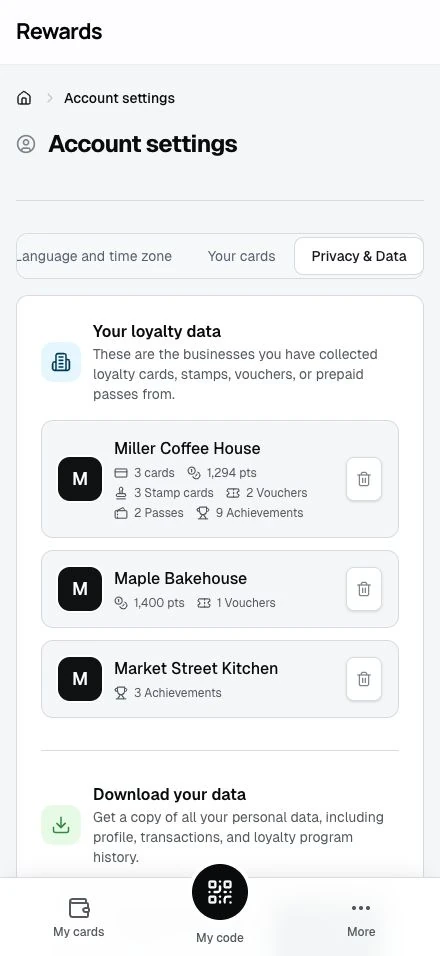
Your loyalty data
The Privacy & Data tab lists every business you have collected loyalty data with. Each business shows your cards, points, stamp cards, vouchers, and prepaid passes. A business you only hold a prepaid pass with appears here too, so the page reflects everything that business holds for you.
A business you collect with also sees your name and email, and your phone number, birthday, and gender when you added them to your profile.
Download your data
Download gives you a JSON file of your profile, transactions, and loyalty history, including prepaid passes and monetary claims still linked to your account. Monetary claim data includes the remaining value, issuer contact, and safe posting history. It excludes internal payment references and staff details.
Delete my data
Each business has a Delete my data button. Removing your data with one business erases its ordinary loyalty data and removes the live wallet relationship. You cannot undo that removal. Monetary paid value and required financial evidence follow the separate rules below. Your data with every other business stays untouched. You confirm with a one-time code before the app removes anything.
Delete your account
Delete your account removes your member identity and closes your account across all businesses. You cannot undo this. Monetary financial evidence remains saved with access limited to authorized oversight. An old pass ID cannot restore member access.
Monetary passes and retained claims
Before the final deletion confirmation, the app shows your affected monetary balances, reserved refunds, claim references and issuer contacts, including claims from a removed business. You can download your records from that confirmation. Removing data for one business shows only that business's claims; deleting your account shows all of them.
Deleting loyalty data does not pay a refund or cancel the issuer's obligation for an unused monetary balance. The application does not automatically delete monetary financial records based on age. These records remain saved, including after full use or refund, with access limited to authorized oversight. They use pseudonymous identifiers after identity removal; they are not anonymous. Account removal still removes the unrelated personal data covered by that request.
If you keep your member account and a retained claim remains linked to it, you can view the balance, posting history, and issuer contact. A claim view does not allow spending. After deleting your whole account, contact the issuing business outside the app to resolve any outstanding value. Export your records before deletion if you need a copy. Continued access to the business’s records depends on its installation, hosting and backups; the application does not promise permanent availability.
Removing a pass from Apple Wallet or Google Wallet also does not refund its value. See your prepaid passes.