Sharing & earning.
How members share their referral link and track their earnings.
When a business enables referrals, you can earn bonus points by inviting friends. Share your unique link so your friend can join the campaign.
The reward is triggered by the friend's first points-earning transaction on this installation, on any loyalty card. Someone who has already earned points cannot complete a new referral. Each side receives the points configured for that campaign.
Finding your referral link
To access your referral link:
- Sign in to your member account
- Open More → Referrals on a phone, or Referrals in the profile menu on a larger screen. Refer a Friend in Quick Actions also opens it
- You'll see each program you can participate in
- Each program displays your unique shareable link
Referrals appears when a card you hold has an eligible referral offer, or when you have received referral history. That history stays accessible after an offer is disabled.
Your unique code
Every member gets a unique referral code for each program. Your code:
- Is 6 characters long (letters and numbers, like
AB12CD) - Is yours forever: it never changes
- Is embedded in your link: friends don't need to type it in
- Can be shared as the code or the full link
Your link looks like: https://rewards.business.com/r/AB12CD
Sharing options
Sharing works through your clipboard. Under Your referral link, each campaign shows the full link in a field with a Copy link button below it. Click the button (or the field itself) and the link is copied; the button confirms with "Copied!".
From there, paste it anywhere a conversation happens: text messages, chat apps, social media, email, group chats. There are no separate WhatsApp, email, or share-sheet buttons; the clipboard reaches every app you already use.
Tracking your referrals
The referral dashboard shows your performance at a glance:
Stats overview
Each campaign shows three counters under Your stats:
| Stat | What it means |
|---|---|
| Total | Friends who signed up using your link |
| Active | Referrals that completed: friends who made their first purchase |
| Earned | Total bonus points from this campaign's referrals |
Recent referrals
Below your stats, you'll see a list of recent referrals with:
- Friend's name: First name and last initial. Anonymous accounts appear as Member
- Status badge: Pending (yellow) or Completed (green)
- Date: When they signed up
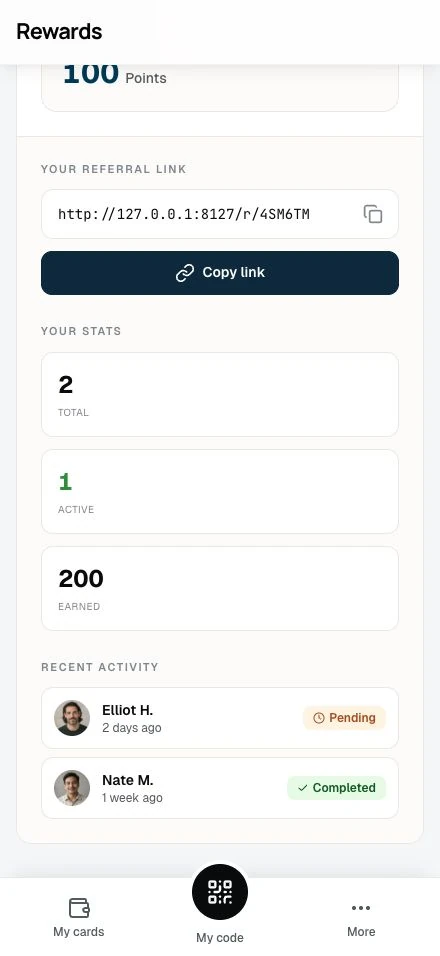
Pending means your friend signed up but hasn't made a purchase yet. You'll earn points when they do.
When you earn points
Points are awarded when your friend makes their first purchase, not when they sign up:
- Friend clicks your link: No points yet
- Friend signs up: No points yet (referral is "pending")
- Friend makes first purchase: 🎉 Points awarded!
This applies to any points-earning transaction on a loyalty card. It could be:
- Shopping in-store and showing their QR code
- Making a purchase through an online integration (Shopify or WooCommerce; early access)
- Receiving points by hand from staff
Note: Stamp card transactions don't trigger referral completion. Only loyalty card (points) transactions count. And it must be your friend's first points transaction ever: a friend who already earned points before your referral will never complete it.
Email notifications
When a referral completes, you'll receive an email notification with:
- How many points you earned
- The card that received the points
- A link to view your updated balance
These notifications are loyalty updates, so they follow the Loyalty updates switch in your email preferences. If you turned it off, you won't receive referral emails, but you still earn the points.
Tips for successful referrals
Who to invite
- Friends who would enjoy the business: Real recommendations convert better
- People who haven't earned points yet: A friend can already have an account, but the referral only completes on their first points transaction ever, so someone with purchase history never completes one
- Local contacts: They need to be able to visit and make purchases
When to share
- After a good visit: Your recommendation lands best then
- Before special occasions: "Try this place for your birthday dinner"
- When it fits the conversation: A recommendation in context feels natural
What to say
Don't send a bare link. Add context:
"I love the coffee here and thought you'd like it too. If you use my link to sign up, we both get bonus points!"
"They have a great loyalty program. Here's my referral link, you'll get a welcome bonus on your first visit."
Common questions
Can I refer myself?
No. The system prevents self-referrals. If you click your own link, you'll see a message explaining this.
What if my friend already signed up?
They can still be referred. When a signed-in member opens your link and is eligible, a pending referral is created and the reward card is added to their wallet. The catch is completion: it fires only on their first points-earning transaction ever, so a friend who has already earned points will stay pending forever.
Can my friend use multiple referral links?
Before signing up, the most recent link wins. Each referral link your friend opens replaces the previous one, so whoever's link they clicked last gets credit when they register.
Why didn't I get points when my friend signed up?
The referral is still "pending." Check your referral list for a yellow Pending badge. Points come after their first purchase.
Do my points expire?
Referral bonus points follow the same rules as regular points on that loyalty card. Check the card's terms for expiration details.
Is there a limit to how many friends I can refer?
No! Invite as many friends as you like. Each completed referral earns you points.
Related topics
- Referral program overview: How the program works
- The landing experience: What your friends see
- Earning points: How loyalty points work
- Transaction history: View your referral earnings