
Public listing homepage.
Turn the programs you approve into a searchable public directory for discovery campaigns and business networks.
On this page
Choose Public listing when visitors need to search and filter loyalty programs across businesses or locations.
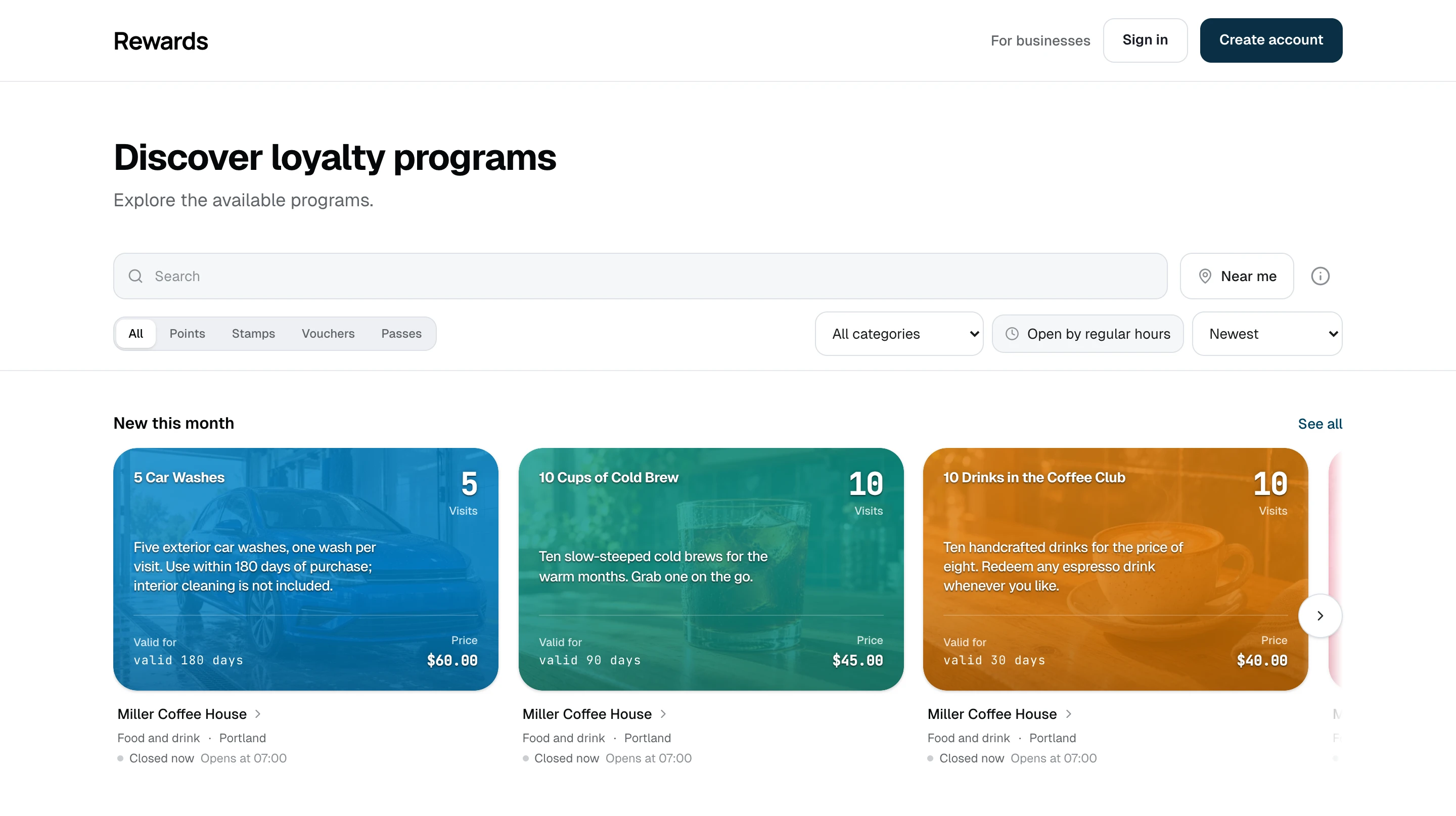
Desktop: Search, program types, location filters, and program cards on desktop.
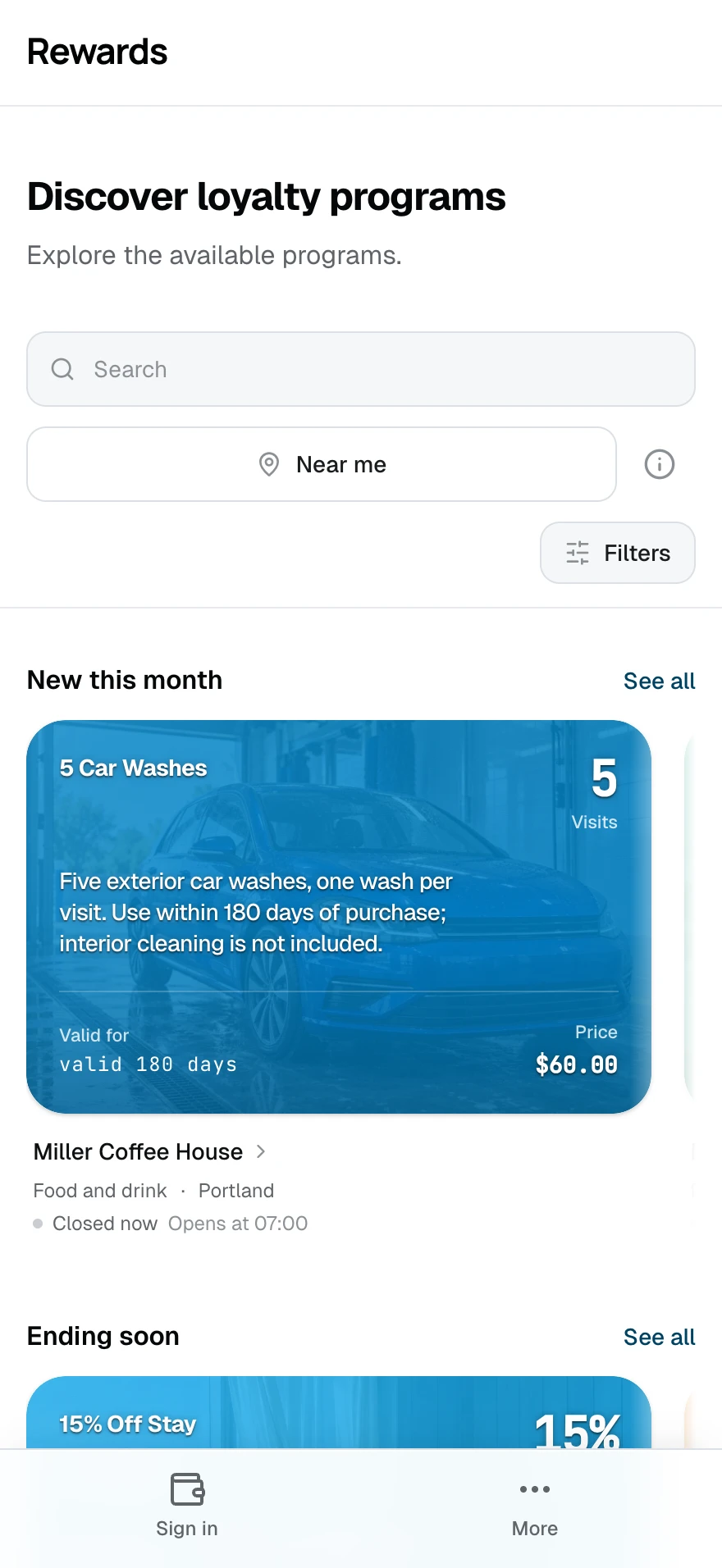
Mobile: The same directory with search and discovery controls adapted for a phone.
How this homepage works
Public listing turns the programs you approve into a searchable directory. Visitors can look for a business or offer, filter by program type, and sort the entire published catalogue.
Use it when discovery is part of what you sell. It can be the public face of a shopping district, mall, association, tourism campaign, local marketplace, or marketing program that brings several businesses together.
Smart wallet presents a smaller collection as a card-led experience. Showcase gives one brand an editorial landing page. Public listing serves visitors who arrive wanting to search.
Best use cases
- A marketer running a multi-business campaign: Make participating offers discoverable from one campaign destination.
- A shopping district or mall: Let visitors find programs by business name and offer type.
- A business association: Turn member benefits into a public reason to explore the network.
- A tourism or destination operator: Present current rewards and passes from participating venues.
- A local marketplace: Give approved businesses a place to publish their programs without sharing dashboard data.
- A large single brand: Help visitors search many locations, campaigns, or program types when a curated landing page is no longer enough.
The useful threshold is visitor intent, not a fixed number of businesses. If visitors browse a short collection for inspiration, Smart wallet may be clearer. If they search for a specific name, location, or program type, Public listing earns its place.
What visitors see
- A unified grid of published loyalty cards, stamp cards, vouchers, and prepaid passes, at most three columns wide on any screen
- One discovery bar that gathers the Spotlight search, the type tabs, the filters, the sort, and Near me into two calm rows within one sticky bar that stays put as the page scrolls
- Search with autocomplete: each suggestion carries a type glyph and its business and location
- Type tabs for All, Points, Stamps, Vouchers, and Passes
- A result count that stays out of the way on the full catalogue and appears only once a search, a filter, or Near me makes it meaningful
- Three catalogue-wide sorts:
- Newest: Programs with the latest creation date first
- Ending soon: Programs with the nearest end date first; programs without an end date follow
- Name: Programs in alphabetical order
- Pagination that loads more results as the visitor continues; the next and previous links also work without JavaScript
- Clear empty and no-results states
- For signed-in members: a quiet In your wallet mark on programs they already hold, and a New to you filter that hides them
- Under each program: the business name. When that business publishes its public page, its name is a quiet link straight to it
Search, filters, and sorting run on the server across the full published catalogue. The search box, type filter, sort, and every discovery filter live in the page address, so a copied link, a bookmark, or a printed QR code reproduces the same view. Location is the one exception: it never enters an address.
You can replace the listing title and supporting line per language under Settings → Homepage. Empty fields fall back to the installation's default language, then to the built-in text.
Discovery: cities, categories, hours, and near me
A separate installation switch, Enable discovery (Settings → Homepage, or FEATURE_LISTING_DISCOVERY=true), adds place context to the directory. It is off by default. With it off, the listing works as described above and asks nobody for a location.
With discovery on:
- Businesses get a place. Each partner can set a category (one fixed list for the whole installation) and a precise map point in Business settings → Location. A business with several locations can give one location its own address, category, map point, time zone, and weekly hours; its programs then carry that location's context. A business without a map point stays in the directory without distances.
- City and category filters appear once they can change the result: the city filter when programs span more than one city, and only categories that are in use. The city filter is always a searchable list you can type into, so it stays usable whether an installation has three cities or a hundred.
- Open by regular hours filters on each business's weekly schedule, evaluated in the business's own time zone. A bar that closes at 02:00 counts as open at 01:00. The filter reads the regular weekly schedule; it makes no claim about holidays. Businesses without saved hours remain in the directory but do not match this filter.
- Near me sorts the directory by straight-line distance after the visitor presses the button. Under 2 km the listing adds a walking estimate, labelled as a straight-line estimate, not a route. If the browser blocks the location, cannot find it, or times out, the listing shows a calm inline card explaining what happened and offering Try again or Choose a city — never a dead end.
- Discovery rows (a second switch, off by default) add New this month and Ending soon rows above the catalogue, at most six programs each, derived from the same rules as the sorts. See all opens the full catalogue with that row's matching sort or filter. Open near you appears only after the visitor uses Near me. The rows disappear as soon as the visitor searches or filters.
- Poster QR codes. The partner QR studio gains a Shared homepage target with its own visual preview. Partners can choose a city, category, program type, sort, Open by regular hours, or Added this month before downloading the code. The city picker is searchable, and opening the code never asks for a location.
- Business pages show a Locations section for extra locations and describe the business to search engines with its public address, map point, category, and weekly hours.
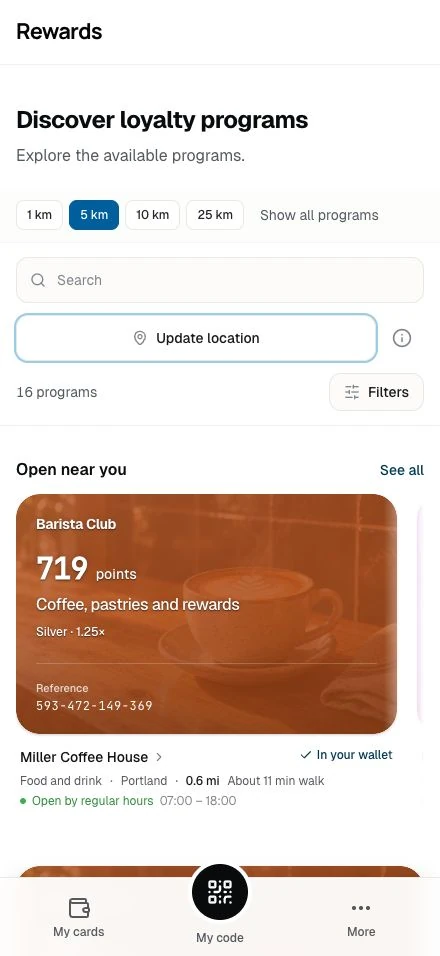
What Near me sends, and what it keeps
Select Near me to let the browser read your position once. The page rounds it to about 110 metres and sends it to your installation. While Near me is active, the page keeps the rounded position in memory and reuses it when you change filters or radius, or load more results. Update location reads a new position. Leaving Near me clears the page's position. Reward Loyalty does not save it in persistent storage, log it, add it to the page address, or send it to a map service. The info control beside the button explains the location use.
If the visitor declines, the page offers the city filter instead. If nothing is inside the chosen radius, the page offers the next radius that has results, for example "Nothing within 1 km. Show 4 within 5 km." Distances follow the Distance unit setting: automatic per language, metric, or imperial.
Public does not mean automatic
Public listing uses the same homepage visibility controls as Smart wallet and Showcase:
- The partner's plan or admin override permits homepage publishing.
- The partner marks an individual program Visible on homepage.
- The partner and its network remain active.
A program that cannot appear in Smart wallet cannot appear in Public listing either. Changing the layout adds search and directory presentation; it does not weaken partner isolation or bypass publication approval.
When Public listing is active, a partner who self-registers receives homepage-publishing eligibility. That partner can then choose which individual programs to publish.
- Existing partners are not changed when you switch layouts.
- An administrator can grant or revoke eligibility under Partner permissions.
- Switching away from Public listing does not rewrite partner or program settings.
Public listing or Smart wallet?
Both show the approved program set, but they serve different visits.
| Public listing | Smart wallet | |
|---|---|---|
| Visitor's goal | Find a business, offer, or program | Understand and browse a curated wallet |
| Presentation | Dense unified directory | Focused hero and grouped shelves |
| Controls | Search, filters, sort, pagination | Category shortcuts |
| Strongest fit | Public campaign or network | Single business or selected network |
| Content strategy | Broad enough to search | Curated and presented |
Neither mode auto-lists every business. Public listing is broader because you choose to publish more, not because the app ignores the permission stack.
Why curation still matters
A directory with a few weak entries can make a new network look unfinished. Automatic publication can also place brands together that never agreed to the association. Public listing avoids both problems:
| Automatic directory | Public listing |
|---|---|
| Every business appears on signup | Eligible partners choose programs to publish |
| The launch list exposes the cold start | You can prepare the catalogue before promoting it |
| Brand associations are uncontrolled | You decide which partners may participate |
| Search is forced over whatever exists | Search works over the catalogue you built |
The shared wallet keeps partner dashboards and data isolated. The directory reveals the public program information you chose to expose.
Configure Public listing
Open Settings → Homepage, select Public listing, and save. The Homepage layouts guide owns the dashboard and .env settings.
Before launch:
- Decide which partners belong in the directory.
- Grant homepage-publishing permission where needed.
- Ask each partner to review the programs marked Visible on homepage.
- Test search using both program and business names.
- Check the empty, no-results, and mobile states.
Related
- Homepage layouts: Compare and configure all four modes
- Smart wallet homepage: Present a smaller collection as a wallet
- Showcase homepage: Lead with one brand and its campaigns
- Portal homepage: Keep the homepage focused on access
- The shared wallet concept: Public discovery with private partner data
- Partner permissions: Grant or revoke homepage publishing