Member experience.
What members see, the wallet summary, the achievements page, the celebration, and the notifications.
Members never set anything up. Once a business turns achievements on, progress appears in the member's own wallet and grows on its own as they keep coming back.
The wallet summary
Below the cards, My Cards shows a compact achievements summary for the business where the member was last active. A small progress ring mirrors the stated progress toward the next milestone; the business name appears when the site has multiple active businesses. It leads with the most useful line: the next milestone within reach ("Next: 10 loyalty days") or, when nothing needs attention, the latest one earned ("Latest: First step"). View achievements opens the full page. Members without any achievement activity see no summary row; the wallet stays clean.
The achievements page
The full page lives behind View achievements and in the wallet's More menu, under Achievements. It shows one business at a time. A member active at several participating businesses gets a Choose a business selector; the page defaults to the business with the most recent loyalty activity.
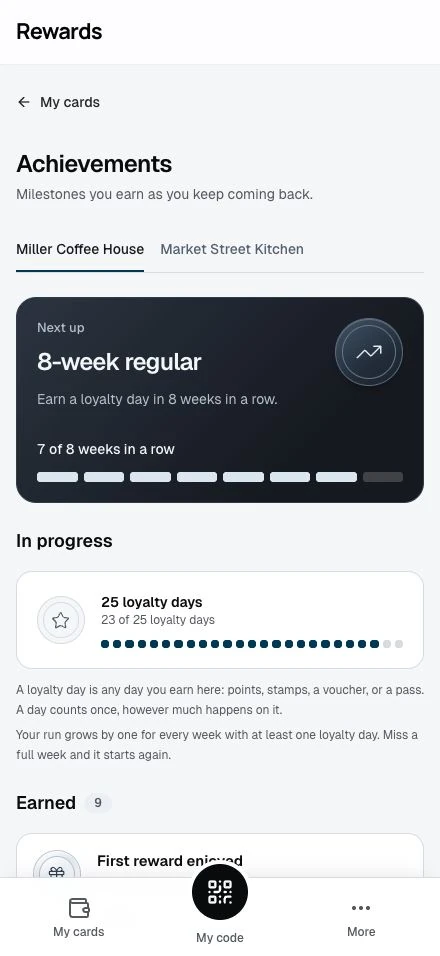
For the selected business the page shows:
- Next up: the nearest milestone, with honest progress such as "3 of 5 loyalty days" or "2 of 4 weeks in a row", and the attached reward when one is still available.
- In progress: the other milestones the member has started, each with its own segmented progress meter.
- Earned: the collection, newest first, with a silver emblem, earned date, and any delivered reward. A delivered reward links to the real thing in the wallet: the voucher, the pass, or the points and stamps entry.
- More milestones: what else the business offers, so the road ahead is visible.
The next milestone has its own dark card. Segments show progress alongside exact counts; larger goals group the segments to keep the meter readable. Details opens the requirements and evidence for an earned achievement. On larger screens, earned cards have matching heights; opening Details expands that row without cutting off its content.
Plain explainers cover the two ideas members ask about: a loyalty day counts once per date however much happens on it, and a weekly run grows by one for every week with at least one loyalty day. During an active run the page shows a gentle reminder: "Earn with us this week to keep your run."
Reward promises appear before earning, exactly as configured: the reward, who offers it, its validity, and its availability, including "First 100 members" when the business set a cap. A reward that is no longer available (cap reached or window ended) stops being shown on un-earned milestones; the milestone itself stays.
The celebration
When an action at the counter earns one or more achievements, the member's open wallet plays one brief celebration in the business's brand color, led by the highest milestone of that moment. One action produces one celebration, even when several achievements land together. Refreshing the page or receiving history from the history import never replays it. Members using reduced-motion settings get a calm fade instead, and changes are announced for screen readers.
Notifications and email
Each earning moment records one in-app notification naming the business, the lead achievement, how many more landed with it, and the honest reward state: "Reward delivered" once it is in the wallet, "Reward on its way" while it is being added, or a calm "Reward couldn't be added" when a delivery cannot complete. The achievement itself stays earned in every case.
Email follows the member's own email preferences: achievement email counts as a loyalty update, so members who turned Loyalty updates off get no achievement email while everything in the wallet keeps working. History imports never send email or notifications.
What members never see
- Another business's data. Progress, achievements, and rewards are counted per business; no business sees a member's activity elsewhere, and members see each business's program on its own.
- Another member's progress. There is no leaderboard, ranking, or public profile.
- Delivery mechanics. While a reward is still being added, the member sees "Reward on its way". If it cannot be added, the member sees a calm "Reward couldn't be added", never an error code or a retry button; the business is alerted to fix it, and those details stay in the business dashboard. The achievement stays earned throughout.
- Withdrawn recognition. In the rare case an operator voids an achievement, it disappears from the member's collection without a trace.
Related topics
- Achievements overview: What achievements are and the milestone catalog
- Rewards and limits: How reward promises and delivery work
- Member email preferences: The loyalty-updates switch achievement email follows