Sharing vouchers with friends.
Share voucher codes via social media, messaging apps, or direct links.
Found a great voucher? Share it with friends so they can save too. Vouchers can be shared through social media, messaging apps, email, or a direct link.
How to share a voucher
- Open the voucher detail page
- Click the Share button
- Choose your sharing method
- Your friend receives the voucher link
Sharing options
The share button offers WhatsApp, Telegram, X, Facebook, Email, and Copy link.
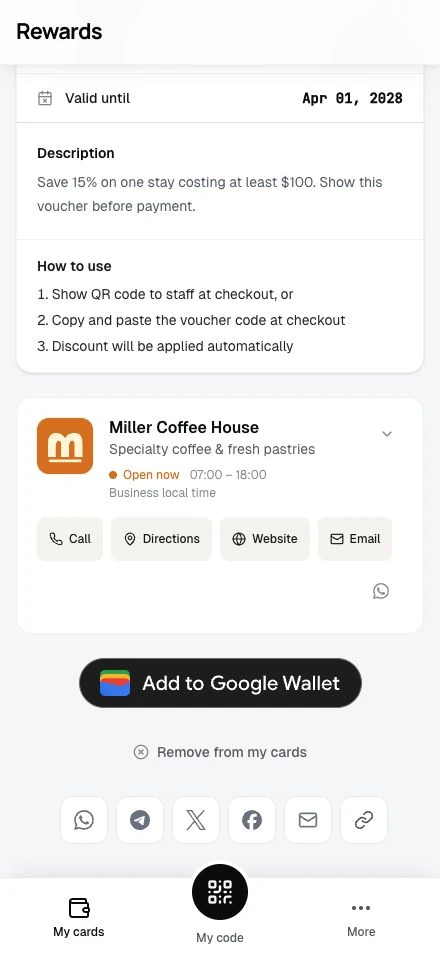
Click the WhatsApp icon to open the app with a pre-filled message:
"Check out this voucher: 20% Off Summer Sale! [LINK]"
Select a contact or group and send.
Telegram
Click the Telegram icon to open the app with the voucher title and link ready to send. Pick a chat or channel and post.
X
Click the X icon to compose a post. The post includes the voucher details and link. Add your thoughts and post.
Click the Facebook icon to open the share dialog. The voucher link appears in the preview. Add your own comment if you want.
Click the Email icon to open your email client with:
- Subject: Pre-filled with voucher title
- Body: Voucher link
Add your friend's email address and send.
Copy link
Click the link icon to get the direct URL:
- Link copied to clipboard
- Paste anywhere: text messages, notes, other apps
- Anyone with the link can view the voucher
What friends see
When someone clicks your shared link:
- They arrive at the voucher detail page
- They see the full discount and requirements
- They can copy the code or generate a QR code
- If not signed in, they'll be prompted to sign in
Friends need their own account to redeem. Sharing only shows them the offer.
Sharing tips
Share the right vouchers
Not all vouchers are good for sharing:
| Good to Share | Maybe Not |
|---|---|
| General discounts (20% off) | First-voucher-use-only offers |
| Fixed amounts ($10 off) | New members only |
| Limited-time sales | Tier-exclusive vouchers |
| Free product promotions | Personalized codes |
First-voucher-use vouchers check prior successful redemptions in the offer's club. New-member vouchers check when your friend created their account on this installation.
Add personal context
When sharing, add why you think they'd like it:
"I know you love their coffee. This gets you 20% off!"
A personal recommendation carries more weight than a forwarded link.
Share early for time-limited offers
If a voucher expires soon or has limited uses, share it soon so friends have time to use it.
Respect privacy
Don't spam friends with vouchers. Share offers you think they'll appreciate.
The voucher code vs. the link
When you share:
The Link: Takes friends to the voucher page where they can see details, copy the code, and get the QR code.
The Code Itself: If you tell someone "Use code SUMMER20," they need to know where to use it. The link provides all context.
For most sharing, the link is better. For quick in-person mentions, the code works fine.
Can friends always use shared vouchers?
Not necessarily. Vouchers may have restrictions:
| Restriction | Friend Can Use? |
|---|---|
| Public voucher | ✓ Yes |
| Tier-restricted | Only if they're in that tier |
| New members only | Only if they joined recently |
| First voucher use only | Only if they haven't redeemed a voucher there before |
| Single-use (by you) | ✓ Yes (their own single use) |
| Exhausted (total limit) | ✗ No, voucher is used up |
When sharing, consider mentioning any requirements so friends know if they qualify.
Social media best practices
Make it personal
Instead of:
"Voucher: SUMMER20"
Try:
"Saved $15 on my order with SUMMER20! Ends this weekend 🏃"
Include key details
- What's the discount?
- Any minimum purchase?
- When does it expire?
Tag the business (optional)
Some businesses appreciate being tagged when you share their offers. It helps spread the word.
Tracking your shares
You can't track how many friends used a voucher you shared. The business sees total redemptions but not the share source.
Related topics
- Finding and Saving Vouchers: Discover and save offers
- Common Voucher Issues: Help for problems
- Members Overview: Your full account features