Partners overview.
Introduction to the partner dashboard: run loyalty programs, manage staff and clubs, read your members, and track performance.
As a partner (business owner), you run loyalty programs for your business. Access your dashboard at /partner using your email and verification code.
What is a partner?
Partners are business owners who use the platform to create and manage customer loyalty programs. Whether you run a coffee shop, restaurant, retail store, or service business, the partner dashboard gives you everything you need.
Your dashboard restricts private business data to your partner account. Published business pages and programs remain visible to visitors. This is the Shared Wallet architecture that enables agencies to serve multiple clients from one installation.
What you can do
The partner dashboard lets you:
| Feature | Description |
|---|---|
| Create loyalty cards | Design branded cards with your earning rules |
| Create stamp cards | Set up punch card programs |
| Create vouchers | Set up promotional discount codes and batch campaigns |
| Create prepaid passes | Create visit packs, memberships, and fixed monetary credit your staff sell at the counter |
| Configure referrals | Enable members to invite friends for bonus points |
| Send email campaigns | Target members with promotional emails |
| View plan & billing | See your current plan, features, usage, and billing links |
| Apple Wallet (optional) | Offer branded passes for eligible programs when your plan and installation include it. See Apple Wallet passes |
| Integrations (optional) | Connect Shopify, WooCommerce, and Google Wallet when your installation enables them. See Integrations |
| Define rewards | Set what customers can earn |
| Manage staff | Add employees who can award points |
| Create clubs | Organize by location or department |
| View analytics | Track your program's performance |
| See customers | View who's collecting your cards |
Learn more about Vouchers & discount codes and Email campaigns.
Navigation
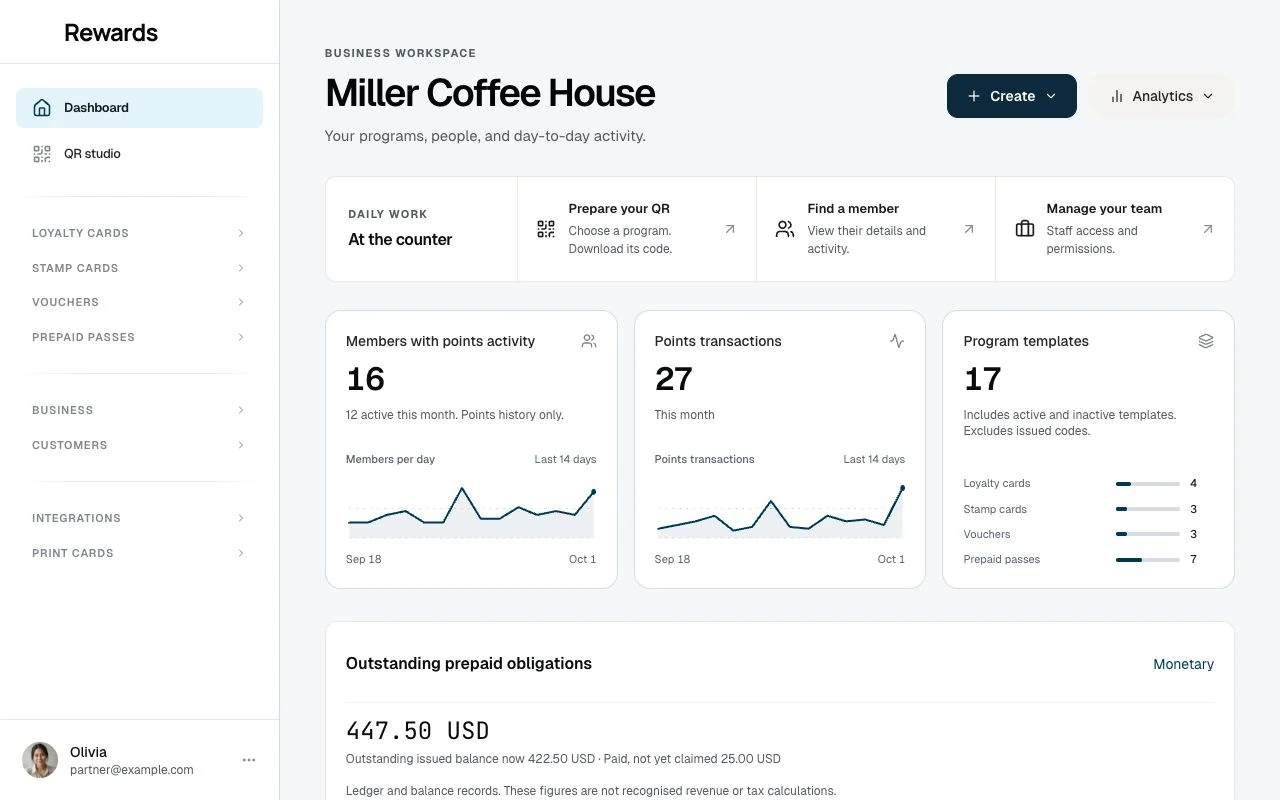
The sidebar groups everyday work by program, business, and customer. Entries depend on the installation settings and your account permissions.
Dashboard and QR studio sit at the top.
| Group | Entries |
|---|---|
| Loyalty cards | Loyalty cards, Rewards, Tiers, Member referrals, Analytics, Transaction history |
| Stamp cards | Stamp cards, Analytics, Transaction history |
| Vouchers | Vouchers, Batches, Analytics, Voucher transactions |
| Prepaid passes | Prepaid passes, Analytics, Transaction history, Monetary settings |
| Business | Business settings, My plan, Clubs, Staff, Activity log analytics, Activity logs |
| Customers | Members, Member segments, Achievements, Email campaigns |
| Integrations | Available store connections, Integration API keys, Automation templates, Webhooks |
| Print cards | Card studio, Card batches |
Apple Wallet appears separately when your account is entitled and the installation is ready to sign passes.
The profile menu opens Account settings, Invite businesses when enabled, and Help & support. It also holds the current language when several languages are enabled, a light/dark mode switch, and Logout. On mobile, use the account button in the top bar.
Account settings keeps Personal details, Security and Language and time zone in one form. Its currency preference does not convert existing monetary pass credit or change currencies recorded at sale.
Business settings and My plan are under Business in the main navigation. Customer audiences and campaigns are under Customers.
Accessing the dashboard
- Go to
/partneron the platform - Enter your email address
- Select Continue
- Select Send me a login code and enter the code from your email
- Continue to the partner dashboard
If your account has a password, the same page also offers password sign-in.
See OTP management for detailed login instructions.
Key concepts for partners
Clubs
Clubs organize your staff by location or department. If you have multiple stores, create a club for each. Staff members can only interact with cards belonging to their club.
Single location: You still need one club. It's how the system connects staff to cards.
See Understanding clubs for details.
Loyalty cards
Each loyalty card represents one points-based rewards program. A card includes:
- Rules: How customers earn points
- Design: Colors, logo, branding
- Rewards: What customers redeem points for
- Visibility: Public or QR-only access
See Loyalty cards for details.
Stamp cards
Stamp cards are punch card programs where customers collect stamps toward a reward. They include:
- Stamp requirements: How many stamps to earn a reward
- Design: Visual appearance
- Rewards: What customers get upon completion
See Stamp cards for details.
Prepaid passes
Prepaid passes are products your staff sell at the counter: a 10-wash card, a 5-class pack, a monthly unlimited. You design the product (visits, validity, price, card design), staff sell and scan it, and the platform counts visits down and handles expiry. Payment stays at your till; the platform records the price without charging anyone.
See Prepaid passes for details.
Rewards
Rewards are what customers save for. Define the points required and what they receive.
Examples:
- Free coffee at 100 points
- 20% discount at 500 points
- Free product at 1,000 points
Staff members
Staff are your employees who interact with customers. They use their phones to:
- Scan customer QR codes
- Award points for purchases
- Add stamps for qualifying purchases
- Process reward redemptions
Customers (members)
Members are customers who hold one of your cards or have transacted with you. Your list separates active customers from those who added a card but have not used it yet. See Your members.
Getting started
- Check your club: Start with the Main club created for your business; add clubs when you need separate staff access
- Create a loyalty card: Design your program
- Define rewards: Set what customers can earn
- Add staff: Enable your team to award points
Analytics
The dashboard shows Members with points activity, Points transactions for this month, and Program templates, with short trends and an activity panel. These counts are separate from the full customer list.
Open Analytics inside a program group for views, earning, redemption, pass use, or monetary balances. Each report labels its period and totals. Monetary obligations appear separately from loyalty activity.
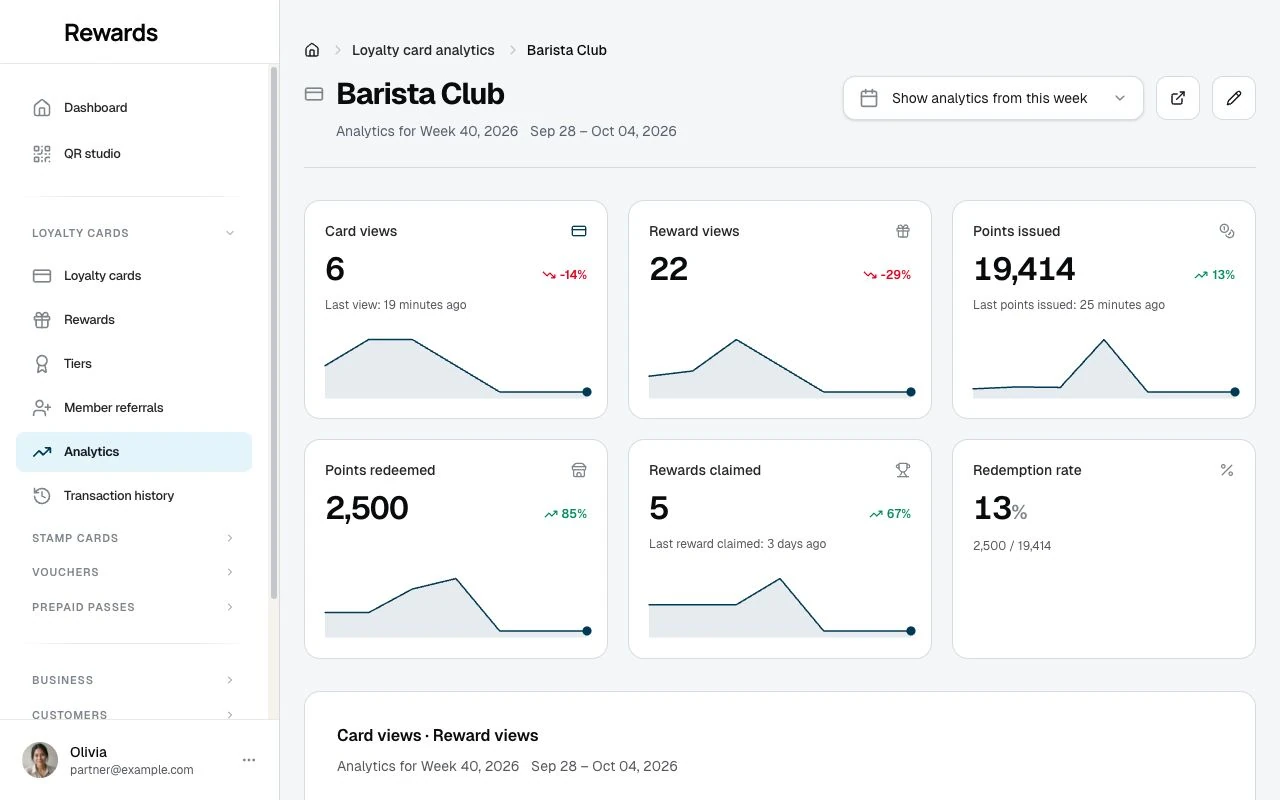
Use these insights to improve your loyalty program.
Related topics
- Partner registration: Creating a partner account
- Business settings: Configure your business profile details
- Billing & My Plan: View your plan, features, and billing
- Understanding clubs: Organizing by location
- Creating loyalty cards: Setting up cards
- Setting up referrals: Enable member-to-member referrals
- Email campaigns: Send targeted emails to members
- Your members: read and filter your member list