Vouchers overview.
Introduction to digital vouchers, batch campaigns, and QR code claiming for scalable promotions.
Vouchers turn your marketing campaigns into trackable, digital promotions. Create individual discount codes or generate thousands of unique vouchers for large-scale campaigns. Members add vouchers to My Cards, claim exclusive offers via QR codes, and redeem them at your physical locations.
💡 Feedback welcome: We're gathering feedback to refine the voucher experience. Tell us what would help your campaigns.
What are vouchers?
Vouchers are digital discount codes that provide instant value: percentage discounts, fixed dollar amounts, free products, or bonus loyalty points. They're the modern replacement for paper coupons, with sophisticated tracking, targeting, and analytics built in.
Common examples:
- SUMMER20: 20% off your order
- SAVE10: $10 off orders over $50
- FREECOFFEE: Free medium coffee with any purchase
Two ways to create vouchers
Manual vouchers
Create individual vouchers with full customization. Perfect for:
- Ongoing promotions ("WELCOME15" for new customers)
- VIP-exclusive offers
- Targeted discounts for specific members
Manual vouchers can be made publicly visible so members discover and add them to My Cards.
Batch generation
Generate hundreds or thousands of unique voucher codes from a template. Perfect for:
- Email marketing campaigns
- In-store QR code promotions
- Social media giveaways
- Event handouts
Each batch voucher has a unique code. Members claim them by scanning a QR code, one voucher per member.
How members get vouchers
Save public vouchers
Members browse publicly visible vouchers and add them to My Cards with a single tap. The voucher appears in My Cards ready to use anytime before expiration.
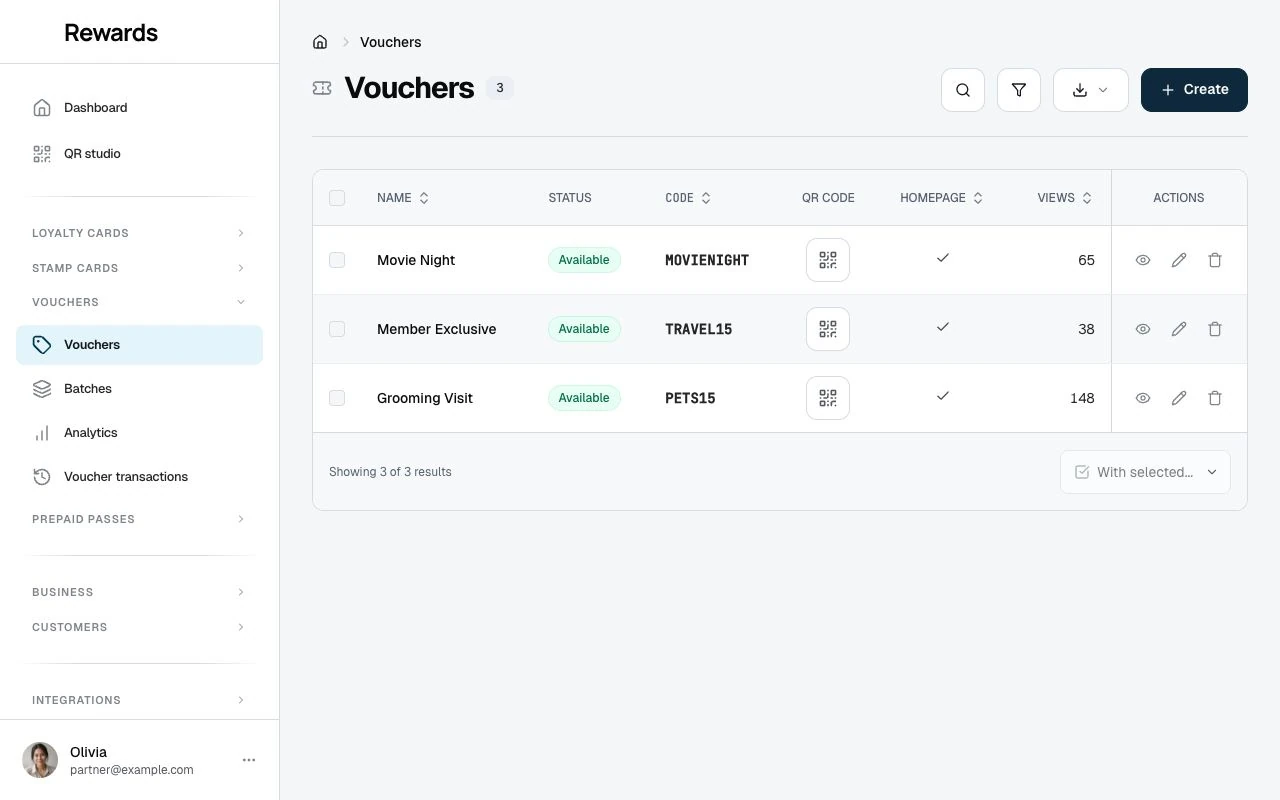
Homepage visibility is one distribution choice. With it on, the voucher appears in public browsing and on the homepage for anyone to discover. With it off, the voucher is unlisted, and members reach it through its QR code or a direct link you share. QR codes and direct links work either way, and the voucher behaves the same once a member opens it.
Claim via QR code
For batch campaigns, you share a QR code (printed in-store, on flyers, or posted online). Members scan the QR code to claim their unique voucher from the batch. Once claimed:
- The voucher appears in their "My Cards"
- They receive a confirmation email
- They can redeem it at checkout
Personal vouchers from automations
The birthday reward and win-back reward issue personal, single-use vouchers automatically. These appear in the member's My Cards without needing to add or claim, and only the intended member can use them.
How redemption works
When a member is ready to use their voucher:
- Member opens voucher in My Cards
- Shows QR code to staff at checkout
- Staff scans the voucher QR code
- System validates eligibility, expiry, and limits
- Discount applied to the purchase
- Redemption recorded with full audit trail
Discount types
Choose from four voucher types:
| Type | Example | Best For |
|---|---|---|
| Percentage Off | 20% off (up to $50 max) | General promotions |
| Fixed Amount | $10 off orders over $25 | Minimum purchase incentives |
| Free Product | Free medium coffee | Product trials, add-ons |
| Bonus Points | 500 points on your loyalty card | Loyalty engagement |
See Understanding Discount Types for detailed guidance.
Targeting & rules
Control who can use vouchers and how:
- Membership Tiers: Only Gold and Platinum members
- New members: Customers who created their account on this installation within a set number of days
- First voucher use: Requires no prior successful voucher redemption in the voucher's club
- Minimum Purchase: Order must reach threshold
- Usage Limits: Per-member or total cap
- Validity Period: Start and end dates
- Homepage Visibility: When on, the voucher appears in public browsing and on the homepage for anyone to discover. When off, it is unlisted, reached through its QR code or a direct link you share. QR codes and direct links work either way.
Once a voucher is in a member's My Cards, it stays usable: it remains redeemable until the voucher expires, you deactivate it, it is fully used up, or another rule on the voucher blocks it.
See Advanced Targeting & Eligibility for strategies.
Visual customization
Make vouchers match your brand:
- Background Colors: Primary color with opacity control
- Background Images: Custom graphics (800×600px recommended)
- Text Colors: Ensure readable contrast
- Logos: Your brand logo (square, up to 800×800px)
Voucher cards display across devices with consistent 4:3 aspect ratio.
Apple Wallet
An eligible business can offer a voucher as a signed Apple Wallet pass from the Apple Wallet page in the partner dashboard. The pass carries the business design, a staff QR, and a link to current voucher details; Reward Loyalty checks the live voucher state when staff scan it. Batch-generated voucher copies do not appear in the partner selector. See Business controls and pass design.
Analytics
Track voucher performance in Vouchers → Analytics:
| Metric | What It Measures |
|---|---|
| Views | How many times customers viewed the voucher |
| Times Used | Total successful redemptions in-store |
| Total Discount Given | Total monetary value of all discounts |
| Unique Members | How many different customers redeemed |
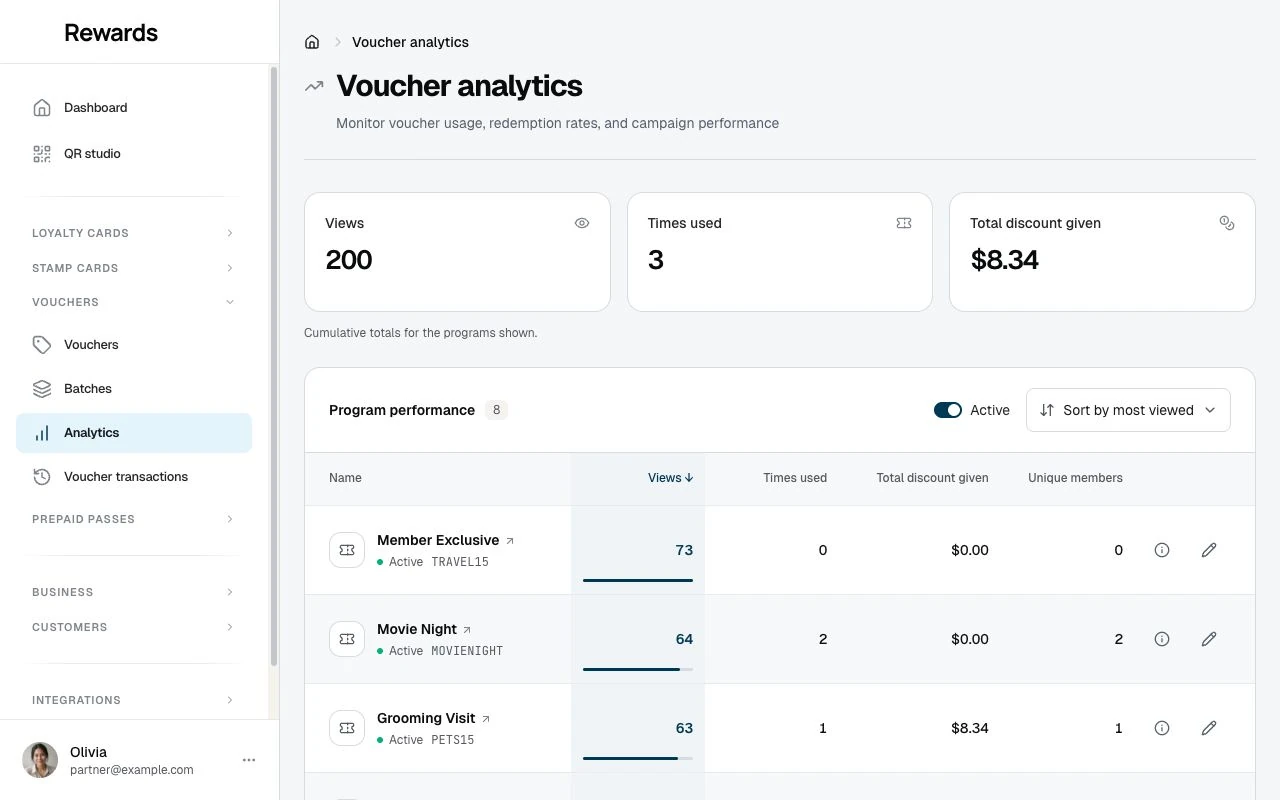
Batch campaigns report separately on the batches dashboard, which tracks claims and the redemption rate (claimed vs. redeemed) per batch. Compare time periods to identify trends and optimize campaigns.
Getting started
For Business Owners:
- Creating Vouchers: Individual voucher setup
- Batch Generation: Generate hundreds of codes
- Managing Batches: Pause, resume, track campaigns
- Discount Types: Choose the right discount
- Advanced Targeting: Reach the right customers
- Visual Customization: Brand your vouchers
- Voucher Analytics: Measure success
For Staff:
- Validating Vouchers: Process redemptions at checkout
For Customers:
- Finding and Saving Vouchers: Discover offers and add them to My Cards
- Claiming via QR Code: Claim exclusive batch vouchers
- Redeeming In-Store: Use your vouchers at checkout
Which plans include it
Vouchers are a plan feature with a per-tier voucher limit. Switch them per tier under Settings → Set up plans in the Plans editor, or grant them to a single business on the partner's Permissions tab. A partner without the feature sees no Vouchers menu and no creation screens, while a partner who already holds it keeps it until you change their plan or their permission. Once no active plan offers vouchers and no partner holds a grant, the My plan comparison stops mentioning them. Vouchers members already saved stay in their wallets and still redeem at the counter.
Related topics
- Loyalty cards: Points-based programs (long-term engagement)
- Stamp cards: Punch card programs (quick wins)
- Understanding Clubs: Organize staff and campaigns