Advanced targeting & eligibility rules.
Target member tiers, new members, and first voucher use, set minimum purchases and usage limits.
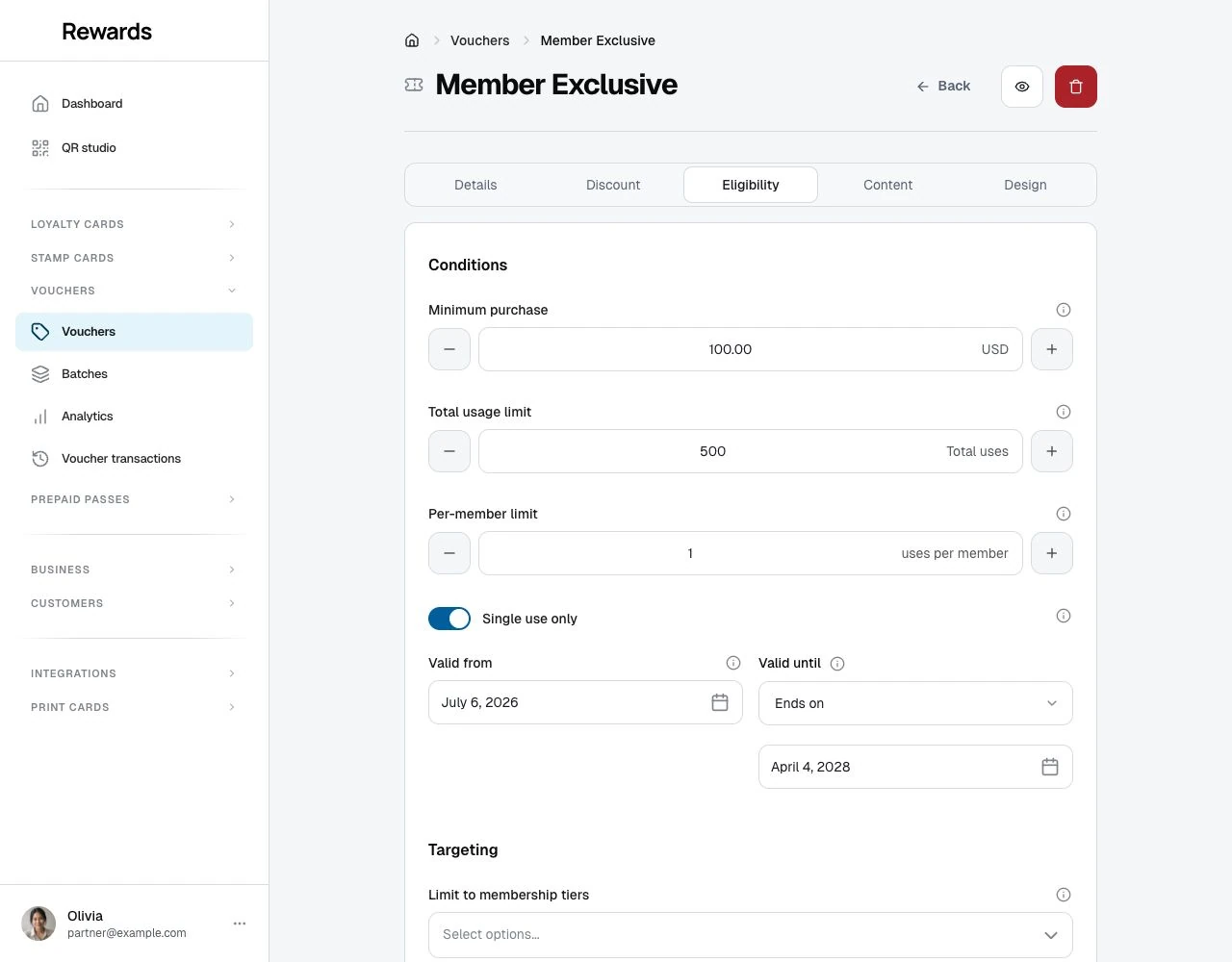
Open Eligibility in the voucher editor to set who can use the voucher and under which rules. Conditions contains purchase, date and usage limits. Targeting contains tier, first-use and new-member rules.
Why targeting matters
Without targeting, any customer can use any voucher. That's fine for broad promotions, but often you want to:
- Reward loyalty: Give exclusive discounts to VIP members
- Acquire new customers: Offer welcome discounts to first-timers
- Increase basket size: Require minimum purchases
- Control costs: Limit total redemptions
- Create urgency: Set expiration dates
Membership tier targeting
Restrict vouchers to specific membership tiers.
How it works
Select one or more tiers from your loyalty program. The voucher is then delivered automatically to the wallet ("My Cards") of every eligible member, and each one receives an email, they never have to go looking for it. The current tier controls who receives the voucher: only members who hold one of those tiers have it delivered and can add it. Once a member has received it, the voucher is theirs to redeem and stays redeemable even if their tier later changes. What stops redemption from then on is the voucher's own rules (expiry, deactivation, or running out of uses), not the tier. Leave it empty to keep the voucher open to everyone. Tiers belong to a club, so the list offers your own tiers, labelled by club.
Example:
- Voucher: GOLDONLY (25% off)
- Target Tiers: Gold, Platinum
- Every Gold and Platinum member finds it waiting in My Cards; Bronze and Silver members never see it
Tier-targeted vouchers are always private. The moment a member holds, or later reaches, an eligible tier, the voucher is added to their My Cards automatically and they receive an email, so they never have to go looking for it. The voucher never appears on the homepage or in public browsing, and members outside the tier never see it. The Homepage visibility toggle does not apply to tier-targeted vouchers; delivery is private either way.
For ordinary, non-tier vouchers, homepage visibility and QR codes or direct links are two separate distribution choices, and they work independently. When homepage visibility is on, the voucher appears on the homepage and in public browsing for anyone to discover. When it is off, the voucher is unlisted. Members reach it through its QR code or a direct link you share. A voucher works the same once opened either way, so QR codes and direct links keep working even when homepage visibility is off.
Tier targeting controls who receives a voucher, not whether a received voucher stays usable. Once a member receives a tier voucher, it is theirs to keep and redeem. A member who later leaves the tier still holds the voucher and can still redeem it. It never disappears without notice.
Use cases
| Tier Strategy | Purpose |
|---|---|
| Platinum only | Exclusive VIP rewards |
| Gold + Platinum | Reward top-tier customers |
| Silver only | Incentivize upgrading to Gold |
| Bronze only | Welcome new loyalty members |
Error message
When an ineligible customer tries to redeem:
"This voucher is only available for specific membership tiers."
Best practices
- Don't exclude too many: Overly restrictive vouchers frustrate customers
- Communicate exclusivity: Make it feel special, not gatekeeping
- Balance with general offers: Have some vouchers for everyone
New members only
Target customers who recently created an account on this installation.
How it works
Enable "New Members Only" and specify how many days counts as "new."
Example:
- New Members Only: ✓
- Definition: 30 days
- Only members who joined within the last 30 days can redeem
Use cases
- Welcome offers: Thank new members for joining
- Early engagement: Encourage first purchases
- Onboarding campaigns: Drive immediate activity
Configuration
New Members Only (checkbox) Enable this targeting rule.
New Members Definition (number) How many days after account creation a member is still considered "new". Joining another business does not restart this period.
| Days | Strategy |
|---|---|
| 7 | Earliest engagement |
| 14 | Welcome window |
| 30 | Standard onboarding period |
| 60 | Extended new member period |
Error message
When a non-new customer tries to redeem:
"This voucher is only available for members who joined within the last 30 days."
First voucher use only
Target members using a voucher in this club for the first time.
How it works
Enable "First voucher use only." A member who has a previous successful, non-voided voucher redemption in this voucher's club cannot use this one. Regular purchases do not count. The check covers the voucher's club, not every club in the business. A loyal customer who has bought from you many times but never used a voucher still qualifies.
Example:
- Voucher: FIRST15 (15% off)
- First voucher use only: ✓
- A member with a prior successful voucher redemption in this club is ineligible; a member who has only made ordinary purchases still qualifies
Difference from new members
| Condition | First voucher use only | New Members Only |
|---|---|---|
| Joined 2 days ago, never used a voucher | ✓ Eligible | ✓ Eligible |
| Joined 2 days ago, redeemed a voucher once | ✗ Ineligible | ✓ Eligible |
| Long-time customer, many purchases, no voucher ever | ✓ Eligible | ✗ Ineligible |
First voucher use checks non-voided voucher-redemption history in the voucher's club. New members checks when the member created their account on this installation, not when they joined your business.
Use cases
- Encourage the first redemption: turn a customer who never uses vouchers into one who does
- Welcome offers for voucher newcomers: "15% off the first time you use a voucher"
- Re-engagement: give long-time customers a reason to try a voucher
Error message
When a returning customer tries to redeem:
"This voucher is only for members who have not redeemed a voucher at this business before."
Minimum purchase requirements
Require orders to reach a certain value before the voucher applies.
How it works
Set a minimum purchase amount. Orders below this amount cannot use the voucher.
Example:
- Voucher: SPEND50 ($10 off)
- Minimum Purchase: $50.00
- A $40 order cannot apply this voucher
Why use minimums
- Increase basket size: Customers add items to reach minimum
- Protect margins: Ensure discount doesn't exceed profit
- Match discount to value: $10 off makes sense on $50+, not on $15
Strategic minimums
| Discount | Suggested Minimum |
|---|---|
| $5 off | $25+ |
| $10 off | $50+ |
| $20 off | $75+ |
| 20% off | $30+ |
Error message
When order is below minimum:
"Minimum purchase of $50.00 required."
Best practices
- Set minimums a little above average: If average order is $35, set minimum at $40-50
- Communicate clearly: "Save $10 on orders over $50"
- Don't be extreme: $100 minimum for $5 off feels unreasonable
Personal vouchers come from automations
There is no form for targeting a voucher at one specific member. Instead, the birthday reward and win-back reward issue personal vouchers for you.
How it works
You pick one of your club's vouchers as the template. When a member's birthday arrives, or when a regular has been away for the number of days you chose, that member receives their own single-use copy: a fresh code, visible only to them, delivered to their wallet and by email.
Example:
- Template voucher: BIRTHDAY10 (10% off)
- On Sarah's birthday, she receives her own single-use copy with a unique code
- Only Sarah can redeem that copy
Use cases
- Birthday rewards: Personalized birthday gifts, issued on the member's day
- Win-back campaigns: Re-engage lapsed customers automatically
Error message
When anyone else opens a personal voucher:
"This voucher is not available to you."
Usage limits
Control how many times a voucher can be used.
Total usage limit
Maximum redemptions across all customers.
Example:
- Total Limit: 100
- After 100 redemptions, voucher is exhausted
Use for:
- "First 100 customers"
- Limited promotions
- Budget-controlled campaigns
Per-member usage limit
Maximum redemptions per individual customer.
Example:
- Per-Member Limit: 3
- Each customer can use the voucher up to 3 times
Use for:
- Repeat-use promotions
- Preventing abuse while allowing multiple uses
Single use only
Each customer can use the voucher once.
Equivalent to Per-Member Limit: 1, but more explicit.
Use for:
- Welcome offers
- One-time promotions
- Exclusive discounts
Exhausted error
When total limit is reached:
"This voucher has reached its usage limit."
Member limit error
When per-member limit is reached:
"You have already used this voucher the maximum number of times."
Validity period
Control when vouchers can be used.
Valid from
Date and time when the voucher becomes active. Before this date, customers cannot redeem.
Use for:
- Scheduled promotions
- "Starting Monday" campaigns
- Coordinated marketing launches
Valid until
Choose No end date for an open-ended voucher, or Ends on to set its end date and time. After the configured end, redemptions are blocked.
Use for:
- Limited-time offers
- Seasonal promotions
- Creating urgency
Examples
| Campaign | Valid From | Valid Until |
|---|---|---|
| Summer Sale | June 1, 00:00 | August 31, 23:59 |
| Weekend Flash | Friday, 00:00 | Sunday, 23:59 |
| Holiday Promo | December 20 | December 26 |
| Always Active | (empty) | (empty) |
Error messages
Before valid from date:
"This voucher is not yet valid. It becomes active on June 1, 2025."
After valid until date:
"This voucher expired on August 31, 2025."
Combining eligibility rules
Multiple rules can work together. The customer must meet ALL criteria.
Example: VIP Welcome Offer
Code: VIPWELCOME
Discount: 30% off
Target Tiers: Gold, Platinum
First voucher use only: ✓
Minimum Purchase: $50
Customer must be:
- Gold or Platinum tier ✓
- Has never redeemed a voucher here before ✓
- Spending at least $50 ✓
All three conditions must be met.
Example: Limited Holiday Promo
Code: HOLIDAY25
Discount: 25% off
Valid From: December 20
Valid Until: December 26
Total Usage Limit: 200
Per-Member Limit: 1
Minimum Purchase: $40
Customer must:
- Order between Dec 20-26 ✓
- Spend at least $40 ✓
- Not have used this code before ✓
- Total limit not yet reached ✓
Targeting strategy guide
| Goal | Recommended Targeting |
|---|---|
| Encourage a first voucher redemption | First voucher use only |
| Welcome new members | New Members Only (14-30 days) |
| Reward VIPs | Tier targeting (Gold+) |
| Increase basket size | Minimum purchase |
| Create urgency | Validity period + Total limit |
| Personalized reward | Birthday and win-back automations |
| Controlled budget | Total usage limit |
| Prevent abuse | Per-member limit |
Next steps
- Creating Vouchers: Apply these rules
- Understanding Discount Types: Pair with right discounts
- Voucher Analytics: Measure targeting effectiveness