Skip to content

Activity logs overview.

Complete audit trail and monitoring for all platform activity

Jul 22, 2026

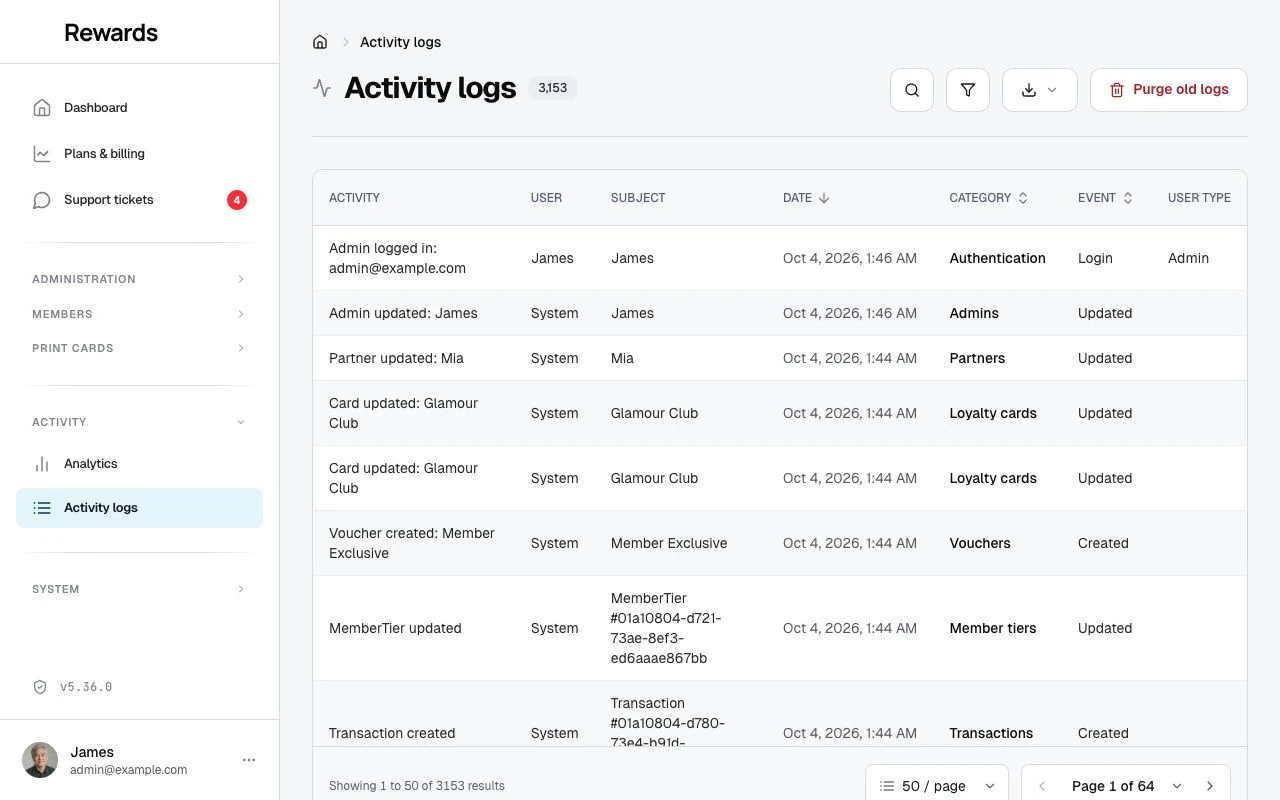
Activity logs provide a complete audit trail of everything that happens on the platform. Every action (creating a card, updating a member, deleting a reward) is automatically recorded with details about who did it, when, and what changed.

What you can do

The activity logging system lets you:

  • Monitor all system activity: See every action across all networks, partners, and users
  • Track changes: View what was modified, including before and after values
  • Investigate issues: Trace problems back to their source with detailed records
  • Ensure accountability: Know exactly who performed each action
  • Detect security threats: Monitor failed login attempts and suspicious patterns
  • Meet compliance requirements: Maintain complete audit trails for regulatory needs

What gets logged

Activity logs capture:

User Actions:

  • Creating, updating, and deleting loyalty cards and stamp cards
  • Managing members, staff, and partners
  • Creating and modifying rewards
  • Setting up clubs and networks
  • Processing transactions and redemptions
  • Creating and redeeming vouchers
  • Tier assignments and changes
  • Privacy actions (data exports, account deletions)

Authentication Events:

  • Successful logins
  • User logouts
  • Failed login attempts
  • Account lockouts
  • Password reset requests
  • OTP code requests and verifications

System Information:

  • Who performed the action (user name and type)
  • What was affected (card, member, reward, etc.)
  • When it happened (date and time)
  • Where it came from (IP address)
  • What changed (old and new values)

Key features

Complete audit trail

Every activity includes:

  • Description: Plain English explanation of what happened
  • User: Who performed the action
  • Subject: What was affected
  • Event Type: Created, updated, deleted, login, logout, and many more specific events
  • Timestamp: Exact date and time
  • IP Address: Where the request came from
  • Changes: What values were modified

The activity log with thousands of entries: category badges, plain-language descriptions, events, users, and timestamps.

Analytics dashboard

Visual insights into your platform activity:

  • Activity trends over time
  • Event type distribution
  • Category breakdowns
  • Most active users
  • Authentication statistics

Advanced filtering

Find exactly what you need:

  • Search by description
  • Filter by category (cards, members, rewards, vouchers, tiers, etc.)
  • Filter by event type (created, updated, deleted, login, tier upgraded, voucher redeemed, etc.)
  • Filter by user type (Admin, Partner, Staff, Member)
  • Filter by affected resource

Log entry language and format

The app stores every activity under a fixed English identifier, such as stamp_earned, otp_login, or tier_upgraded. These stay the same on every installation, which keeps audit trails, log analysis, and integrations consistent. This is standard practice for audit logs, and no major compliance framework (GDPR, ISO 27001, PCI-DSS) requires them in any specific language.

Where you read those events and categories on screen, the platform shows them in your configured language.

What stays English

  • Stored identifiers: the raw event and category values in the database
  • CSV export: the Event and Category columns keep the raw identifiers, so a spreadsheet or integration reads the same values in any language
  • Agent API: audit endpoints return the raw identifiers

What follows your language settings

  • Analytics dashboards: the event and category names in the breakdown charts
  • Log viewer: the Event and Category filter menus and columns
  • Activity descriptions: human-readable descriptions like "Card was created"
  • The interface itself: buttons, column headers, emails, and the rest of the platform

Note: the display names sit on top of the fixed identifiers, so the underlying record and its exports never change with the viewer's language.


Privacy & security

Sensitive Data Protection: Activity logs never record passwords, security tokens, or other sensitive credentials. The system leaves these fields out of the log.

Data Retention: Activity logs are kept for 365 days by default. Older records can be purged manually to optimize database performance. See Managing Activity Log Size below.

Read-Only Records: No one can modify or delete activity logs one by one. This protects audit trail integrity for compliance and security. Only a bulk purge of old records is possible.


Global compliance frameworks

The activity logging system supports compliance with data protection and audit requirements worldwide. The append-only, tamper-proof architecture meets the technical requirements of major regulatory frameworks.

Supported frameworks

Region Framework Key Requirements Platform Support
🇪🇺 EU GDPR (Articles 30, 32) Processing activity logs, 3+ years retention ✅ Full
🇺🇸 USA CCPA/CPRA Consumer request tracking ✅ Full
🇺🇸 USA SOC 2 Type II Authentication events, 1+ year retention ✅ Full
🇺🇸 USA HIPAA Access logs, 6+ years retention ✅ Full
🇬🇧 UK Data Protection Act 2018 Similar to GDPR ✅ Full
🇧🇷 Brazil LGPD Processing activity records ✅ Full
🇨🇦 Canada PIPEDA Access logs, 1+ year retention ✅ Full
🇦🇺 Australia Privacy Act 1988 Data handling logs ✅ Full
🇸🇬 Singapore PDPA Data breach and access logs ✅ Full
🇯🇵 Japan APPI Access logs, 3+ years ✅ Full
🇨🇳 China Cybersecurity Law Authentication events, 6+ months ✅ Full
🇨🇳 China PIPL Consent and processing tracking ✅ Full

Compliance-ready design

The activity log system provides:

Feature Compliance Benefit
Append-only records Logs cannot be modified, which keeps audit trails tamper-proof
Immutable timestamps Server-generated timestamps cannot be altered
Complete context capture Who, what, when, where, and what changed
User action attribution Every action tied to an authenticated user
IP address logging Geographic and device tracing for investigations
Change tracking Before/after values for data modification audits
Privacy event logging Data export, deletion, and consent actions tracked
Configurable retention Meet jurisdiction-specific retention requirements
Bulk purge with minimum floor Automatic enforcement of minimum retention periods

Note: While the platform provides the technical infrastructure for compliance, you are responsible for configuring appropriate retention periods and ensuring your overall data processing practices meet legal requirements in your jurisdiction.


Who can access activity logs

Administrators have full access to all activity logs across the entire platform. They can view, filter, analyze, and purge old records.

Partners can view activity logs for their own business only, including staff actions and customer transactions. Partners require the Activity Log permission to be enabled by an administrator. Partner access is also a plan feature: switch it per tier under Settings → Set up plans. A partner who already holds it keeps the Activity menu until their plan or permission changes, and once no active plan offers it with no partner granted, the signup plan cards and the My Plan comparison stop listing it. Logging itself never pauses, and administrators always keep the full log.

Staff and Members do not have access to activity logs.


Managing activity log size

Over time, activity logs can build up to millions of records, which slows database performance and raises storage costs. Administrators can purge old records from the admin dashboard.

Why purge old logs?

  • Improve performance: Large log tables can slow down queries
  • Reduce storage costs: Free up database space
  • Maintain compliance: While removing data you no longer need to keep

How to purge old logs

  1. Navigate to Activity logs in the admin sidebar
  2. Click the Purge Old Logs button (red button in top-right)
  3. Review the confirmation page:
    • Total number of records to be deleted
    • Breakdown by category (loyalty cards, vouchers, members, etc.)
    • The retention period being respected
  4. Click Purge X Records to confirm
  5. Confirm the browser dialog

⚠️ Important: Purging is permanent and cannot be undone. The action itself is logged for audit purposes.

Minimum retention period

The app enforces a 90-day minimum retention period to meet baseline compliance requirements across most jurisdictions. It never purges records from the last 90 days, regardless of your configured retention setting.

Recommended retention by framework:

Requirement Recommended Retention
GDPR (EU) 3 years
SOC 2 Type II 1 year minimum
HIPAA (healthcare) 6 years
General business 1-3 years

If your configured retention period is longer than 90 days, that value is used instead.

What gets purged

The confirmation page shows exactly how many records will be deleted, broken down by category:

  • Loyalty card events
  • Stamp card events
  • Voucher events
  • Member events
  • Tier events
  • Authentication events
  • Privacy events
  • And all other logged categories

Only records older than the cutoff date are affected.

Cookies on this site.

Google Analytics runs only if you allow it. Cookie policy