Referral program overview.
Introduction to the member referral system and how it works.
The referral program lets your regulars bring in their friends. A member shares a unique link so a friend can join the campaign.
The reward is triggered by the friend's first points-earning transaction on this installation, on any loyalty card. Someone who has already earned points cannot complete a new referral. Each side receives the points configured for that campaign.
What is the referral program?
Members recommend your business to friends, and the program rewards them when a friend joins and buys.
Each side gains:
| Party | What they get |
|---|---|
| The Referrer | Bonus points when their friend makes a purchase |
| The New Member | Welcome bonus points on their first transaction |
| Your Business | Track customers who join through member referrals |
How it works
The referral flow:
1. Partner enables referrals → 2. Member gets unique link →
3. Member shares with friend → 4. Friend clicks link →
5. Friend sees landing page → 6. Friend signs up →
7. Friend makes first purchase → 8. Both earn points 🎉
Step by step
1. Partner creates referral campaign
Business owners create referral campaigns from the partner dashboard. They set:
- Points for the referrer (existing member)
- Welcome bonus for the referee (new member)
- Which loyalty card receives the points
2. Member gets unique link
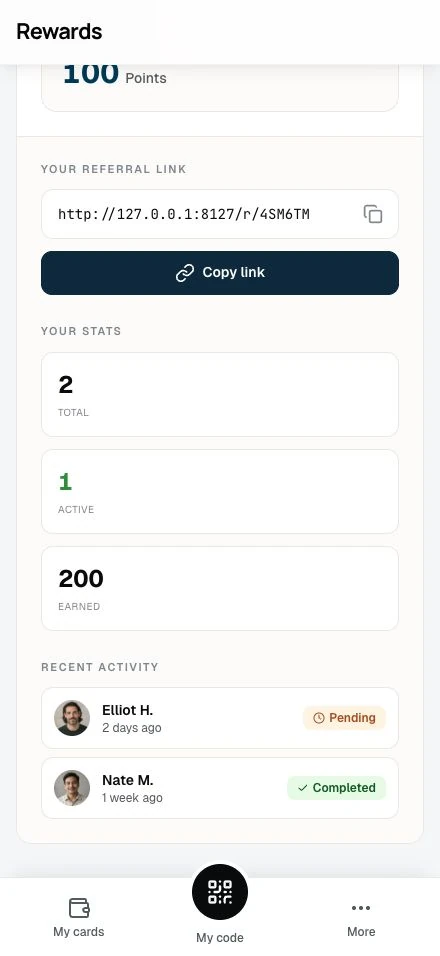
Once active, members can find their referral link in the Referrals section of their dashboard. Each member gets a unique 6-character code (like AB12CD) that's embedded in their shareable link.
3. Member shares with friends
Sharing is a copy-link action. The member clicks Copy link (or taps the link field itself) to put the full referral link on the clipboard, then pastes it wherever the conversation happens: a chat message, an email, a social post.
4. Friend clicks the link
When someone clicks a referral link, they land on a branded page showing:
- Who invited them
- The welcome bonus they'll receive
- How to join
5. Friend signs up
Clicking Accept invitation takes them through the standard registration flow. Their referral is tracked, no code to enter.
6. Pending referral created
After signup, the referral is "pending" and no points move yet. This stops signup-only referrals from paying out.
7. Friend makes first purchase
Completion comes when the new member makes their first purchase. That could be:
- Earning points at a physical location
- Shopping on a connected online store (Shopify or WooCommerce; early access)
- Any transaction that awards loyalty points
8. Both earn points
The moment the first purchase is processed:
- The referrer receives their bonus points
- The new member receives their welcome bonus
- Both get email notifications (if enabled)
- The referral status updates to "completed"
Key benefits
For business owners
- Reward cost: Choose the points awarded and account for the cost of the rewards customers can redeem
- Pre-qualified leads: Friends of fans are likely to become fans themselves
- Measurable returns: Track how many customers come from referrals
- Self-promoting: Happy members want to share
For existing members
- Easy bonus points: Earn rewards for something you'd do anyway (recommending good businesses)
- A reason to share: Passing a good deal to friends feels good
- No limit: Refer as many friends as you like
For new members
- Warm welcome: Bonus points from the first visit
- Trust: A friend's word carries more weight than an ad
- Savings: The welcome bonus spends on a future visit
Understanding referral status
Referrals move through two stages:
| Status | Meaning | Points awarded? |
|---|---|---|
| Pending | Friend signed up but hasn't purchased yet | No |
| Completed | Friend made their first purchase | Yes |
There is no expired state. Disabling a campaign leaves its referrals pending: they do not complete while the campaign is off, and they stay visible in the member's list.
Transaction types
Referral rewards appear in transaction history with special labels:
- Referral bonus: Points earned by the referrer
- Welcome bonus: Points received by the new member
Both transactions land at the same moment, when the referral completes.
User roles
Each role has its own actions:
What partners can do
- Enable or disable referral programs
- Set point values for referrer and referee
- Choose which loyalty cards receive reward points
- View referral activity in transaction history
What members can do
- Access their unique referral code and link
- Copy the link to the clipboard and share it anywhere
- Track signups through your link, completed referrals, and points earned
- View recent referral activity with status
Related topics
- Setting up referrals (partners): Configure your referral program
- Sharing & earning (members): How to refer friends
- The landing experience: What new members see
- Earning points: How loyalty points work