Earning points.
How points accumulate on your loyalty cards
You earn points by making purchases at participating businesses. The more you spend, the more you earn.
The process
- Make a purchase
- Tell the staff you have a loyalty card
- Open your loyalty card
- Show them your QR code
- Staff scan it and enter the purchase amount
- The points land on your balance
Watch it land live. With your wallet open when staff scan your code, the points settle on your card and your totals within a couple of seconds, with a short celebration in the business's colours. See Live updates and celebrations.
Your QR code
Each loyalty card has a unique QR code that identifies you. Find it by:
- Opening the loyalty card from My Cards
- Selecting Show code
- Showing the large QR dialog to staff; it includes the card title and business
Beneath the QR you see Your identifier, your own number. When the counter cannot scan, staff can type it instead.
Pro tip: Screenshot your most-used codes for quick access.
Point calculation
Each business sets their own rules. Common examples:
- 1 point per $1 spent
- 5 points per $10 spent
- Flat points per visit
The card details show how you earn points.
Welcome bonuses
Some cards offer bonus points on your first purchase. This is automatic. Make a purchase and you get the bonus.
Tier multipliers
If you've earned a higher tier status with a business, you may receive a points multiplier on every purchase:
| Tier Example | Multiplier | Effect |
|---|---|---|
| Bronze | 1.0× | Standard earning |
| Silver | 1.25× | 25% bonus points |
| Gold | 1.5× | 50% bonus points |
| Platinum | 2× | Double points |
Cards show the earned tier and multiplier together (for example, "Gold · 2×") so you know which cards offer bonus earning. See Membership Tiers for more details.
Checking your balance
View your balance anytime:
- Click My Cards in the header
- Select the loyalty card
- Your current points appear on the card
Transaction history
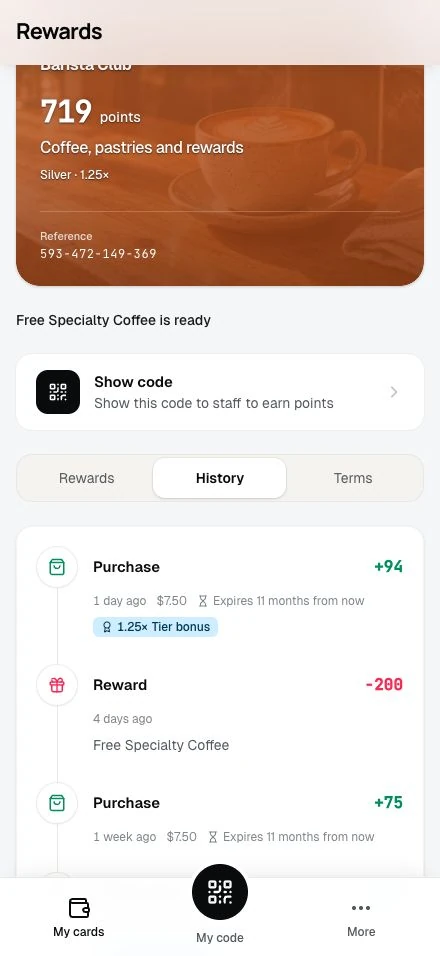
See every transaction:
- Open the loyalty card
- View your history
- See points earned, dates, and amounts
Points don't transfer between businesses
Points on one card cannot move to another card. Each business's program is independent. Within the same loyalty card, though, another member can send you points: create a request link and share it. See Requesting points.
Earning points from online purchases
⚠️ Early Access: Online point earning requires the business to enable and connect a store integration (Shopify or WooCommerce). This may not be available on all installations.
Some businesses connect their Shopify or WooCommerce store to their loyalty program. When they do, every paid order earns points on the linked loyalty card. No QR code needed. The same card rules apply as at the counter: points per amount spent, rounding, purchase limits, and any welcome bonus on your first order. Tier multipliers do not apply to online orders.
How it works:
- Shop in a connected Shopify or WooCommerce store
- Complete your purchase using the same email as your loyalty account
- Points land when you pay for your order
- Check your balance in My Cards; the purchase appears in your history as "Shopify order" or, for WooCommerce stores, "Online order"
💡 Tip: Use the same email address for store purchases as your loyalty account. This is how the system knows to credit your points.
Some Shopify stores display a loyalty widget that shows the program and a preview of rewards. Checking your balance and redeeming rewards happen in My Cards and at the counter, not in the widget. On WooCommerce-connected programs, you convert points into store discount coupons from your card page instead. See WooCommerce for details.
Earning points via redemption codes
If you can't scan your QR code (phone order, drive-through, forgot your phone), staff can give you a 4-digit code instead.
How it works:
- Staff generates a code at checkout
- They tell you the 4-digit code (e.g., "0754")
- Sign in to your account later
- Click Enter Code in your account menu
- Type the code and click Submit Code
- The points land on your loyalty card
Each code stays valid for a window staff choose when they create it, anywhere from an hour to a month, so enter it soon. See Redemption codes for the complete guide.
Earning points through referrals
If a business has a referral program, you can earn bonus points by inviting friends to join.
How it works:
- Find your unique referral link in the Referrals section of your dashboard
- Share the link with friends via copy, WhatsApp, email, or native share
- Friend clicks your link and signs up
- Friend makes their first purchase
- You both earn bonus points!
Two types of referral transactions appear in your history:
| Transaction Type | Who Receives | When |
|---|---|---|
| Referral Bonus | You (the referrer) | When your friend makes their first purchase |
| Welcome Bonus | Your friend (the referee) | When they make their first purchase |
The points land the moment your friend earns their first points on a loyalty card, not when they sign up. This means the referral is "pending" until they visit and shop.
💡 Tip: Track your referral stats (how many friends signed up, how many completed, and your total bonus points) all from the Referrals page.
See Sharing & Earning for the complete guide to referring friends.
Expiration
Points can expire. When a business sets an expiry period on a card, every batch of points you earn carries its own expiry date, a fixed number of months after the transaction that earned it. New purchases do not extend older points; each batch keeps its own date. Your transaction history shows when each batch expires and highlights dates within 60 days.