The shared wallet concept.
One member account for several businesses, with separate program balances and business access.
A shared wallet lets a member use one account for several businesses on the same Reward Loyalty installation. Each business manages its own programs and sees the member's activity with that business.
For the software, client plans and billing model, see multi-tenant loyalty software. This guide explains the member account and business data boundaries.
How the shared wallet works
One account, many programs
A member can add a café's loyalty card and a salon's loyalty card to My cards. They do not need a separate account for each business on that installation.

In this example, the café balance is 120 points and the salon balance is 40 points. Each program keeps its own balance and rewards. The wallet does not combine those points into a balance of 160.
Members sign in with their email code. An account that already has a password can also use password sign-in. If you enable anonymous members, visitors can start without an email.
What each business can see
| The partner can see | The partner cannot see through its dashboard |
|---|---|
| Its own programs and staff | Another partner's private program management |
| Members with a relationship to its business | The full installation's member list |
| Those members' activity with its business | Their transactions and balances at other businesses |
| Its business analytics | Another business's analytics |
A member can appear in two businesses' member lists. Each business sees its own relationship and transactions. Administrators have broader access to manage the installation. See User roles.
Public business pages and published programs remain visible to visitors. Private dashboard access and public discovery are separate choices.
What customers see
Members open My cards to find the programs they have added or used. Their cards show the relevant balances, progress, or remaining uses.
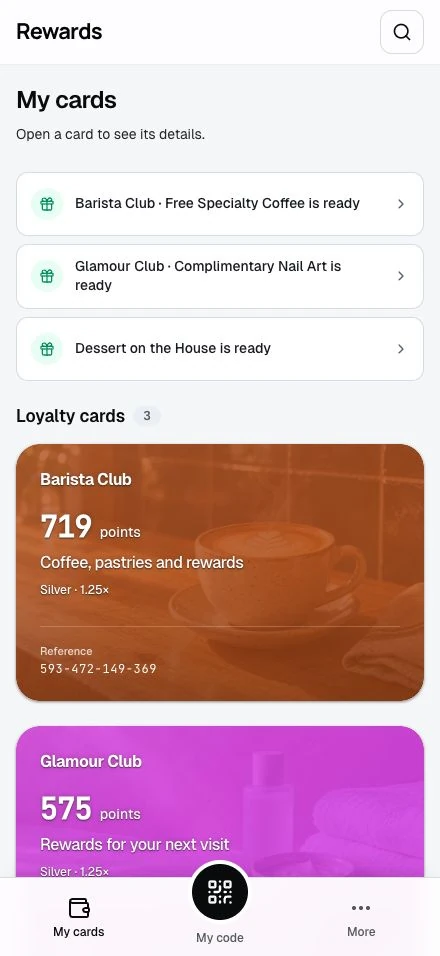
See Your wallet for adding cards, using the member code, and finding past programs.
Why no automatic directory?
Creating a partner does not publish all its programs. Public discovery depends on the operator's homepage settings, the partner's permission, and which programs the partner chooses to publish.
| Homepage | What visitors see |
|---|---|
| Smart wallet | A curated collection of program cards |
| Showcase | A brand-led page with selected programs |
| Portal | Access to the portals without a public program catalogue |
| Public listing | Approved programs with search and filters |
All four layouts use the same accounts and access rules. Choose the homepage layout that fits how customers find your business.
How customers find businesses
A business can share a program through a counter QR code, receipt, website link, or email. A public directory is optional.
- The member opens the link or scans the QR code.
- The program page shows the business and offer.
- The member signs in when the action requires it.
- The member adds or uses the program, subject to its terms.
Buying a prepaid pass is a separate counter transaction. Opening its page does not buy or add a pass.
Use cases this architecture enables
| Setup | How to organize it |
|---|---|
| One business | Start with one partner account and its Main club |
| Agency | Give each client a partner account and set its permissions and plan |
| Several brands | Give each business its own partner account and branding |
| Business association | Add participating businesses and choose whether to offer public discovery |
The operator maintains hosting, updates, and platform configuration. Plans and billing controls business access and pricing.
Common questions
Can points be spent at another business?
Adding cards to one wallet does not pool their balances. Each program defines its own rewards.
Does this work across separate installations?
The shared account belongs to one installation. A different installation has its own member accounts.
Can a partner see every member?
No. Partner member lists follow their business relationships. Administrators can manage members across the installation.
Where do members manage their data?
Members use Account settings and privacy for their profile, preferences, export, and account deletion.
Next steps
- Homepage layouts: Choose the public entry point.
- Partner permissions: Set what each business can use.