
Monthly summary.
Review a completed month of loyalty activity, compare it with the previous month, and download a searchable PDF.
On this page
Open Business → Monthly summary to review recorded loyalty activity across your programs for one completed calendar month.
The flat layout is designed for print. Screen, PDF and browser printout share the same headings and figures.
Choose a month
The month selector offers up to 24 completed months, starting no earlier than the month your business account was created. The report uses your account's time zone. Change that preference in Account settings → Language and time zone.
Your first report becomes available after your account's first calendar month ends. A month without eligible activity shows zero counts and an empty-state message. If the preceding month started before your account existed, the report says Previous month unavailable.
Read the figures
| Figure | What it counts |
|---|---|
| Active customers | Distinct retained customer records with eligible points, stamp, completed voucher-use or visit/time-pass activity in the month, after corrections. Joining a program alone does not count. |
| Active on 2+ days | Those customer records with activity on at least 2 different dates within this month, across programs. |
| Rewards redeemed | Completed points reward-redemption rows plus stamp reward-redemption rows, after corrections. One row counts once. Online points discounts count as activity, not as points reward redemptions. |
| Win-back offers used | Completed, non-voided uses of your win-back vouchers, including vouchers issued in an earlier month. |
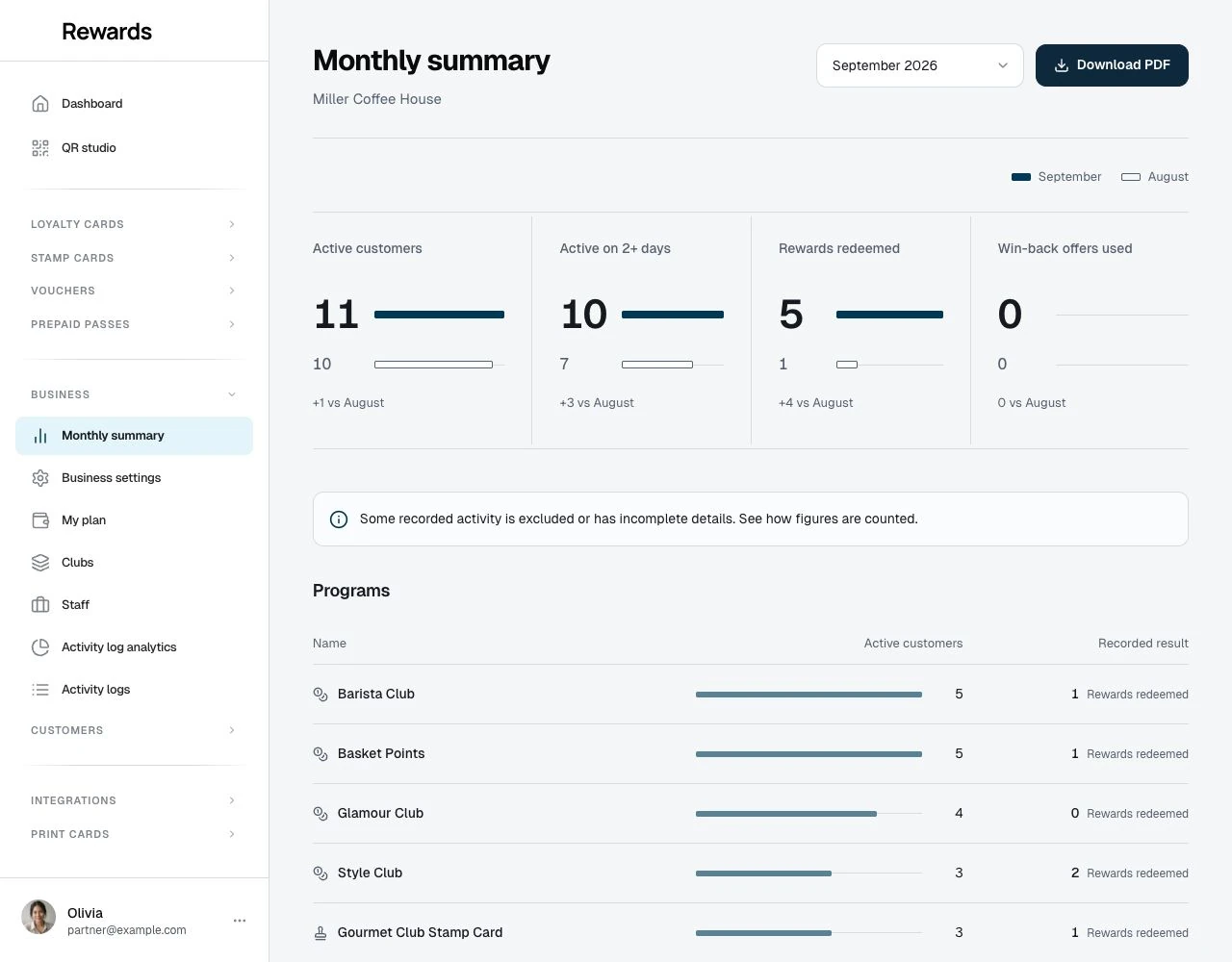
The report shows applicable figures and absolute differences from the previous complete month. The filled bar represents the selected month; the outlined bar represents the preceding month. Each metric pair has its own scale.
These figures describe recorded participation. Active on 2+ days does not establish cross-month retention or count visits. Reward and win-back uses do not prove additional visits or sales.
Programs
The program list shows up to 20 programs with recorded activity, ranked by active customers. Overall totals include every eligible program. One customer can appear in several rows, so adding the rows does not give a distinct-customer total.
The icon identifies a loyalty card, stamp card, voucher or pass. The result beside each program counts rewards redeemed for points and stamp cards, completed uses for vouchers, or use operations for visit/time passes. Pass use operations count actions, not units consumed. Monetary passes and their balances are outside this report.
Locations describe where programs apply. Transactions do not record a location, so this report cannot filter or split figures by location.
Check the counting rules
Expand How figures are counted for the definitions and any coverage limits. A notice appears when retained records include known exclusions or incomplete details.
Anonymous customers count as customer records. Multiple devices can be separate records, and linked or merged accounts follow their current retained identity. Missing customer identities cannot count as active customers, although known redemption operations still count. Deleted history cannot be reconstructed.
Later corrections can change past months. For example, undoing a September stamp in October removes that original activity from September's figures. The report shows its actual Calculated time and time zone. A calculation may be reused for up to 5 minutes; the displayed calculation time stays the same.
Download or print
Choose Download PDF to save the figures already displayed. The PDF preserves the layout and includes selectable, searchable text, the expanded counting rules and calculation time. Creating it does not recalculate the report.
The filename contains a safe form of your business name and the report month, for example monthly-summary-harbour-coffee-2026-09.pdf. The direct download uses A4 pages. Your browser's Print command also supports A4 and Letter paper.
Read through an AI connection
Ask, for example, “Show my last completed month's loyalty summary.” The read-only get_merchant_monthly_summary tool uses the same calculation as this page and returns the month, previous-month figures, program rows, calculation time and coverage definitions.
The connection needs Agent API access and either read or read:analytics scope. See Business tools and Monthly summary endpoint.