Processing redemptions.
How to process reward redemptions for customers
When customers have earned enough points, they can redeem them for rewards. You process these redemptions through the staff portal.
The redemption flow
- Customer requests a specific reward
- Scan their QR code
- Verify they have enough points
- Select the reward they want
- Tap Claim reward
- Provide the reward
Processing a redemption
After scanning the customer's QR code:
- Open the customer overview
- Tap the reward they want to claim
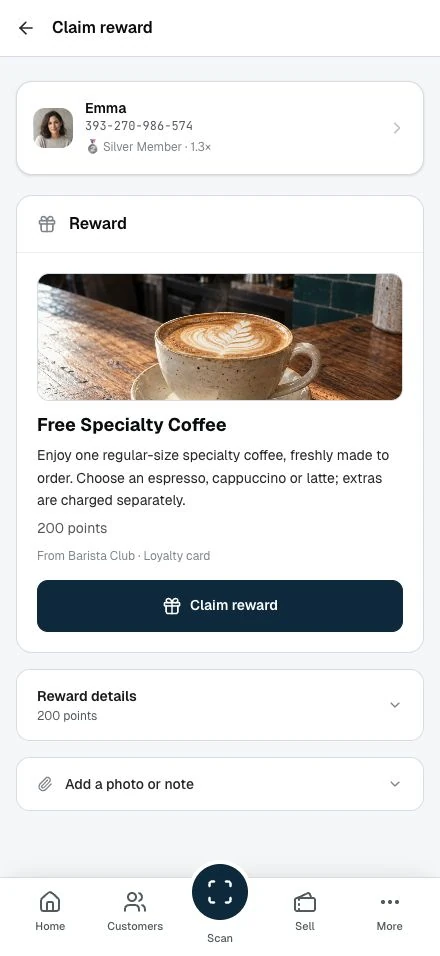
- The Claim reward page shows the customer, the reward at a glance (its name, description, and image where available, plus the point cost), and the loyalty card it comes from, so you can confirm what to hand out
- Verify they have enough points. The details panel shows the balance
- Tap Claim reward to confirm
The points leave the customer's balance at once.
If the customer doesn't have enough points
If the balance is too low, the Claim reward page shows a calm message with the shortfall. No submit button appears. There is nothing to confirm. Let the customer know how many more points they need.
Checking details
Below the Claim reward button, a collapsible details panel shows the points required and the customer's current balance. Tap it to expand.
You can also attach a photo or a short note using the Add a photo or note panel below. These are internal only. The customer does not see them.
After redemption
On the result screen, you see the points redeemed and the customer's balance. Tap Done to return to the customer or History to open the loyalty card's record. Give the customer the physical reward; they can find the redemption in their transaction history.
Stamp card rewards
When a customer completes a stamp card, their customer overview shows a Claim reward action. The process is the same: open the Claim reward page, verify the card is complete, tap Claim reward.
The Claim reward page shows the reward's name and description, and the stamp card it comes from, so you know what to hand out; the details panel shows the stamps required and any bonus points awarded on completion.
Redemption codes
To award points when a customer can't scan their QR code, use redemption codes:
- Go to Redemption codes in the sidebar
- Click Generate code; if you have more than one card, pick the right one from the empty Select a card picker first (with a single card it opens straight on it)
- Enter the point amount, choose how long the code stays valid under Valid for, and generate
- Tell the customer the 4-digit code
- Customer enters the code in their account to receive points
This works for phone orders, drive-throughs, or when customers forgot their phone. See Redemption codes for the full guide.
Handling issues
Customer disputes point balance:
- Check their transaction history
- If there is a genuine error, contact your partner
Reward out of stock:
- Apologise and explain the situation
- Offer an alternative if available
- Do not process the redemption if you cannot fulfil it
Wrong reward processed:
- Contact your partner right away
- They can review and maybe reverse the transaction
Good practice
Verify before processing. Confirm which reward the customer wants.
Fulfil right away. Provide the reward right after processing.
Be friendly. Redemption is a positive moment. Make it feel that way.