Undoing and reversing.
How staff undo a points award or reverse a stamp, voucher, or pass at the counter
Mistakes happen at a busy counter. A reward goes to the wrong person, or you add the same points twice. The app lets staff put these right on the spot, in a way that keeps the record honest.
Undoing a points award
Open the customer from Recent customers or by scanning their code. In the Customer overview, tap History on the loyalty card, then use Undo recent points.
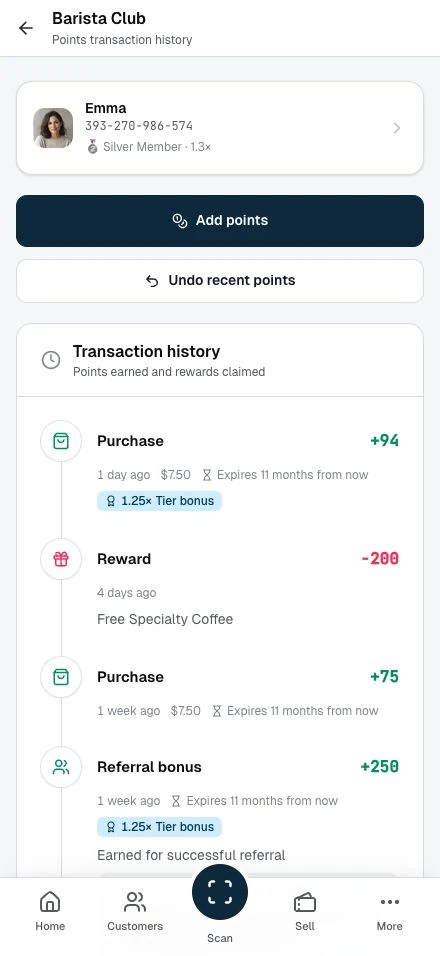
The undo:
- Takes the points back out of the customer's spendable balance straight away.
- Stays on the record as a reversal entry. It keeps the original award, so the history shows both the award and that you put it right.
- Rechecks the customer's tier when the reversed points had counted toward it. If they no longer qualify for a higher tier, they move back down.
What you can undo
Undo recent points reverses your most recent eligible points award for this member and card. Its points must still be unspent and unexpired. Check the history before confirming: an earlier award can be the latest eligible one.
What you cannot undo
Some points are out of reach at the counter, by design:
- Points the customer has already spent. Once points have gone toward a reward, there is nothing loose to take back.
- Points that have expired. Expired points have already left the balance.
Undo recent points is hidden when none of your awards qualifies.
Stamps, vouchers, and passes
The same idea covers your other counter actions. Each reversal lives in that program's History:
- Stamps. Reverse a stamp you added from the stamp card's History. The stamp count drops back, and the system logs the reversal. See Managing stamp transactions.
- Vouchers. Undo a redemption you made by mistake from the voucher's History. It restores the voucher's remaining count, reverses any bonus points, and lands on the record as an audited entry. See Redeeming vouchers.
- Prepaid passes. Reverse a pass use from the pass History, and the visit goes back onto the pass.
Each reversal applies to your most recent eligible action for that member and program. The balance or count changes straight away, and the original entry stays on the record.
When to ask a partner or admin
Ask a partner or administrator to review corrections outside your staff access. This includes a colleague's transaction, points the customer has already spent, or a correction that needs a manager's judgement. Their available correction controls depend on the program and its history.