Win-back rewards.
Send lapsed members a personal, single-use voucher that invites them back, with no manual work.
The win-back reward finds the regular who stopped coming, an absence a busy counter can overlook. When a member hasn't visited your business for the number of days you choose, they receive a personal, single-use copy of a voucher you pick, in their wallet and by email, branded with your business name.
How it works
- You pick one of your club's vouchers as the win-back gift, set how many days of silence trigger it, and how long the personal copy stays valid.
- Each day, the platform finds members whose last visit is at least that many days ago.
- Each eligible member receives their own copy: a fresh code, visible only to them, usable once, valid from the day it is sent for the number of days you chose.
- The member gets a "we miss you" email with the code and sees the voucher in their wallet. Members who opted out of email still receive the voucher in their wallet.
A visit means checkout activity with your business: earning points or stamps, redeeming a voucher, or using a prepaid pass. Signing in or browsing the wallet doesn't count. The clock measures real visits, not app opens.
The original voucher is only a template: it is never published or redeemed itself, and the personal copies don't clutter your voucher list. Issued win-back vouchers appear in redemptions and the activity log like any other voucher.
Once per absence, never spam
A member receives at most one win-back voucher per absence. They become eligible again only after they return (earn points or stamps, redeem a voucher, or use a prepaid pass) and then go quiet again for the configured number of days. The issued voucher itself doesn't count as a return; only a real visit does.
The sweep skips members whose last visit is more than 90 days past your threshold. This keeps the message timely: a "we miss you" a year after the last visit reads wrong. It also means enabling the feature on an established club never blasts every member who ever lapsed.
Enabling the win-back reward
Like the birthday reward, the win-back settings appear when editing an existing club, not when creating one: a brand-new club has no vouchers yet, so there is nothing to choose. Create the club, add at least one voucher to it, then come back and edit the club.
- Go to Clubs, edit the club and open Automated rewards.
- Under Win-back voucher, select the voucher to use as the gift. Selecting a voucher enables the reward; choosing No win-back reward disables it.
- Set Days of inactivity: how long a member must be away before the gift is sent (14–180 days, default 60).
- Set Win-back voucher validity (days): how long the personal copy stays valid, counted from the day it is sent (1–90 days, default 14).
- Save.
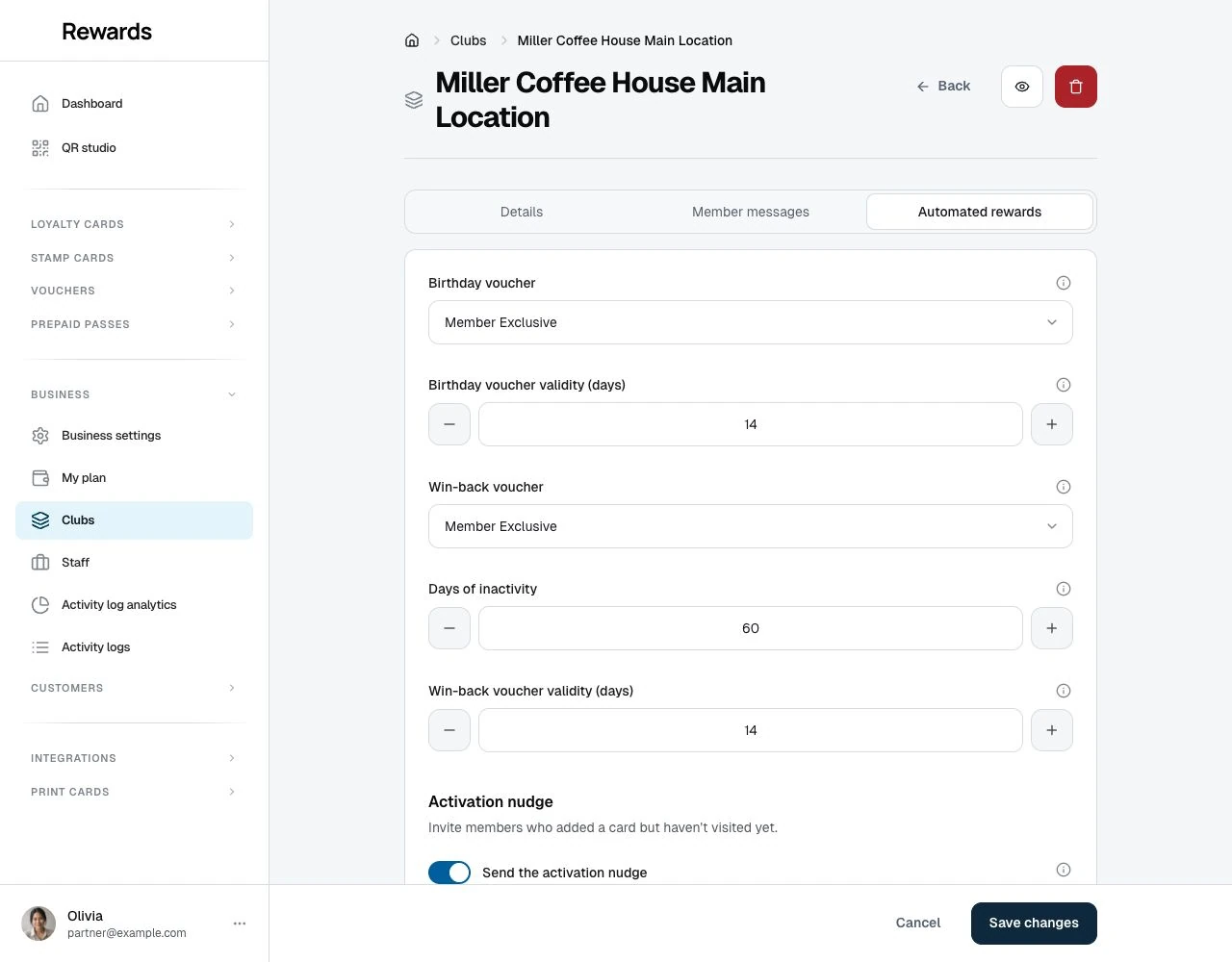
Any active voucher of the club works as the template: percentage or fixed discounts, a free product, or bonus points. Its title, image, and conditions (such as minimum purchase) carry over to each personal copy.
Who receives a win-back voucher
A member receives the voucher when all of these are true:
- They hold a loyalty card, stamp card, or prepaid pass in the club.
- They have visited your business before (earned points or stamps, redeemed a voucher, or had qualifying prepaid-pass activity). The sweep skips members who only joined a card but never checked in, so the reward can never reach members who don't already know your business.
- Their last visit is at least the configured number of days ago, and no more than 90 days beyond that.
- They haven't already received a win-back voucher during this absence.
- Their account is active and registered.
See also: the activation nudge is the sibling for members who added a card but never made a first visit, the ones this sweep leaves alone.
The sweep processes large clubs in batches of 200 vouchers per club per run; the next run continues where the last one stopped, so it misses nobody.
Scheduling and hosting
The win-back run is designed for self-hosted reality and works without special server setup:
- With cron configured, it runs every night on its own.
- Without cron, it runs on normal portal traffic: the first admin, partner, or staff activity of the day triggers it in the background.
- Manually, an admin can run it any time from Health center → Scheduled tasks, which also shows when it last ran and how many vouchers it issued.
The sweep needs no queue worker, and running it more than once is safe: members never receive duplicates within the same absence.
Tips
- Make the gift worth a trip: a free product or a meaningful fixed discount brings people back more often than a small percentage.
- Match the threshold to your visit rhythm: 60 days suits daily-habit businesses like coffee; salons and car care often deserve 90–120.
- Pair it with the birthday reward. Together they cover the two moments a program wins loyalty back: celebration and silence.