Setting up referrals.
How partners configure card-based referral campaigns with point rewards.
Enable referrals to let your existing members invite friends.
The reward is triggered by the friend's first points-earning transaction on this installation, on any loyalty card. Someone who has already earned points cannot complete a new referral. Each side receives the points configured for that campaign.
Prerequisites
Referral campaigns are card-based: each campaign points at loyalty cards, and both rewards land on a loyalty card. Before you create one, you need at least one loyalty card. One card can carry both rewards, or you can split the referrer and referee rewards across two cards.
If you haven't created a loyalty card yet, see Creating loyalty cards first.
Accessing referral settings
You can configure referrals from the partner dashboard:
- Sign in to your Partner Dashboard
- In the sidebar, go to Loyalty cards → Member referrals
- You will see a list of your referral campaigns
- From here, click Create to create a campaign, or edit an existing one
The list shows the campaign name and active state, followed by Referrer reward and New member reward. Each reward combines its points with the destination card's translated heading. No reward means that side awards zero points. Both card choices remain required when creating or editing a campaign.
Creating a referral campaign
A campaign is a small, self-contained form. You can run several campaigns side by side, each with its own name and reward cards.
| Field | Description |
|---|---|
| Name | Required. For internal reference only; members never see it |
| Active | Whether the campaign runs. On by default for new campaigns |
| Referrer reward (Points) | Points the sharing member earns per completed referral |
| Select loyalty card (Referrer reward) | Required. The loyalty card that receives the referrer's points |
| Referee reward (Points) | Welcome bonus points the new member earns |
| Select loyalty card (Referee reward) | Required. The loyalty card that receives the welcome bonus |
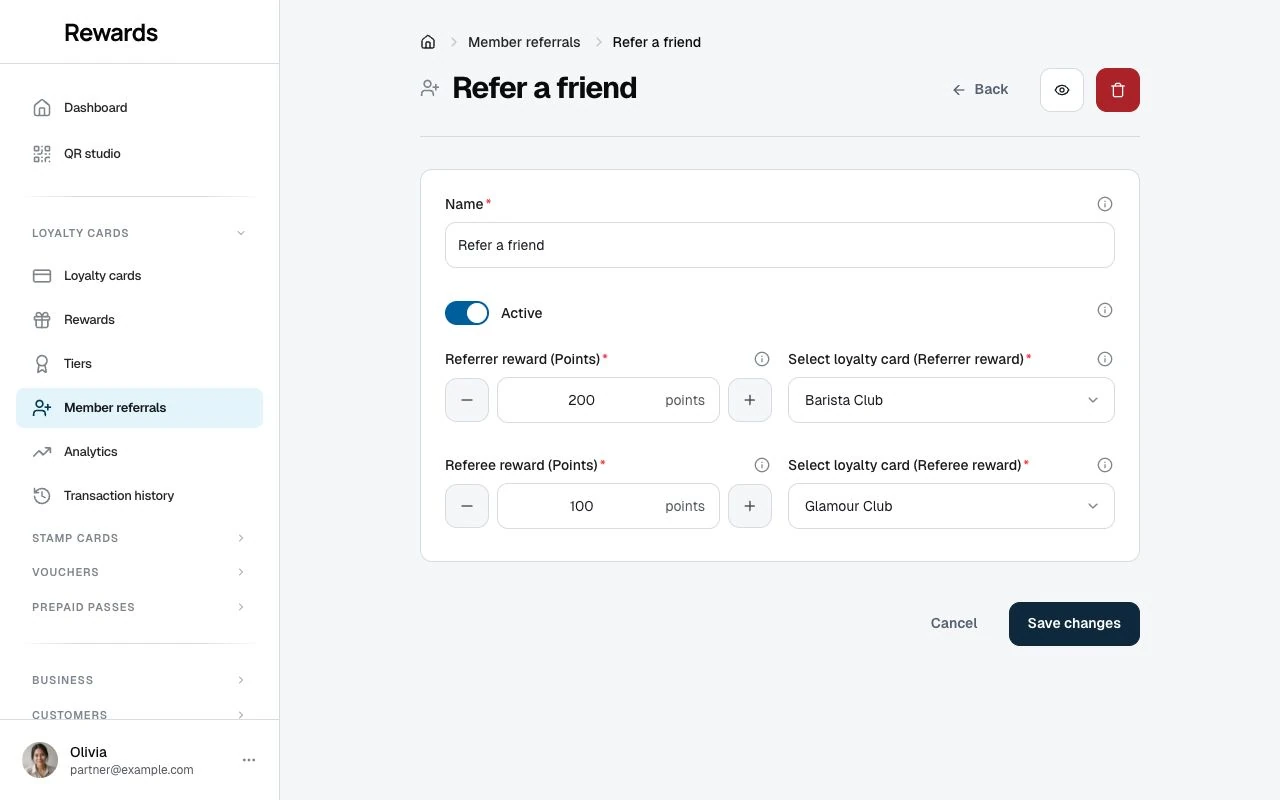
There is no club field: campaigns attach to cards, not clubs. Members see the referral option in their dashboard when they hold the campaign's referrer card or referee card.
Configuring rewards
You can configure rewards for both parties in a referral:
Referrer reward
The existing member who shares their link receives this reward when their referral completes.
- Referrer reward (Points): How many points the referrer earns (e.g., 500)
- Select loyalty card (Referrer reward): Which loyalty card receives the points
Referee reward
The new member who signs up receives this welcome bonus on their first purchase.
- Referee reward (Points): How many points the new member earns (e.g., 200)
- Select loyalty card (Referee reward): Which loyalty card receives the points
Rules and validation
- Both cards are always required: Every campaign names a referrer card and a referee card, even when one side's points are 0
- Zero is a valid point value: A side set to 0 completes without awarding points, so a campaign with 0 and 0 saves fine but rewards no one
- Own cards only: The pickers list your loyalty cards
- Whole numbers: Points run from 0 up to 100,000 per side
Example configurations
Standard two-way reward
Award points to both parties:
| Setting | Value |
|---|---|
| Referrer points | 500 |
| Referrer card | Coffee Rewards |
| Referee points | 200 |
| Referee card | Coffee Rewards |
Result: Referrer earns 500 points, new member earns 200 points, both on the same card.
Generous welcome bonus
Focus on attracting new customers:
| Setting | Value |
|---|---|
| Referrer points | 100 |
| Referrer card | Loyalty Plus |
| Referee points | 500 |
| Referee card | Loyalty Plus |
Result: Lower referrer reward, but the generous welcome bonus becomes a strong selling point for referrers to share.
Different cards for each party
Use different cards for more sophisticated programs:
| Setting | Value |
|---|---|
| Referrer points | 1000 |
| Referrer card | VIP Rewards |
| Referee points | 250 |
| Referee card | Starter Rewards |
Result: Referrer earns VIP points while new members start on a beginner card. The referee card is auto-added to the new member's wallet, so pointing it at a starter card decides where they begin.
Best practices
Setting point values
- Make it meaningful: Rewards should feel worth earning
- Consider your economics: 500 points might be $5 or $50 depending on your rate
- Balance incentives: Generous referrer rewards drive sharing; generous referee rewards improve conversion
- Make awards clear: Choose an amount members can compare with your reward costs
Choosing cards
- Same card for simplicity: Most businesses use one card for both parties
- Different cards for segmentation: Send new members to a "starter" card
- Remember who sees the campaign: Members holding either reward card get the referral option, so the cards you pick decide who can share
Before launching
- Test with a friend: Complete the full referral flow yourself
- Verify emails work: Check that notification emails are configured
- Announce to members: Let existing members know about the program
- Add to signage: Remind customers they can earn by sharing
What members see
Once a campaign is active, members who hold its referrer or referee card experience:
Member dashboard
A Refer a friend page appears in their navigation showing, per campaign:
- The reward cards and what each party gets
- Their unique referral link with a Copy link button (copy is the only share control)
- Stats: Total, Active, and Earned
- Recent referrals with status badges
Referral landing page
When someone clicks a member's link, they see a page with:
- The referrer's name ("Jane wants you to join")
- The welcome bonus shown up front
- An Accept invitation button that leads to registration
Managing active programs
Viewing activity
Referral completions appear in your transaction history with the event types:
referral_bonus: Points awarded to referrersreferral_welcome_bonus: Points awarded to new members
Disabling referrals
If you need to pause or stop referrals:
- Edit the referral campaign
- Toggle Active to OFF
- Save changes
Important: Pending referrals (friend signed up but hasn't purchased) will remain pending. They won't complete even if the new member later makes a purchase while the program is disabled.
Changing point values
You can adjust point values at any time:
- New completions use the current settings
- Already-completed referrals aren't affected
- Pending referrals will use whatever values exist when they complete
Troubleshooting
"Members don't see referrals"
Check that:
- The campaign's Active toggle is on
- The member holds the campaign's referrer card or referee card (holding either one shows the option)
- They're opening the Refer a friend page, not only My Cards
"No points were awarded"
Verify that:
- Points are configured above 0 for that side (0 saves fine but awards nothing)
- The new member made a purchase (signing up alone awards nothing)
- The purchase was the new member's first points-earning transaction ever
- The campaign was enabled when the purchase was made
"Referral stuck on pending"
This is normal until the new member makes a purchase. Pending referrals:
- Only complete on the referee's first-ever points-earning transaction, on any loyalty card
- Never complete for a referee who already had a points transaction before the referral
- Don't complete from stamp card transactions
- Don't complete while the campaign is disabled
Related topics
- Referral program overview: How referrals work
- The landing experience: What new members see
- Creating loyalty cards: Set up cards first