
Health center.
System diagnostics dashboard for monitoring your Reward Loyalty installation.
On this page
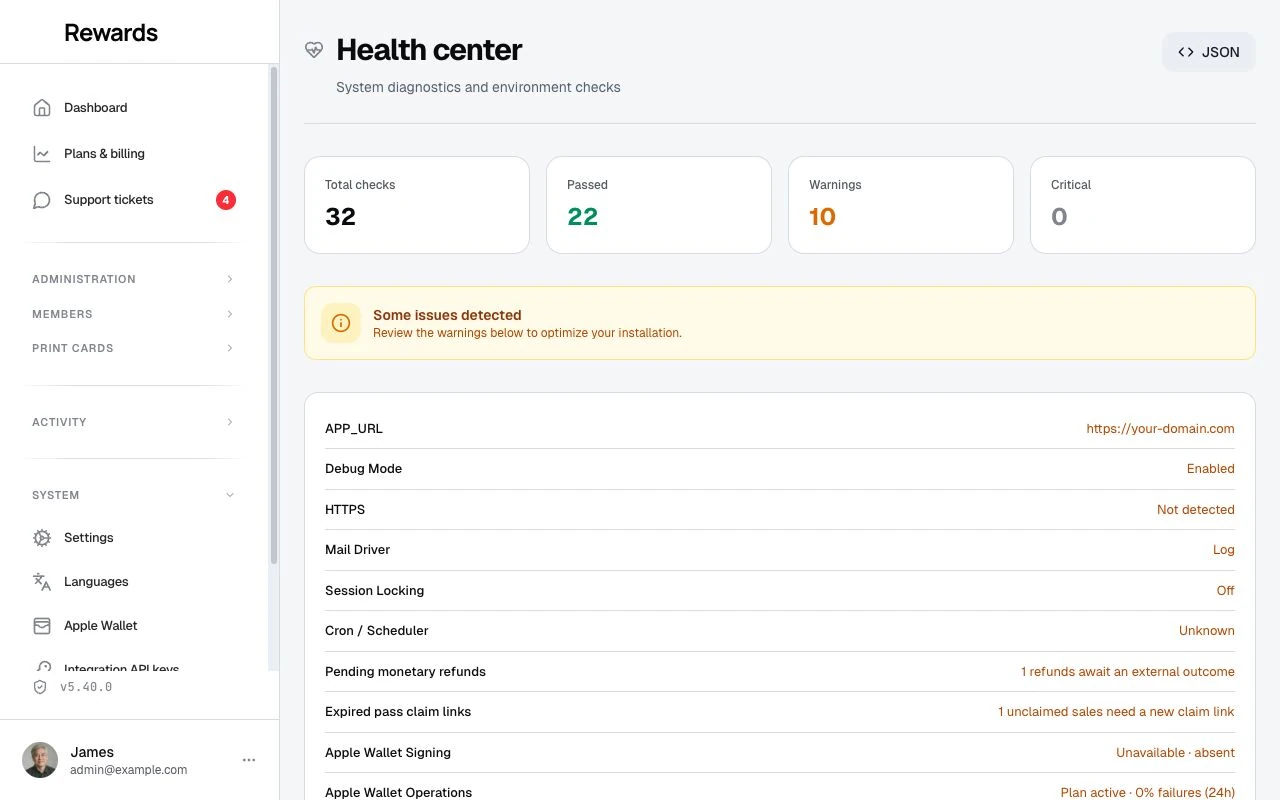
The Health center lets super administrators check the server, database, storage, and services. It also provides controls to run maintenance tasks.
Accessing the health center
Navigate to Admin → Health center in the sidebar. The Health center is only visible to super administrators (role 1).
A JSON endpoint is also available at /{locale}/admin/health/json for monitoring tools that can authenticate as a super administrator.
What gets checked
The Health center groups its checks into these categories:
Environment
| Check | What It Verifies |
|---|---|
| PHP Version | Reports the runtime version; compare it with the current installation requirements |
| PHP Extensions | Checks the extensions used by the health diagnostics |
| Disabled Functions | proc_open, proc_close, exec, shell_exec are available |
The current release requires PHP 8.4.1 or later. The health check still uses older PHP thresholds, so an OK result alone does not confirm compatibility. Use the server requirements before installing or updating.
Application
| Check | What It Verifies |
|---|---|
| APP_URL | Matches the current request URL |
| Debug Mode | Disabled in production (prevents exposing sensitive data) |
| HTTPS | Active for production environments |
| App Version | Current installed version |
| Session locking | Whether session locking is on, and if so whether its lock store answers a live check. Off is a healthy state. |
Database
| Check | What It Verifies |
|---|---|
| Connection | Database is reachable |
| Version | Database server version (MySQL, MariaDB, SQLite) |
| Migrations | All migrations are applied, none pending |
Storage
| Check | What It Verifies |
|---|---|
| Writable Directories | All 6 required directories are writable |
| Storage Symlink | public/storage symlink exists |
Services
| Check | What It Verifies |
|---|---|
| Queue Driver | Queue is configured and processing jobs |
| Mail Driver | Mail transport is configured for transactional email |
| Cron / Scheduler | Laravel scheduler is running via cron |
| Birthday Sweep | Birthday vouchers were issued today (only when a club has the birthday reward configured) |
| Win-Back Sweep | Win-back vouchers were issued today (only when a club has the win-back reward configured) |
| Pass Expiry Sweep | Lapsed prepaid passes were closed out today and expiry reminders went out (only when members hold active passes) |
| Achievement rewards | Achievement rewards are being delivered: no failed deliveries, none waiting longer than expected, and no stalled or failed history import |
| Apple Wallet | Checks the signing runtime, private storage, signing identity, and pass operations when configured |
| Billing Provider | The active billing mode is ready: manual/offline, or Stripe/PayPal with credentials and the webhook secret/id in place |
| Automation templates | The templates on disk match what was verified, and any template still waiting for a run on its platform is named |
| Sale records | The records behind retry-safe purchases are readable and complete, and any sale left half recorded is counted with what can still be said about it |
The sweep and delivery rows always appear in the list. When a feature is not in use, the row reads OK with Not configured (birthday, win-back, and achievement rewards) or No active passes (pass expiry) instead of disappearing.
The automation and sale-record rows appear only where the Agent API is switched on for the installation.
Status levels
Each check reports one of three statuses:
- OK: Check passed, no action needed
- Warning: Non-critical issue that should be reviewed
- Critical: Requires immediate attention
The summary cards at the top show the total count for each status level.
Cron / scheduler (recommended)
Reward Loyalty uses Laravel's task scheduler for background operations. All core loyalty features work without cron: it is recommended for automated maintenance, not required.
What the scheduler handles:
- OTP cleanup: Removes expired one-time passwords hourly
- Birthday vouchers: Issues birthday rewards daily at 02:30
- Win-back vouchers: Issues win-back rewards daily at 02:45
- Activation nudges: Sends the activation nudge to members who added a card but haven't visited yet, daily at 02:50
- Stamp card expiration: Processes expired stamps daily at 03:00
- Pass expiry: Closes out lapsed prepaid passes and sends expiry reminders daily at 03:15
- Points expiry: Closes out expired points and sends expiry reminders daily at 03:30
- Achievement reward delivery: Delivers pending achievement rewards every minute
- Demo refresh: Resets demo data daily (demo mode only)
- Health heartbeat: Writes a timestamp every minute for diagnostics
In the Health center itself, each of these maintenance tasks appears with a one-line description of what it does and a Run now button, so an operator sees what a task will do and can trigger it by hand when cron is not set up.
To enable the scheduler, add this cron entry to your server:
* * * * * cd /path-to-your-project && php artisan schedule:run >> /dev/null 2>&1
On cPanel, use the Cron Jobs interface to add this command with a "Once Per Minute" frequency.
If the scheduler is not configured, the Health center shows a warning. The daily loyalty tasks (birthday vouchers, win-back vouchers, activation nudges, stamp card expiration, pass expiry, and points expiry) still run: the first admin, partner, or staff activity of the day triggers them in the background, at most once per day. Achievement reward delivery falls back the same way, on normal traffic at most once per minute. OTP codes still expire on their own, but database cleanup runs only with cron, and the daily tasks may run later in the day than their scheduled time.
Scheduled tasks panel
Below the status banner, the Scheduled tasks panel shows the recurring maintenance tasks (birthday vouchers, win-back vouchers, activation nudges, stamp card expiration, pass expiry, voucher expiry reminders, points expiry, webhook log cleanup, and achievement reward delivery) with the date of their last run and the result. Each task has a Run now button that processes it right away. All tasks are safe to run more than once: members never receive duplicate birthday or win-back vouchers, no member is invited to activate more than once, stamps only expire when they are due, each expiry reminder sends at most once, and a reward is never delivered twice.
Use Run now after configuring a birthday or win-back reward to issue today's vouchers right away, or to verify a task works before relying on the schedule.
Monetary pass operations
The monetary checks show delivery backlog and failures, accounts restricted for integrity review, pending external refunds, and expired unclaimed sale links. A pending refund or expired link needs business attention; it does not prove that a payment failed or cancel any value. An expired claim link can be replaced for the same paid sale.
Three scheduled tasks appear with Run now controls:
| Task | Scheduled cadence | What Run now does |
|---|---|---|
| Monetary pass delivery | Every minute | Delivers a bounded batch of activity, in-app notices, and wallet updates; also retries failed deliveries |
| Monetary pass integrity | Every five minutes | Compares journal records with stored balances and restricts inconsistencies for review |
| Monetary record retention | Hourly | Compatibility task; leaves monetary financial records saved, including closed records with past legacy retention dates |
Each task reports its completion time, checked, processed, skipped and failed counts, and a safe error code. Diagnostics contain no raw references, private payloads, or financial record IDs. A delivery retry repeats the notice or wallet update only; it never posts another debit. Integrity checking does not invent a balancing correction. Running the monetary-retention task never deletes a financial tree based on age. Ordinary activity-log cleanup and member privacy removal keep their separate rules.
These tasks run without a queue daemon. When cron has no recent heartbeat, authenticated admin, partner, or staff traffic triggers bounded work at the same minimum intervals. Low traffic can delay delivery; use Run now or configure cron.
Monetary financial notices use the in-app channel. Google Wallet receives the current balance when available; Apple Wallet keeps a static pass face and links to current details. Existing welcome-message preferences still apply. See member pass use.
Achievement reward delivery
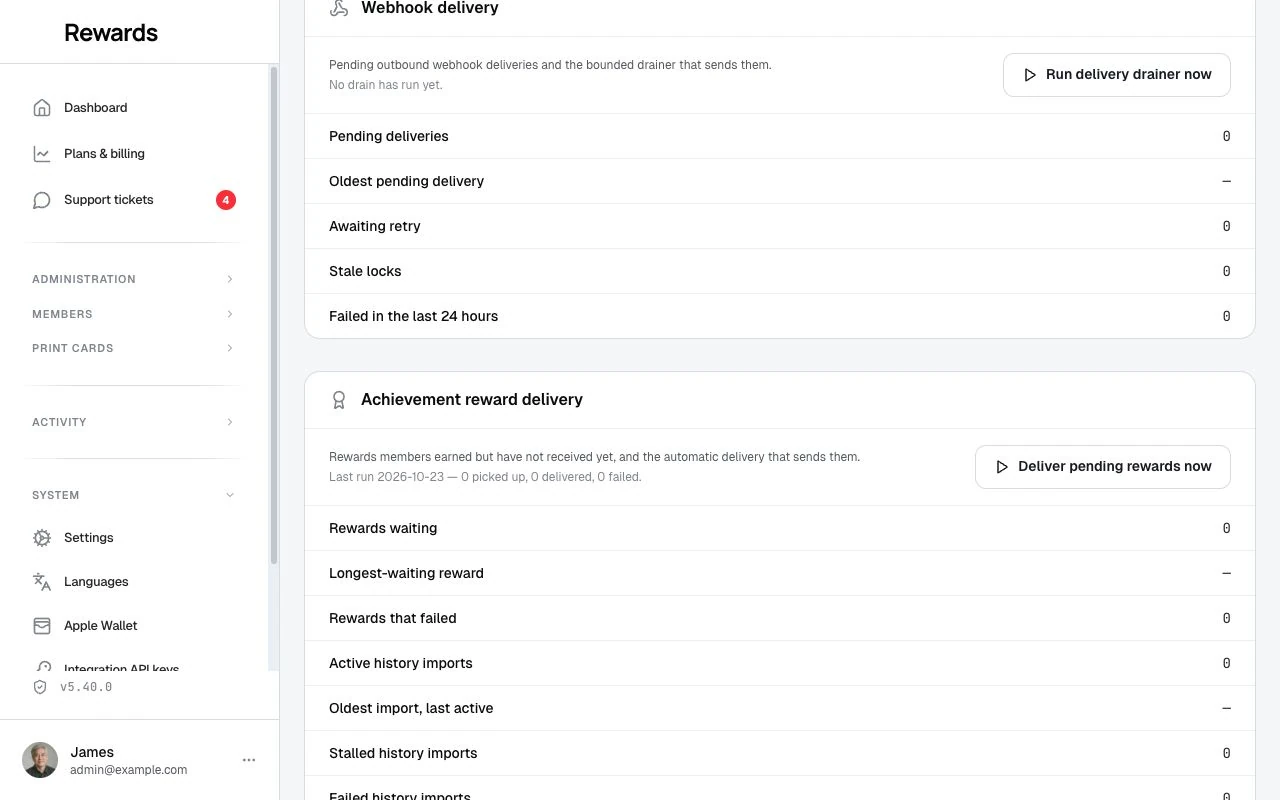
When any business runs an achievements program, the Health center adds an Achievement reward delivery panel with the numbers behind the services check:
- Needs attention (only while failed deliveries exist): every affected business by name, how many of its rewards failed, why in plain words ("Reward product is inactive", "Member account was removed"), and how long the oldest failure has waited. Open reward deliveries signs you into that business (a normal, logged impersonation) and lands on its reward deliveries, where you repair or release each one; see when delivery fails. The list shows the fifty busiest businesses and says how many more are affected. It names businesses and reasons only, never a member or a reward's settings.
- Rewards waiting and the Longest-waiting reward: rewards a member earned but that have not reached their wallet yet, and how long the oldest has waited. If these climb on an install with no cron and little traffic, that is expected; press the button below to deliver them at once, or set up cron.
- Rewards that failed: deliveries that stopped after repeated errors. Each one waits under Needs attention above until it is repaired and retried, or released.
- Active history imports, the Oldest import, last active time, and any Stalled or Failed history imports: the state of the past-activity recognition that runs when a business first starts its program. "Last active" is the last time the oldest running import showed progress.
Deliver pending rewards now delivers a small batch (up to 20 rewards) at once and also nudges a stalled history import along. It is safe to press as often as you like; a reward can never deliver twice. It moves rewards that are waiting. A delivery that already failed only moves again once its cause is repaired and it is retried (or released) from the business's reward deliveries, which is where Open reward deliveries takes you. A history import that stopped after repeated errors shows as failed here; an administrator repairs it by running the achievements:reconcile command for that business. See Achievements troubleshooting.
Queue driver guidance
Reward Loyalty uses queued jobs for email delivery, notifications, and integrations. The queue driver determines how these jobs are processed:
| Driver | Behavior | Recommended For |
|---|---|---|
| Sync | Jobs run during the HTTP request | Single-business installs, shared hosting |
| Database | Jobs are stored in the database and processed by a worker | Multi-partner installs, moderate traffic |
| Redis | Jobs are stored in Redis and processed by a worker | SaaS operators, high-volume deployments |
| Null | Jobs are silently discarded (⚠️ warning) | Testing only. Mail and notifications are not sent |
For most self-hosted installs, sync is fine. The application works with sync queues. Jobs run inline instead of later. If you notice slow page loads when sending email or processing large batches, switch to database and run a queue worker.
To start a queue worker (for database or Redis drivers):
php artisan queue:work --sleep=3 --tries=3
On production servers, use a process manager like Supervisor to keep the worker running.
JSON API
The Health center JSON endpoint returns structured diagnostic data:
GET /{locale}/admin/health/json
Response:
{
  "success": true,
  "data": {
    "checks": [
      {
        "category": "environment",
        "label": "PHP Version",
        "status": "ok",
        "value": "8.4.1",
        "detail": null
      }
    ],
    "summary": {
      "ok": 19,
      "warning": 1,
      "critical": 0,
      "total": 20
    }
  }
}
This endpoint requires admin authentication and super administrator role.