Prepaid passes overview.
What prepaid passes are, when to sell them, and how they fit beside points, stamps, and vouchers.
A prepaid pass is a product your staff sell at the counter: counted visits, unlimited access or a fixed monetary balance. The customer pays once at your counter and receives a digital pass. Visit passes keep their visit and validity rules; monetary credit has no expiry and belongs to one pass at the issuing business.
Points and stamps reward future behavior. Vouchers discount a present purchase. A pass monetizes commitment: the customer pays today for visits they will make later. For service businesses such as car washes, studios, and barbers, the pass is the product.
Monetary balances
Prepaid passes offer three types: counted visits, unlimited access, and a monetary balance. A monetary pass holds one fixed amount in one currency for the issuing business. Each purchase creates a separate pass. Staff record the payment taken at the counter, then deduct exact purchase amounts as the member uses their credit.
Monetary sales start disabled. Under Prepaid passes → Monetary settings, the partner reviews the details from Business settings and the fixed translated member terms, then enables sales. The form has no terms editor or retention-period setting. The application does not automatically delete monetary financial records based on age. Backups and hosting determine their continued availability. Monetary products share the existing Prepaid passes permission and product limit. They have no expiry, top-ups, promotional credit, discounts, free grants, transfers or cross-business use.
The business collects payments and returns money at the counter, and uses its accounting system to calculate VAT and issue fiscal documents. Reward Loyalty keeps the supporting balance, references and history. Its balance records and exports are not tax invoices. A monetary pass's type does not establish its VAT treatment; the partner must classify its actual offering. The operating assessment covers the Netherlands/EU and issuer-only use. It is not a worldwide regulatory clearance.
Turning off monetary sales or losing the sales entitlement stops new issues. Authorized staff can still service existing credit, and the partner can reconcile and record external refunds. See monetary setup, checkout and financial records.
The visit-specific instructions below describe counted and unlimited passes.
What a pass is
Product lists and details show Type and Value. Value is the original offer: a visit count, an unlimited-access period, or a monetary face value in its currency. The member's remaining visits or credit belong to their issued pass.
Visit passes have two settings:
- Uses. A counted pass covers a fixed number of visits, for example ten washes. An unlimited pass covers any number of visits while it stays valid.
- Validity. An optional window in days, counted from the day of sale. A counted pass can run without one (the ten washes never expire). An unlimited pass requires one, because unlimited visits with unlimited time is not a sellable product. Thirty days of unlimited visits is a monthly membership.
A pass also carries a display price. The platform records what the customer paid for receipts and reports. Payment itself stays at your counter; the platform never charges members. A business can also issue a free visit pass as an achievement reward.
How a pass moves through the system
- A partner designs the pass product per club: name, uses, validity, price. A QR code per product opens its public page for counter displays. See Partner setup. Sales, visits, and breakage land in Analytics & History.
- Staff sell it in one scan-and-confirm flow. The member receives the pass in their wallet plus an email receipt branded with your business name. See Selling and scanning.
- On each visit, staff scan the pass QR and tick off one or more visits. Mistakes have an undo.
- The member watches the remaining count in their wallet. See The member view.
- A daily task closes out lapsed passes and sends one reminder per pass that enters its final week with visits left. It runs with cron, on portal traffic without cron, or by hand from Health center → Scheduled tasks. No queue worker is involved.
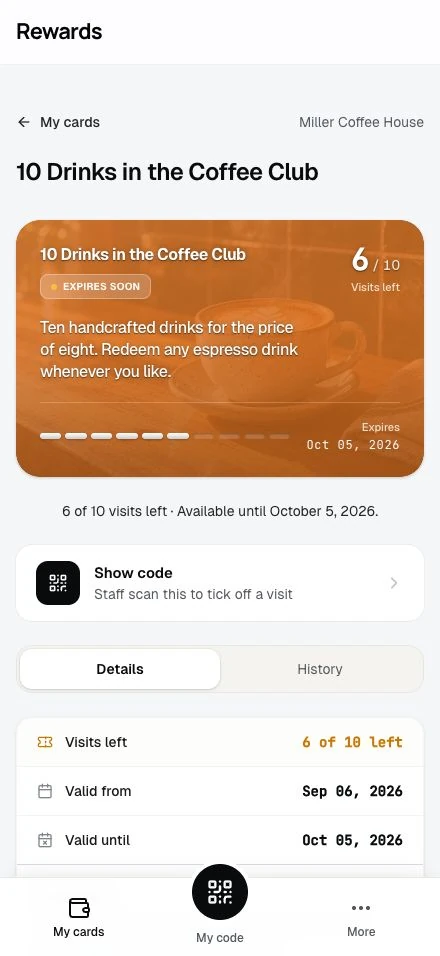
What sold passes keep
Each sold pass snapshots the product at the moment of sale: uses, price, currency, and validity. Editing the product later changes future sales only. Deleting it stops future sales and leaves every sold pass working. Members keep what they bought.
Every movement on a pass lands in a ledger: the sale, each visit, each correction, the expiry. Nothing in that history is edited or deleted afterwards; corrections add an offsetting entry. The pass detail page shows this history to the member in plain words.
What stays out
For visit passes, payment corrections stay at the counter. Members cannot buy passes online, passes cannot move between members, and there is no auto-renew. Refunds are not a money flow here; staff undo a visit scanned by mistake, and anything beyond that happens at your counter, where the payment lives.
Programmatic access
Both APIs cover passes. The Agent API (machine to machine, authenticated with X-Agent-Key) lets a partner integration manage pass products and sell, scan, and undo visits, and lets a member integration read their wallet. Visit writes use write:passes; monetary writes require both write:passes and an explicit write:pass-money grant plus pass_format=2. Format 1 remains visit-only; reads accept read. See the partner endpoints, member endpoints, and scopes. The locale REST API exposes the same surface for partner, staff, and member clients. Passes stay plan gated on both APIs.
Plan requirements
Prepaid passes are a plan feature, like vouchers. The administrator grants the permission and a template limit per partner, on the plan or as an override under Partners → Permissions. Partners without the feature cannot manage pass products, sell passes, or record visits. Existing visit passes remain visible as read-only records. Monetary credit keeps its separate servicing rules. Admin setup covers the full admin side, and the FAQ answers the common questions from all roles.
Each plan decides whether it includes passes and how many pass products a partner may create. They ship off on the free tier, then 3, 10, and unlimited on the paid tiers. To change a tier, open Settings → Set up plans and switch the feature or the limit in the Plans editor. A partner who already holds passes keeps selling them until their plan or permission changes. Sold passes remain in member wallets and staff history either way, but staff cannot record or undo visits while the feature is disabled; restoring the permission makes those controls available again. Once no active plan offers passes and no partner holds a grant, the My plan comparison stops mentioning them.
Upgrading from an earlier version
config/plans.php ships as pure defaults and is refreshed by updates, so a normal update delivers the prepaid-pass keys on its own. Until an installation takes that update, the feature stays off on every plan. Nothing breaks; passes stay unavailable until you turn them on one of two ways.
Set the plan values. Update the installation first, so the loaded plan definition carries the prepaid-pass settings; the Plans editor can only change values the definition already contains. Then open Settings → Set up plans and switch the feature and limit per tier in the Plans editor. Editor values live in the database, layer over the shipped defaults, and survive every update. New and reassigned partners receive the plan's values; for an existing partner, update their plan assignment or grant the feature on their Permissions tab.
Or grant it per partner. Without changing any plan, open Partners → edit a partner → Permissions, switch on Prepaid passes, and set the limit (-1 for unlimited). This override wins over the plan and suits a single partner or a trial run of the feature.