Monitoring performance.
Track enrollments, completions, and customer engagement
Track your stamp card program performance with detailed analytics and insights. Monitor enrollments, completion rates, and customer engagement to optimize your programs.
The card dashboard
Open a stamp card to see its dashboard. The selected period applies to page views and their trend. Members shows current enrollment. Total stamps issued, Completed cards, Rewards claimed, and the reward redemption rate show all-time totals. Stamps required per reward appears beneath Total stamps issued. A donut shows claimed rewards against the rewards still unclaimed. The header names the period you are viewing and keeps the public page and edit actions in reach. The selector offers today, yesterday, this or last week, this or last month, and this or last year. Weeks run Monday through Sunday.
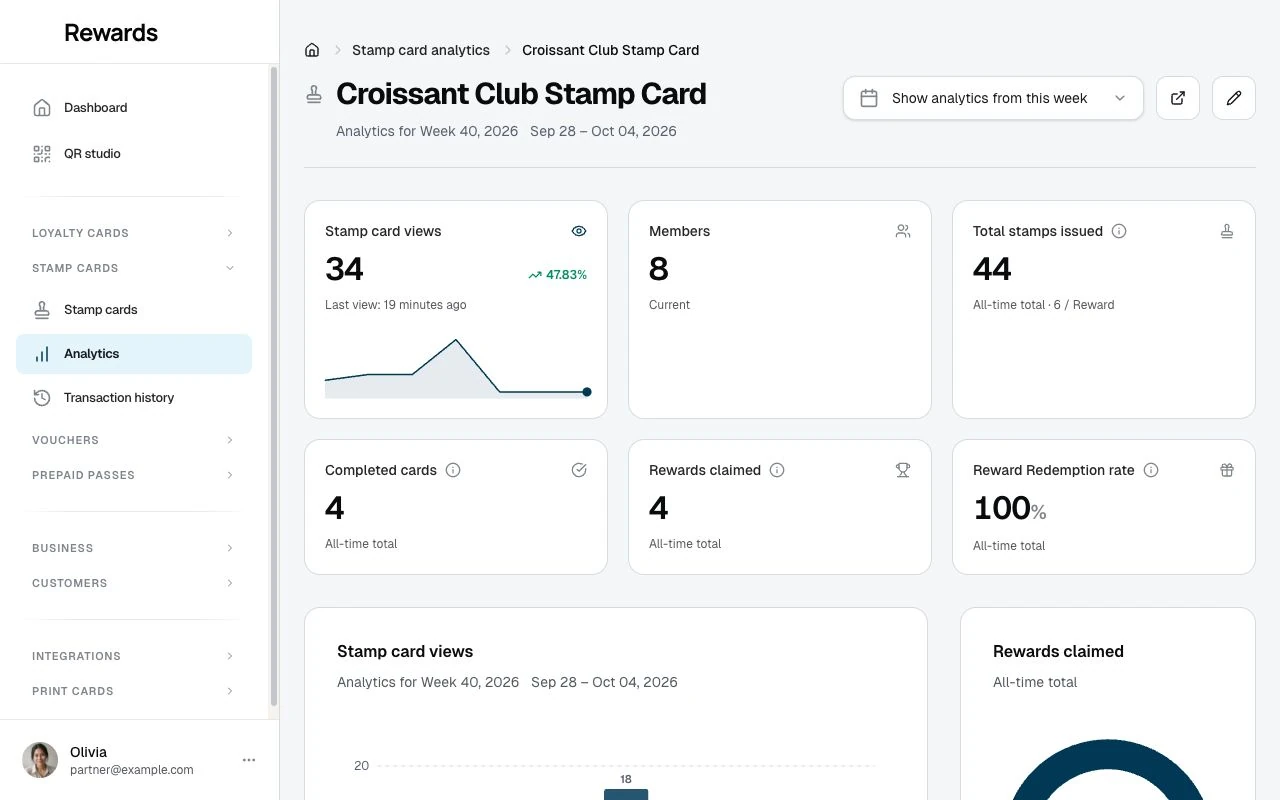
A Recent Activity feed at the foot of the page lists the latest events for the card, the stamps collected and rewards claimed and when, with a link to the full transaction history.
Accessing performance data
Stamp cards list view
Go to Stamp cards in the partner sidebar to see all your programs.
Columns displayed:
- Club: Which club the program belongs to
- Name: Program identification
- Active: Accepting stamps now
- On homepage: Whether the card shows on the public homepage
- Stamps issued: All stamps given on the program
- Completions: How many times customers filled the card
- Views: Page views of the card
- QR: The program's join code
The Analytics entry under Stamp cards opens the analytics index, sortable by views, name, stamps, completions, redemptions, and dates. Open a program there to see its full dashboard.
Key performance metrics
Total enrollments
What it measures: Members enrolled in the program, including members who added it before their first stamp
Compare enrollment with your own customer base and previous launches. A new program and a long-running program need different expectations.
Low enrollments indicate:
- Poor visibility (enable homepage display)
- Unclear value proposition (improve descriptions)
- Unappealing reward (increase value)
- High barriers (lower minimum purchase)
Total stamps awarded
What it measures: All stamps given across all customers
Use for:
- Understanding program activity level
- Calculating average stamps per customer
- Identifying engagement trends
Calculation examples:
- 100 enrollments × 7 average stamps = 700 total stamps
- High number indicates strong engagement
Total completions
What it measures: How many times customers have completed the card
Includes:
- First-time completions
- Repeat completions by same customers
- All historical completions
Compare completions over similar periods and check whether the same members complete the card more than once.
Completion rate
The dashboard shows reward-claim rate: claimed rewards divided by completed cards. Its totals are not limited by the views period selector.
To calculate a member completion rate, use the transaction export to count distinct members who completed a card, then divide by the members in the same group. Repeated completions by one member must not count as different members. This is a separate calculation, not a dashboard tile.
Improving low completion rates:
- Reduce stamps required
- Lower minimum purchase amount
- Remove or increase daily limits
- Extend validity period
- Increase reward value
Viewing customer-level data
Members list integration
Open Customers → Members to see stamp card participation:
Cards column and member details show:
- Which programs each customer is enrolled in
- Current progress for each card
- Quick link to transaction history
Click customer name to view full profile including all stamp card activity.
Transaction history
For each customer enrollment, view:
Access: Customers → Members → select a card in the Cards column, or open the member and select Transaction history beside that stamp card.
Information displayed:
- All stamps earned (dates and times)
- Purchase amounts (if recorded)
- Staff member who added stamps
- Internal notes
- Before/after stamp counts
- Completion events
- Reward redemptions
Use for:
- Customer service inquiries
- Dispute resolution
- Understanding customer behavior
- Identifying patterns
Time-based analysis
Use the card dashboard’s period selector to compare current and previous day, week, month, or year figures. The software does not compute a per-customer completion time; when you want it, work it out from the transaction history export.
Enrollment trends
The enrolled-members tile shows the current total, not new enrollments within the selected views period. For enrollment trends, compare saved totals from different dates or analyze dated enrollment records:
Launch spike:
- High enrollments in first week
- Normal for new programs
Steady growth:
- Consistent enrollments over time
- Indicates sustainable program
Declining enrollments:
- Fewer new customers joining
- May need refresh or promotion
Seasonal patterns:
- Higher enrollments during busy seasons
- Use validity periods for seasonal programs
Comparing programs
If you have multiple stamp card programs:
Side-by-side comparison
Metrics to compare:
- Enrollments
- Completion rates
- Repeat participation
Example of your own analysis:
The following table uses illustrative figures calculated outside the dashboard. Use the same member group and time period for every program.
| Program | Enrollments | Completion Rate |
|---|---|---|
| Coffee Card | 250 | 65% |
| Pastry Card | 180 | 72% |
| VIP Card | 95 | 38% |
Insights:
- Pastry Card: Quick wins, high completion
- Coffee Card: Popular, good completion
- VIP Card: Exclusive, longer commitment
Best performers
Identify your most successful programs:
High enrollment + High completion:
- Perfect program design
- Replicate for other offerings
High enrollment + Low completion:
- Great initial appeal
- Reduce barriers to completion
Low enrollment + High completion:
- Niche appeal
- Increase visibility
Low enrollment + Low completion:
- Needs major revision or retirement
Export and reporting
Exporting data
To export stamp card data:
- Go to Stamp cards list
- Apply any filters if needed
- Click Export and pick CSV, TSV, or JSON
- Download the file
The programs export includes the card fields plus the list counters (stamps issued, completions, views). For per-stamp detail, export the transaction history instead; that export carries every earn, void, and claim.
Use exports for:
- Executive reporting
- Trend analysis
- External analytics tools
- Historical records
Custom reports
Combine stamp card data with other metrics:
Customer lifetime value:
- Customers with stamp cards vs without
- Impact on overall spend
- Retention rates
Cross-program participation:
- Customers in both loyalty cards and stamp cards
- Combined engagement levels
- Total rewards earned
Optimization strategies
Based on enrollment data
Low enrollments:
- Enable homepage visibility
- Train staff to mention program
- Create in-store signage
- Send email announcements
- Improve reward value
High enrollments:
- Program is working well
- Consider creating similar programs
- Maintain current strategy
Based on completion data
Low completion rates:
- Reduce stamps required
- Lower minimum purchase
- Increase reward value
- Remove restrictive limits
- Extend validity period
High completion rates:
- Program is successful
- Consider increasing stamps for higher-value rewards
- Create premium tier programs
Based on time data
Slow completion:
- Send reminder notifications
- Offer bonus stamp promotions
- Reduce barriers
- Increase reward appeal
Fast completion:
- Program is engaging
- Ensure rewards are sustainable
- Monitor for abuse
Monitoring best practices
Check metrics weekly: Regular monitoring helps catch issues early.
Set performance goals: Define targets for enrollments and completions.
Compare like periods: Use your own earlier results and comparable programs. Account for changes in opening hours and promotions.
Act on insights: Use data to make informed program adjustments.
Track changes: Monitor impact of modifications you make.
Celebrate successes: Share positive results with your team.
Troubleshooting performance issues
"No enrollments after launch"
Possible causes:
- Program not visible
- Unclear value proposition
- Staff not aware
Solutions:
- Enable homepage visibility
- Improve descriptions
- Train staff
- Promote it
"High enrollments but no completions"
Possible causes:
- Too many stamps required
- Minimum purchase too high
- Daily limits too restrictive
Solutions:
- Reduce stamps required
- Lower minimum purchase
- Remove or adjust limits
"Completions but no repeat participation"
Possible causes:
- Reward not strong enough
- Card didn't reset
- Customers unaware they can continue
Solutions:
- Increase reward value
- Verify technical functionality
- Communicate reusability
Next steps
- Managing Transactions: View and manage customer stamp history
- Best Practices: Optimize based on performance data
- Configuring Rewards: Adjust rewards based on insights