Membership tiers.
Set up tiered membership levels with benefits and qualification rules
Membership tiers turn your loyalty program from simple point accumulation into a status-driven engagement platform. Create levels like Bronze, Silver, Gold, and Platinum where members automatically progress based on their loyalty activity.
Why use tiers?
Tiers encourage repeat engagement by rewarding your best customers with visible status symbols and tangible benefits. Similar to airline frequent flyer programs, tiers create aspirational goals that motivate customers to spend more.
Benefits of tiers:
- Increased engagement: Customers work toward the next level
- Higher retention: VIP status creates emotional attachment
- Better rewards: Top customers earn multiplied points on every purchase
- Clear progression: Visual progress tracking motivates action
How tiers work
Club-level architecture
Tiers operate at the club level, not the individual card level. This mirrors real-world loyalty programs like airline frequent flyer status or hotel elite tiers.
- Each club (business) can configure one tier system
- Members earn a single tier status per club
- That status applies to all loyalty cards within that club
Example: A coffee chain has three loyalty cards (Classic, Premium, Student). A member earning points across any of these cards accumulates toward one shared tier status. If they reach Gold, all three cards reflect Gold status and benefits.
Lifetime points qualification
Tiers can use lifetime points earned, purchase amounts, or transaction counts. Points-based qualification uses lifetime qualifying points, not the current spendable balance:
- Lifetime qualifying points: Earned points excluding reversed awards; spending points does not reduce this total
- Current balance: Available points to spend (decreases with redemptions)
A member who earned 10,000 lifetime points but spent most of them still maintains their tier status. Tiers reward loyalty history, not current spending power.
Before you start
💡 Tiers are optional. Your loyalty program works without them. Point multipliers default to 1.0. Add tiers when you're ready to reward your most loyal customers with VIP status and bonus benefits.
Create your loyalty cards and rewards first. Tiers enhance existing programs. They work best when you already have:
- At least one club created
- Active loyalty cards
- Members using your program
Creating your first tier
- Go to Tiers in the partner sidebar (under Loyalty cards)
- Click Create
- Fill in the tier details across four tabs
Select How membership tiers work above the list to open the guide. It starts collapsed on each page load.
Tab 1: Details
| Field | Description |
|---|---|
| Name | Internal reference (e.g., "Gold") |
| Display Name | What members see (translatable) |
| Description | Summary of benefits (translatable) |
| Club | Which loyalty program this tier belongs to |
| Level | Hierarchy position (0 = base, higher = better). Must be unique within each club. |
| Is Active | Controls tier availability. Toggling this reassigns affected members. |
Level numbers determine tier hierarchy and the starting tier. The active tier with the lowest level becomes the default starting point for new members. Start at 0 for your base tier, then use 1, 2, 3 for higher tiers. Each level number must be unique within a club to avoid ambiguity.
Tab 2: Qualification
Set the requirements members must meet to unlock this tier:
| Threshold | Description |
|---|---|
| Points Threshold | Lifetime points earned across all transactions |
| Spend Threshold | Lifetime purchase amount, entered in your currency (e.g., 500 for $500) |
| Transactions Threshold | Number of purchases made |
When you set more than one positive threshold, the club's evaluation setting determines whether a member must meet Any condition or All conditions. To use one metric, set that threshold and leave the others empty.
The active tier with the lowest level serves as the starting tier. A higher tier without positive thresholds shows No qualifying conditions.
The tier list shows the club, tier identity, level and qualification summary. It starts in level order. On phones, open Details for the benefits and current active member count.
Tab 3: Benefits
Configure the rewards members receive at this tier:
| Benefit | Description |
|---|---|
| Points Multiplier | Multiply earned points (1.5 = +50% bonus) |
| Redemption Discount | Reduce the points needed to redeem a reward. Enter a fraction from 0 to 1; the list shows 0.15 as 15%. |
Points multiplier must be between 0.1 and 10.0. Values below 1.0 reduce earned points; values above 1.0 increase them. A 2.0× multiplier means a purchase that would earn 100 points earns 200 instead.
Note on point ceilings: If a card has a "Max Points Per Purchase" setting, that ceiling still applies after the multiplier. A 2× multiplier on a card capped at 1,000 points will never award more than 1,000 in a single transaction. See Point Rules.
Tier-exclusive vouchers. Beyond the points multiplier, you can reserve a voucher for one or more tiers on the voucher's Targeting tab. A tier-restricted voucher is delivered in private: the moment a member holds, or reaches, an eligible tier, it lands in their My Cards and they receive an email. It never appears in public voucher listings or on the homepage, and members outside the tier never see it. Once a tier voucher lands in a member's My Cards it stays theirs to use, and they keep it even if their tier later changes. Tier targeting controls who receives a voucher, not whether they can still redeem one they already hold. The voucher stays redeemable until it expires, you deactivate it, or it is used up. See Advanced Targeting & Eligibility.
Tab 4: Design
Choose how the tier appears to members:
| Field | Description |
|---|---|
| Icon | Emoji or icon identifier (e.g., 🥇, 💎) |
| Color | Hex color code for badges (e.g., #FFD700) |
Use recognizable emojis and vibrant colors that work in both light and dark mode.
Common tier structures
Coffee shop example
| Tier | Level | Points | Multiplier | Icon | Color |
|---|---|---|---|---|---|
| Bronze | 0 | 0 | 1.0× | 🥉 | #CD7F32 |
| Silver | 1 | 1,000 | 1.25× | 🥈 | #64748B |
| Gold | 2 | 5,000 | 1.5× | 🥇 | #FFD700 |
| Platinum | 3 | 15,000 | 2.0× | 💎 | #8B5CF6 |
Bronze is the default tier (all new members start here). Platinum offers double points on every purchase.
Restaurant example
| Tier | Level | Spend | Multiplier | Icon |
|---|---|---|---|---|
| Regular | 0 | $0 | 1.0× | ⭐ |
| VIP | 1 | $500 | 1.3× | 🌟 |
| Elite | 2 | $2,000 | 1.75× | 👑 |
This structure uses spend thresholds instead of points. Elite members earn 75% more points on every purchase.
How tier progression works
The system re-evaluates every member after each transaction:
- Customer makes a purchase or redeems a code
- The system processes the transaction and awards points
- System checks member's qualifying stats (lifetime points, spend, transactions)
- System finds the highest tier the member qualifies for
- If different from current tier:
- The member moves up, or down if you enabled it
- The system assigns the new tier
- Member receives email notification (a per-club switch, one each for upgrades and downgrades; see Automatic messages)
- The system records an activity-log entry
The system keeps the history. When a member's tier changes, the old assignment stays in the database (marked inactive) for audit purposes.
Deactivating and reactivating tiers
When you deactivate a tier, the system re-evaluates everyone on it and moves them to the highest remaining tier they qualify for. If no other tier qualifies, they fall back to the default (lowest-level) tier.
When you reactivate a tier, the system re-evaluates members on lower-level tiers. Anyone who qualifies for the reactivated tier, or a higher one, moves up. Members already on higher tiers stay put.
Seeing member tiers in the dashboard
Open a tier's View action to inspect Details, Qualification, Benefits, Design and History. The view keeps the tier's selected icon, color and qualification values.
Your Members list shows each member's current tier in a Tier column alongside the member details and Cards, as a chip with the tier's icon and name on a soft wash of the tier's colour. A member with a tier in more than one club shows one chip per club. The column appears once you have at least one tier configured.
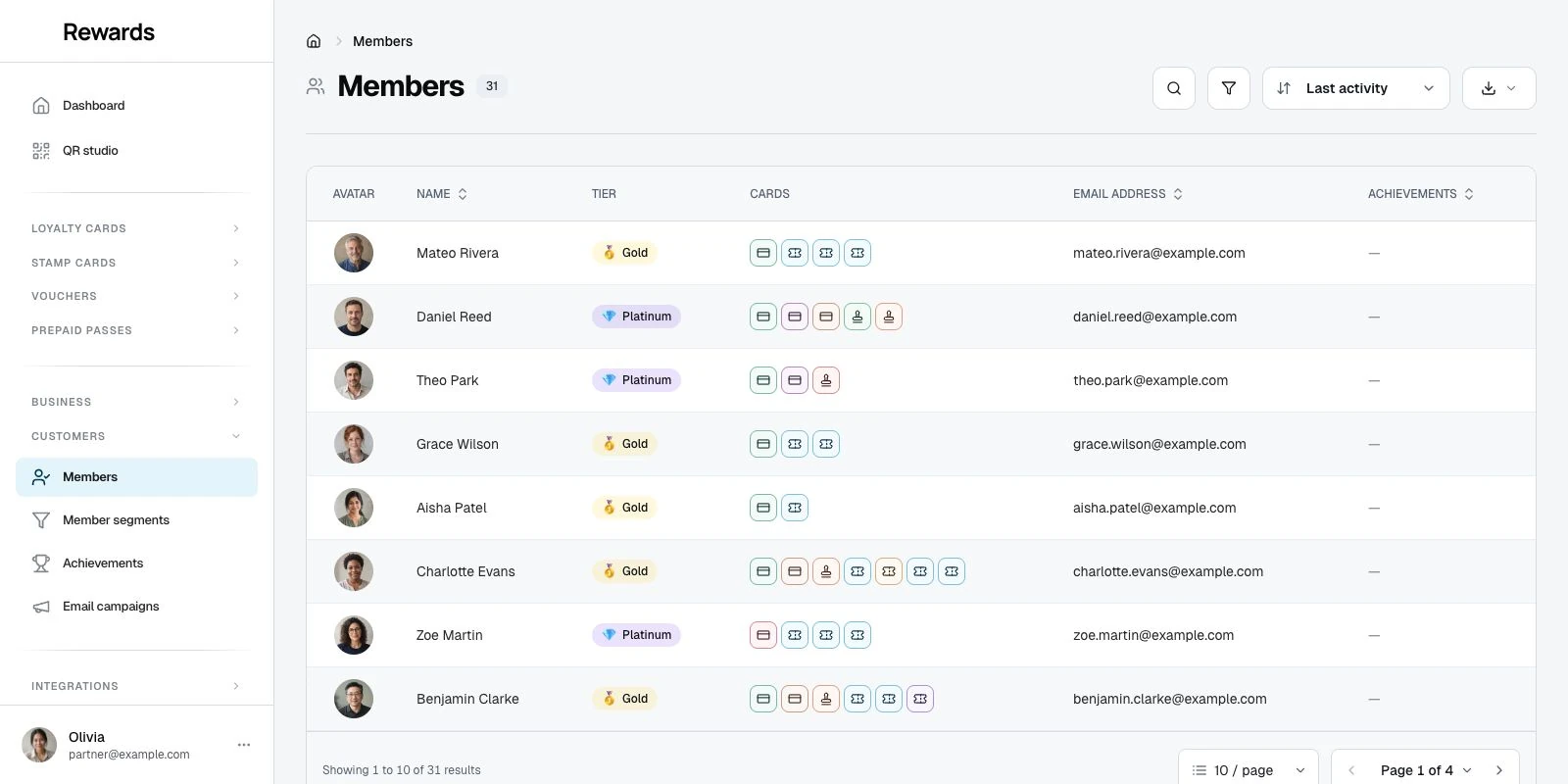
You can also filter the list by tier: click Filters, add the Tier filter, and choose one or more tiers to see only the members who hold them now.
How members see tiers
When tiers display
Tiers only appear to members when they've earned them:
Tier shows if:
- Member has earned lifetime points greater than zero in your club
- Member has an active tier assignment
- Member is viewing a card from your club
Tier does not show if:
- Member has zero lifetime points (default tier, not earned)
- Member is viewing a card from a different club
- Your club has no tier system configured
Display locations
The loyalty card face shows the member's earned tier beneath the balance and card description, both in My Cards and on the card detail page. When the tier's points multiplier is above 1×, it appears beside the tier name, for example "Gold · 1.5×".
Tier information belongs to each card's business. My Cards groups loyalty cards, stamp cards, prepaid passes and vouchers by program type; it has no separate tier section or tier progress strip.
Best practices
Tier structure design
Start with 3-4 tiers maximum. More tiers create confusion. Bronze, Silver, Gold, Platinum is a proven structure.
Start your base tier at level 0. The lowest-level active tier becomes the starting point for new members. This tier needs no thresholds.
Use unique level numbers. Each tier within a club must have a distinct level number. The system rejects duplicate levels, so the default tier is never ambiguous.
Raise benefits step by step. Each tier should feel better than the last, but not so much that lower tiers feel worthless.
Icon and color selection
Use recognizable emojis:
- 🥉🥈🥇💎 (medals and gems)
- ⭐🌟✨ (stars)
- 👑💝🎁 (special symbols)
Choose vibrant, distinct colors:
- Bronze:
#CD7F32(warm brown) - Silver:
#64748B(slate gray) - Gold:
#FFD700(bright gold) - Platinum:
#8B5CF6(vibrant violet)
Related topics
- Creating Cards: Design your loyalty program
- Managing Rewards: Set up redemption options
- Analytics: Track tier progression and engagement