
Languages & translations.
Manage languages and edit every text from the admin dashboard.
On this page
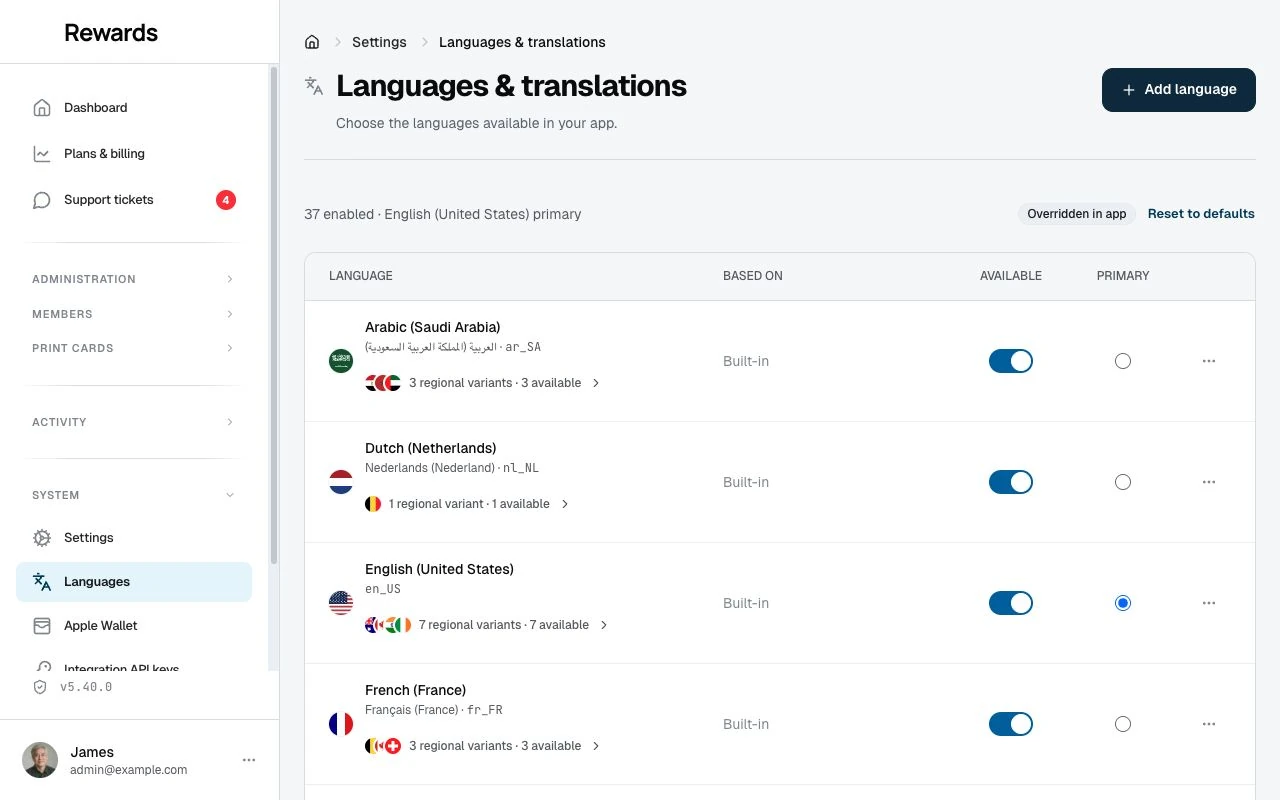
Languages & translations is where you choose the languages your installation offers, set the main language, add new languages, and edit every text in the product — buttons, messages, the FAQ, and the content pages. Only full administrators can open it, and it applies to the whole installation, not to a single business. The key promise: everything you save here is stored in the database and survives application updates, with nothing to configure on the server.
Open it from Languages in the admin sidebar, under System. It is also on the settings overview as the Languages & translations card.
How translations work
Every text on screen comes from the first of these that has it:
- Your edit in the translation editor.
- The language's own built-in file (the 13 built-in languages only; regional variants have no files).
- The language it is Based on (added languages only).
- The fallback language (set under Advanced).
- English (United States), which always has every text.
A worked example. You turned on English (United Kingdom) — a built-in regional variant based on English (United States) — and edited one text:
| Text | English (UK) shows | Why |
|---|---|---|
| Save changes | Your edit | You edited it in English (UK) |
| Cancel | The English (US) text | No UK edit, so its Based on language supplies it |
| A brand-new text from an update | The English (US) text | New texts arrive untranslated and show the source language |
Business content is translated in its own form: card names, reward and voucher descriptions, and email campaigns. See Writing business content in several languages. When a visitor's translation is empty, the app first checks the enabled language representing that family, then its source language, the primary language, the fallback language, English, and other saved translations. Interface text still follows the separate inheritance rules above.
The terms this page uses
- Built-in language — one of the 13 translations that ship with the app, stored as files.
- Added language — a language you create on this screen. It has no files; it is based on another language and starts with that language's text.
- Regional variant — a ready-made language that ships with the app, such as English (United Kingdom) or Spanish (Mexico). It works exactly like an added language — based on a built-in language, edited in the editor, edits surviving updates — but you never create it: it is already there, nested under its base language in the list. Its base language is fixed. Regional variants are off after installation and all on in the demo.
- Available — visitors can choose the language and pages can open in it. (
APP_ACTIVE_LOCALESin.envand'active'in a language folder'sconfig.phpcontrol the same thing; see defaults.) - Primary language — the main language: the default for visitors, and the language every new business record must be written in.
- Fallback language — the language checked when a text is missing, before English. Set it under Advanced, the small section below the language list on the Languages screen.
- Edited text — a text you saved in the translation editor. Edits win over every other source and survive updates.
Languages are named by a language code plus a country code, like en_GB or es_MX. The country half matters: it sets dates, numbers, and currency formatting, so English (UK) shows British dates even when its text comes from English (US).
The built-in languages are English (US), German, Spanish, French, Indonesian, Italian, Japanese, Korean, Dutch, Polish, Portuguese (Brazil), Turkish, and Arabic — Arabic with full right-to-left support. Only English (US) starts available. Visitors get the available language that best matches their browser preferences; a saved choice or account preference wins over that.
Everyday tasks
Make a language available, or hide it
- Open Languages in the admin sidebar.
- Turn the language's Available switch on or off.
- Select Save changes in the bar at the bottom.
When you turn off a language, the page first shows how many accounts prefer it and which added languages use its text — nothing is deleted, and you can turn it back on later. If you turn off the language you are currently browsing in, the page reopens in the primary language after saving.
What visitors see: after Save changes, every enabled language and regional variant appears in the language selector. The member, partner, and admin selector sorts choices by language and country; with more than six choices, search finds a language, country, or locale code. Staff use a grid of the available languages. Selecting a region keeps its own dates, number formats, and translated text. When only one locale is available, the selector hides itself.
Change the primary language
- Turn on the Available switch of the new primary language, if it is off.
- Select its Primary choice. The Primary choice only appears on available languages.
- Select Save changes.
What visitors see: immediately after saving, new visitors without a matching browser language get the new primary language. Existing members keep their own saved choice.
Use British English as your main language
British English ships as a built-in regional variant, so there is nothing to add:
- Open Languages.
- Open the English group — the "7 regional variants" line under English (United States).
- Turn on the Available switch of English (United Kingdom).
- Select its Primary choice.
- Optionally turn off Available for English (United States).
- Select Save changes.
What changes: dates and number formats follow British conventions immediately, and the wording stays the same English until you edit it — open the English (United Kingdom) editor to change "color" to "colour" wherever you care. Edits you make to English (United States) later flow through to every English variant that has no own text.
The same steps work for every variant: English (Australia) en_AU, Spanish (Mexico) es_MX, German (Austria) de_AT, the Swiss trio de_CH / fr_CH / it_CH, Belgium's nl_BE / fr_BE, and Canada's en_CA / fr_CA — open the group, turn the variant on, save.
What visitors see: the enabled variant appears as its own choice in the language selector. Making it primary changes the default for new visitors and the required language in business-content forms. If English (United States) is disabled, English (United Kingdom) takes its place in those forms.
The shipped regional variants
| Based on | Variants |
|---|---|
English (United States) en_US |
United Kingdom en_GB, Ireland en_IE, Australia en_AU, New Zealand en_NZ, Canada en_CA, India en_IN, South Africa en_ZA |
Spanish (Spain) es_ES |
Mexico es_MX, Argentina es_AR, Colombia es_CO, Chile es_CL, Peru es_PE, United States es_US |
French (France) fr_FR |
Canada fr_CA, Belgium fr_BE, Switzerland fr_CH |
German (Germany) de_DE |
Austria de_AT, Switzerland de_CH |
Italian (Italy) it_IT |
Switzerland it_CH |
Dutch (Netherlands) nl_NL |
Belgium nl_BE |
Portuguese (Brazil) pt_BR |
Portugal pt_PT |
Arabic (Saudi Arabia) ar_SA |
United Arab Emirates ar_AE, Egypt ar_EG, Morocco ar_MA |
All of them are off after installation and all on in the demo. Searching for one in the Add language dialog shows it with a Built-in badge and jumps to its row instead of creating anything.
Add a completely new language, like Swahili
- Select Add language, search for Swahili (Kenya), and keep Based on: English (United States).
- Select Add language, then make it Available and select Save changes.
 3. Select the language's name to open its translation editor. Every text shows in English, ready to overwrite.
4. Use the Needs translation filter: it lists every text without a Swahili translation, and its count drops with every save. Saving a text unchanged also counts — that is how you mark "the English wording is right here" as done.
3. Select the language's name to open its translation editor. Every text shows in English, ready to overwrite.
4. Use the Needs translation filter: it lists every text without a Swahili translation, and its count drops with every save. Saving a text unchanged also counts — that is how you mark "the English wording is right here" as done.
What visitors see: the language is selectable immediately; texts appear in English until you translate them, so you can translate the most-visited pages first and publish gradually.
Edit a text — in any language, including English
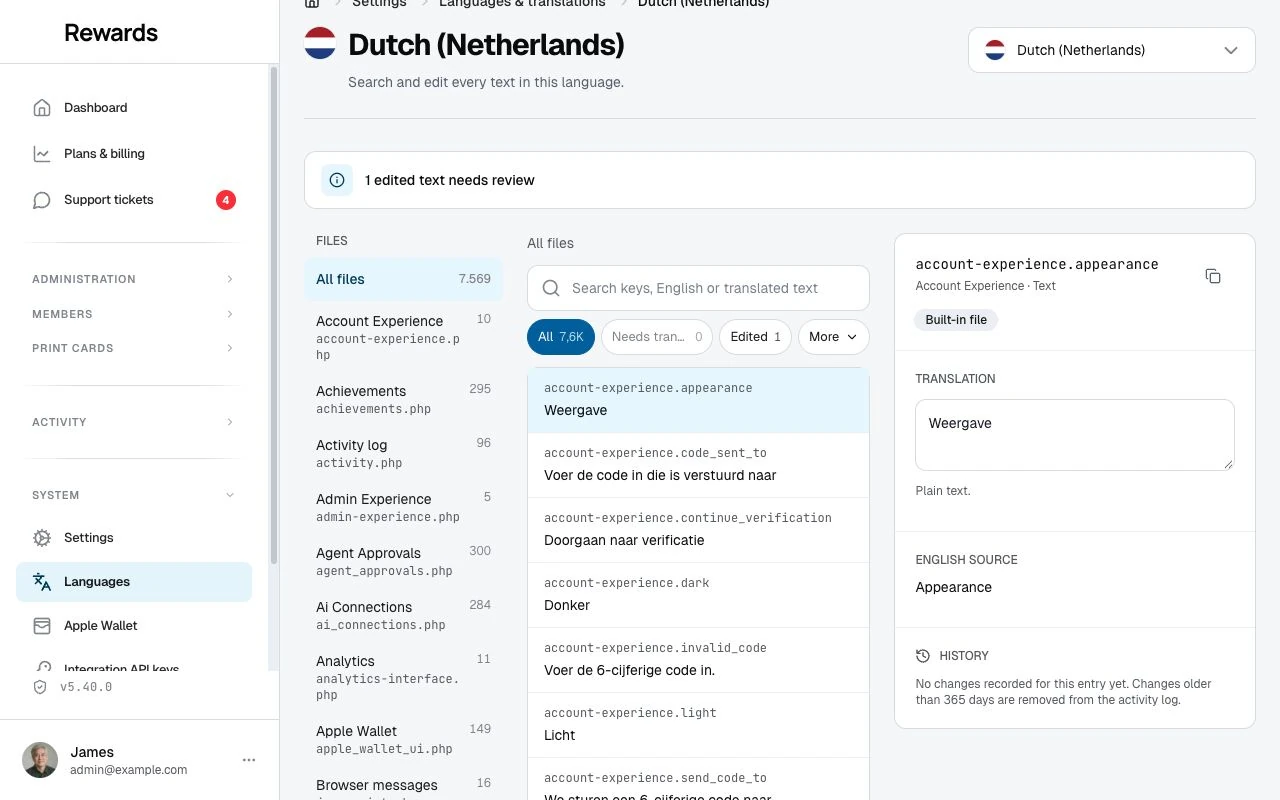
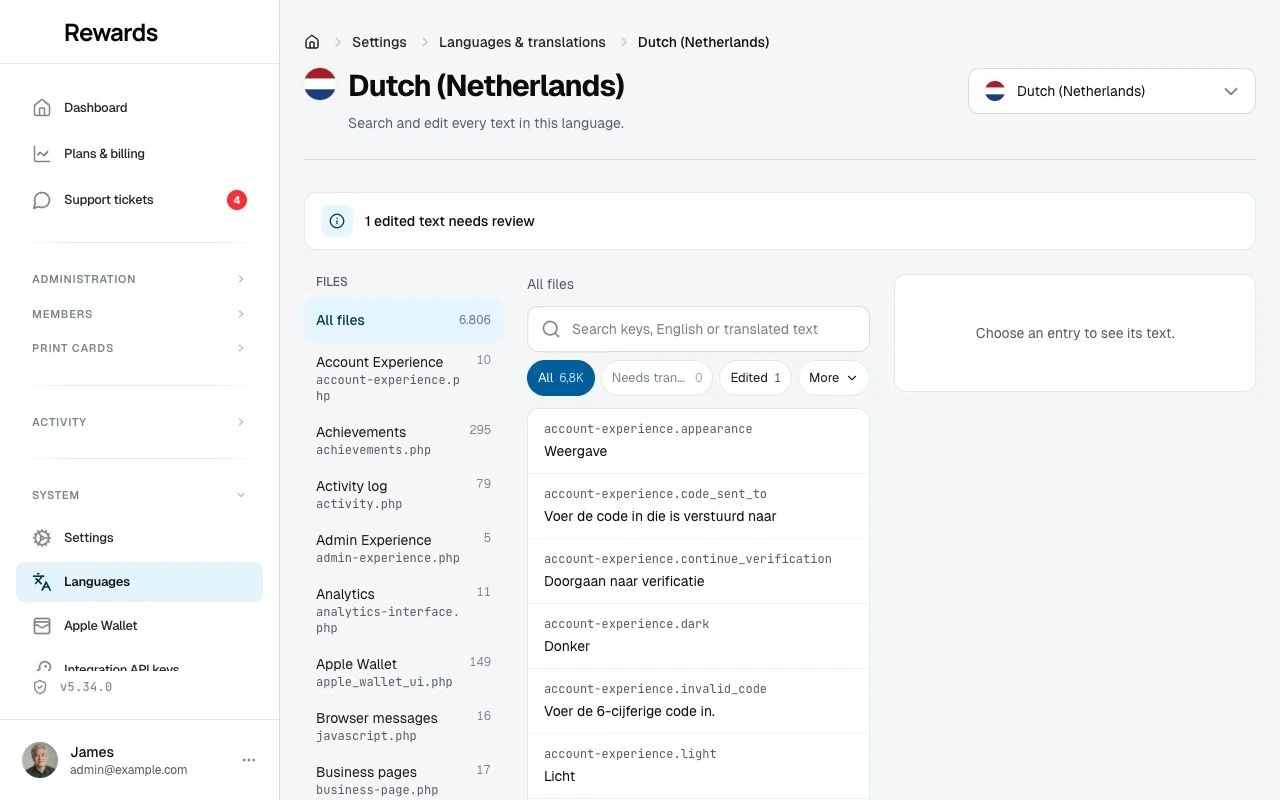
- Open the language's editor: select its name in the Languages list, or Edit translations in its row menu. This works for every language, available or not.
- Find the text with the search box — "Search keys, English or translated text" — by typing part of the text, its English wording, or its key. The file list on the left narrows to one file, but search is usually faster.
- Select the entry. The panel shows where its current text comes from (Built-in file, Based on English (United States), or Edited), the Translation field pre-filled with that text, and the English source for reference.
- Write your text. Placeholders such as
:countare shown as chips; keep them in your translation — real values replace them later. The editor names any missing placeholder before you can save. - Select Save changes. You can edit several texts across several files and save them together; the bar counts your unsaved changes, and the editor asks before you leave the page with unsaved work.
This works for English too: an edit on the English (United States) row replaces the shipped wording everywhere English is shown.
Some entries are more than plain text, and the editor adapts:
- Plural entries hold each form separated by a vertical bar (
:count card|:count cards). A Count preview shows which form a number selects, using the language's own plural rules. - Formatted text entries allow bold, italic, line breaks, and links, with a preview. Anything else is refused by name before saving.
- List entries, like the FAQ, are ordered cards.
What visitors see: saved texts are live immediately, on the next page they open.
Edit a content page or the FAQ
The About, Contact, Privacy, and Terms pages are edited as a whole:
- Open the language's editor and search for the page, or open the Pages file in the file list.
- Edit the Title, Description, and Icon — they form the page's header — and the Page text below them.
- Check the Preview under the fields: it shows the header and the page as visitors get them.
- Select Save changes.
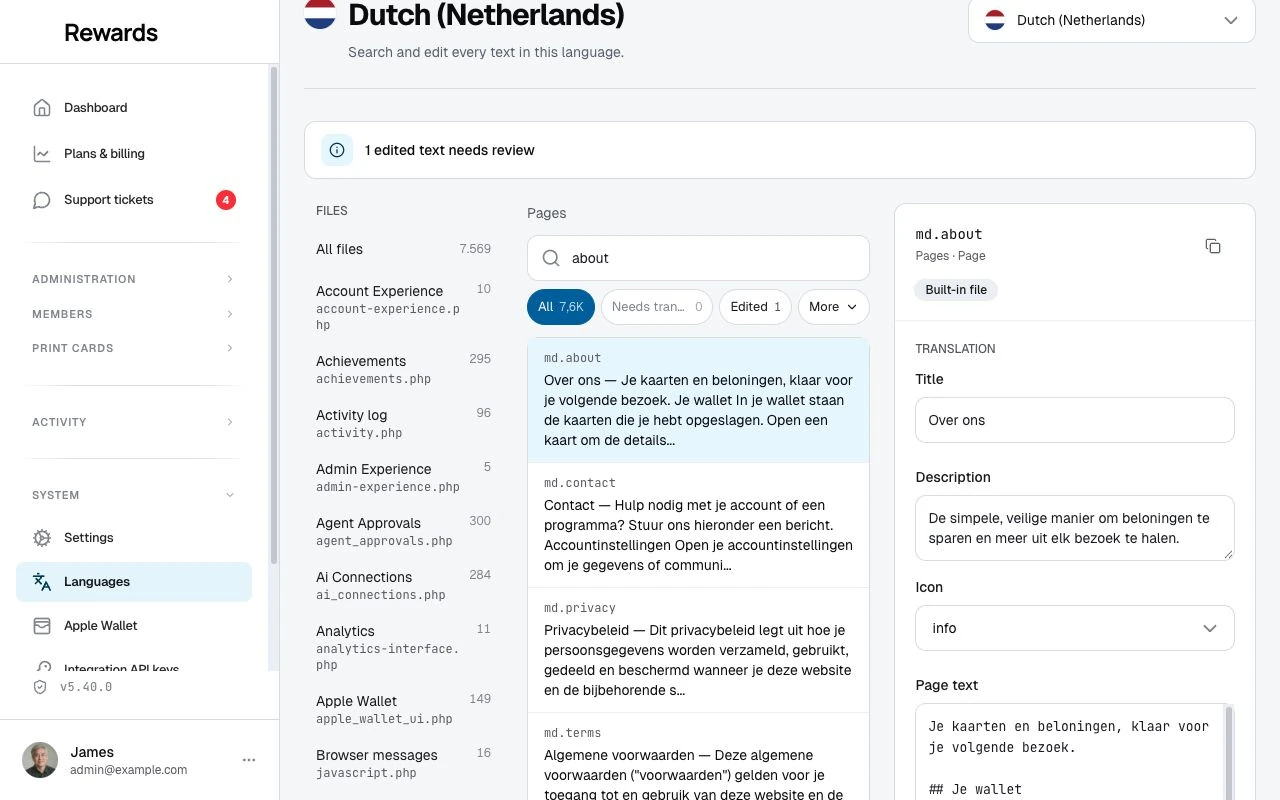
The page text is Markdown; see Content page rules for what it can contain.
The FAQ is a list, not a page. Its entry (in Frequently asked questions) shows question-and-answer cards: edit them in place, Add question, remove, or move them up and down. The order you see is the order visitors see. An empty list shows no questions.
What visitors see: the updated page or FAQ immediately after saving.
Undo an edit
- Reset to original (under the translation field of an edited text) removes your edit and returns the text to what sits underneath it — the built-in file, the Based on language, or English. For a text that is no longer in the product, resetting removes it completely, after a confirmation.
- History (in the entry panel) lists who changed the text and when, with the earlier wording. Select Use this value on an earlier version, then Save changes, to bring it back. History comes from the activity log and reaches back as far as its retention (365 days by default).
What visitors see: the restored text immediately after saving.
What happens when you update Reward Loyalty
| When a release… | What happens on your site | What you see in the editor |
|---|---|---|
| adds new texts | They appear immediately, in each language's own translation when the release has one, otherwise in the source language | A New mark on each, and "42 new texts" in the update banner |
| changes an English text you never edited | The new wording shows immediately | Nothing to do; the entry simply shows the new text |
| changes a text you edited | Your text keeps showing | Source changed: the entry shows the original as you last saw it beside the original as it is now. Edit your text, or select Keep my text |
| removes a text | Your translation keeps working for anything that still uses it | No longer used on the entry; Reset to original removes it for good |
| improves a built-in translation (for example Spanish) | Texts you never edited show the improved wording; texts you edited keep your wording | Nothing to do for untouched texts. Your edited texts are marked Source changed, with the old and new original side by side and Keep my text |
| adds a new file | Its texts appear like any other new texts | The file carries a New mark in the file list |
Plainly:
- Your edits are never overwritten. Not by updates, and not by improved built-in translations; when the original under an edit improves, the edit is flagged Source changed for you to compare.
- Built-in language files are replaced by updates unless you protect them. Added languages and regional variants have no files, so there is nothing to replace — their edits live in the database like everything else you save here.
- Added languages receive new texts in their source language until you translate them.
- After an update, each language's editor shows an update banner — for example "5.33.0: 42 new texts · 3 removed · 7 edited texts need review" — and each count opens the matching filter. The Since version choice above the results widens the view when you skipped releases. The Languages list and the settings overview show the same work per language.
- Updates run this bookkeeping automatically. If you deploy with git or replace files manually, run
php artisan languages:synconce afterwards (opening the Languages page also triggers it).
Writing business content in several languages
The primary language stays visible in each translated field. Use Show more languages (optional) to open the other language headings, then select a heading to reveal its input. Regional variants sit under the language representing their family, so the form stays compact.
The representative is the primary language when it belongs to that family; otherwise it is the enabled base language, or the first enabled regional variant. A region can therefore be the main field without its base language being enabled. For example, a UK business can write in English (United Kingdom) and leave English (United States) disabled.
Opening an extra language remembers that choice for your account in this browser. On another record or after reloading, only the primary language and those remembered inputs stay open. The full list remains behind Show more languages (optional). Select the × beside a remembered language to return it to that list; its text is kept. These preferences use browser storage, not cookies, and do not follow you to another browser or device.
A green circle-check marks Has content in the language list. Empty regional fields use the language named in their fallback hint. Other empty translations follow the business-content fallback order above. Closing a language or hiding the list never clears a translation.
If a translated field fails validation, its section and language input open so you can correct it. The form moves focus to the first available invalid field. Opening or closing language inputs does not count as an unsaved change; editing their text does.
The same controls appear in record forms, campaign subjects and messages, plan translations, and translated homepage text. In an email campaign, provide both a subject and a message for each complete translation; the two are selected together for preview and delivery.
Fallbacks in detail
Interface texts fall back per text, in the order at the top of this page: your edit, the language's own file, its Based on language, the fallback language, English. At every stop, that language's own edits win over its files. Example: a Spanish (Mexico) visitor, es_MX based on es_ES, sees your Mexican edit if you made one, otherwise the Spanish text (edited or built-in), otherwise English.
Content pages are used whole. A page comes from one language — title, description, and text together — so visitors never see a Dutch title above an English text. Example: until you translate the About page into Swahili, Swahili visitors get the complete English About page.
Email campaigns send the subject and body together from one language. When a campaign is not fully translated in the recipient's language, the app picks the first language that has both — it never combines a subject in one language with a body in another. See Email campaigns.
When you turn off a language that members chose: they keep receiving email in it, because its translation is still there. Links in those emails open in an available language, and on the site they browse in the best available match. In their profile, they can pick a new language from the available ones. Turning the language back on restores everything as it was.
Defaults from .env and language files
The screen starts from your server configuration and takes over when you save. Precedence, top wins:
| Availability | Primary and fallback |
|---|---|
| Saved on the Languages screen | Saved on the Languages screen |
APP_ACTIVE_LOCALES in .env (comma-separated, for example "en_US,nl_NL") |
APP_LOCALE and APP_FALLBACK_LOCALE in .env |
Each language folder's config.php 'active' value (only when APP_ACTIVE_LOCALES is empty) |
— |
In demo mode, every language with a translation is available regardless of these settings.
Reset to defaults (on the Languages screen) removes what you saved there and returns control to .env and the files. It keeps your added languages — they stay in the list and become unavailable until you turn them on again — and it never touches your edited texts.
Use full codes (en_US) in .env. An old .env that still says APP_LOCALE=en keeps working: the app treats it as en_US without rewriting your file. If the configured primary language is unavailable, the app uses the first available language and shows a notice on the Languages screen, leaving your configuration unchanged.
Working with files (advanced)
The screen is the recommended way to manage translations. Files remain useful in two cases: a content page that needs an embed, and translations you want to manage in git.
Each built-in language is a folder under lang/ — lang/es_ES/, for example — with one PHP file per area (common.php holds most interface texts, validation.php the form messages, faq.php the FAQ) and an md/ folder with the four content pages. To create a language as files, copy the complete lang/en_US/ folder, rename it to the new code (like sw_KE), and translate the values. File-based texts show up in the editor like any others, and edits made in the editor sit on top of them.
Protecting custom translations during updates
Updates replace language folders. If you changed files under lang/, list those folders in .env so updates keep them:
PROTECTED_TRANSLATIONS="es_ES,sw_KE"
- Protection and availability are separate:
PROTECTED_TRANSLATIONSkeeps files through updates,APP_ACTIVE_LOCALES(or the screen) makes languages available. Neither implies the other. - Edits made on the screen need no protection. They are not files.
- A protected folder from an older version keeps working: texts it is missing are filled from the newest English, and the editor lists them under Needs translation.
- The
resources/lang-release/folder is managed by the app and always follows the release. Do not edit or protect it.
Content page rules
Page text is Markdown, and everything standard works:
## Opening hours
We are open **every day**, see [our website](https://example.com).

- All heading levels, bold, italic, links, and lists.
- Images from
httpsaddresses or your own site's paths (like/images/team.jpg). - Quotes, code blocks, and tables (written as HTML
<table>tags). - Simple inline HTML such as
<b>or<br>.
Edited pages cannot contain embeds: <iframe> (Google Maps, videos), scripts, forms, and similar are refused by name when you save. If a page needs an embedded map or video — common on a Contact page — keep that one page as a file: edit lang/<code>/md/contact.md and protect the folder. File pages keep their full HTML exactly as you wrote it.
Backups and history
Your languages and edited texts live in the database, so they are part of your normal database backups. The updater's own rollback backups cover files only.
Every save is also recorded in the activity log, visible to full administrators only, and powers each entry's History. The log is pruned after its retention period (365 days by default), so treat history as a review trail, not a permanent archive.
Limits
- Languages need a language-plus-country code like
fr_CA. Codes without a country (es_419), script variants (sr_Latn), and three-letter languages cannot be added. - Apple Wallet passes support the 13 built-in languages. An added language's passes use its Based on language when that is one of the 13, otherwise English. Google Wallet links simply follow the member's language.
- Edited pages cannot contain embeds; keep such a page as a protected file.
- Two administrators cannot overwrite each other unseen: the second save of the same text is refused with a note, and you choose to reload or reapply.
Questions
Why is some text still in English in my new language? New and added languages show their Based on language's text — usually English — for every text you have not saved yet. Open the language's editor and use the Needs translation filter to see exactly what is left.
Can I make a language independent from the one it's based on?
You don't need to: every text you edit becomes your own and survives updates, so a language becomes as independent as you make it, one edit at a time. Copying all texts at once would freeze thousands of texts at today's wording and flag every one of them for review whenever an update improves the original. If you added the language yourself, you can switch what it is based on at any time: open the ⋯ menu at the end of its row and select Language details. Built-in languages and their regional variants always follow the shipped files; the only way around that is the advanced route — changed files under lang/, protected with PROTECTED_TRANSLATIONS.
I saved a translation but don't see it. Where do I look? Check three things: you edited the language you are viewing the site in (the editor's language shows at the top right); you edited the right kind of text — page content and the FAQ are separate entries from interface texts, and business content such as card names is translated in its own record, not here; and you selected Save changes (the bar at the bottom counts unsaved changes). Saved changes are live immediately; there is no cache to clear.
Do I still need PROTECTED_TRANSLATIONS?
Only for files you changed under lang/. Everything saved on the Languages screen or in the translation editor survives updates on its own.
Can business owners or staff edit translations? No. Only full administrators can open Languages & translations. Businesses translate their own content — cards, rewards, campaigns — inside those records.
What happens to members who chose a language I turn off? They keep their preference and keep receiving email in that language, while the site shows them the best available language and email links open in an available language. They can pick a new language from the available ones at any time.
How do I translate card names or rewards? In the record itself. A card's edit page has one name field per language, and rewards, vouchers, and campaigns have the same per-language fields on their own edit pages. This screen only translates the product's own texts.
Can I add a language that isn't in the list, like es_419 or sr_Latn?
No. Only language-plus-country codes such as es_MX or sr_RS can be added. Pick the closest country variant.
How do I move my old file-based customizations into the editor?
Edit the same texts in the editor; an edit wins over the file, so the shown text does not change. There is no automatic import, so work through your customized texts one by one — the editor pre-fills each field with the current text, so it is copy-free. Once every customized text is recreated as an edit, you can remove the folder from PROTECTED_TRANSLATIONS.
Does editing work in demo mode? You can browse the whole screen and preview freely, but saving is disabled in the demo.
What do "New", "Source changed" and "No longer used" mean? New: the text arrived in an update and this language has no own translation yet. Source changed: you edited this text, and a later update changed the original underneath it — compare and edit, or select Keep my text. No longer used: an update removed the text; your translation is kept and still works for anything that uses it, until you reset it.
Related topics
- Updating: how updates work and protecting custom files
- Email campaigns: campaign languages and delivery
- Activity logs: the history behind every translation change
- System settings: all admin configuration options